Video Editor CV Example
If you're hoping to launch a career in the media industry, including video editor roles, it's essential to write a CV that shows your skills and achievements in the best light. It's the mention of key responsibilities from your career, such as editing raw footage and applying colour grading that will show employers you're a good fit for the role. In this guide, we'll equip you with all the key tips and advice you'll need to craft a video editor CV that sets you up for success in your job applications.
A video editor CV that's well-written, engaging and showcases the most relevant skills and experience gives you the best chance of progressing to the next stage of the recruitment process. Let’s break down the core components of a CV and examine how to build them in a way that highlights your originality and creativity.
Standard video editor CV sections
How you approach writing your video editor CV will vary according to your experience, your level and the details outlined in the job description.
If you're lacking experience in the role or industry you're applying for, you may wish to select a CV format that reduces the emphasis on the work experience section and finds other ways to showcase your skills and achievements. As such, adopt a functional (or skills-based) CV format that places skills and education above the work experience section in the order of the document. Use sections like volunteer work, internships and hobbies and interests to showcase your skills, as long as they're relevant to the job description.
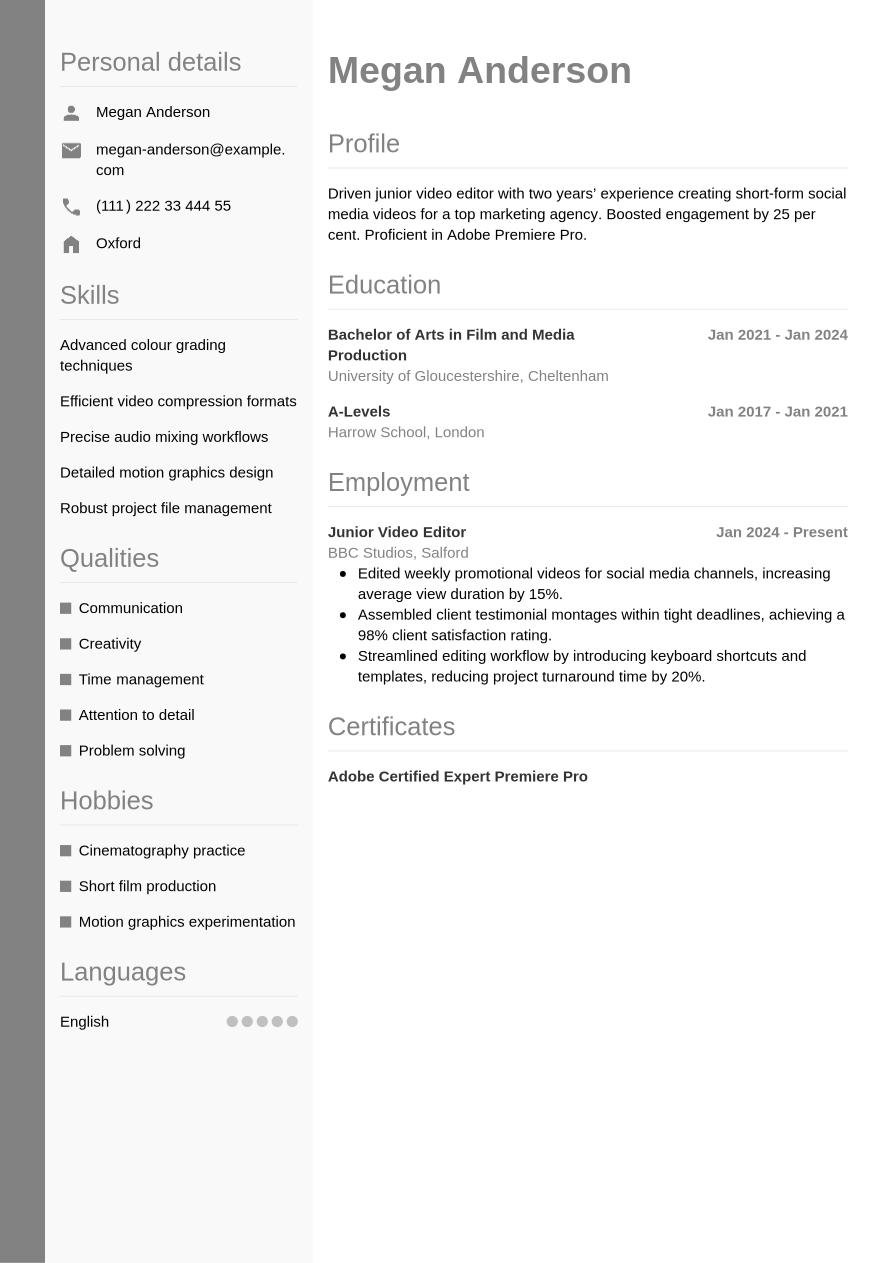
Once you've got some relevant work experience under your belt, you'll want your CV to focus on this as much as possible, and show how you've developed your skills and put them to good use in the workplace. Employers will be keen to see the impact you've had in other roles, and for other organisations. In this case, a reverse-chronological CV format is the most likely to make a positive impact. List the most recent and relevant work experience from your career and provide evidence to support your claims in the form of data, figures or other quantifiable results.
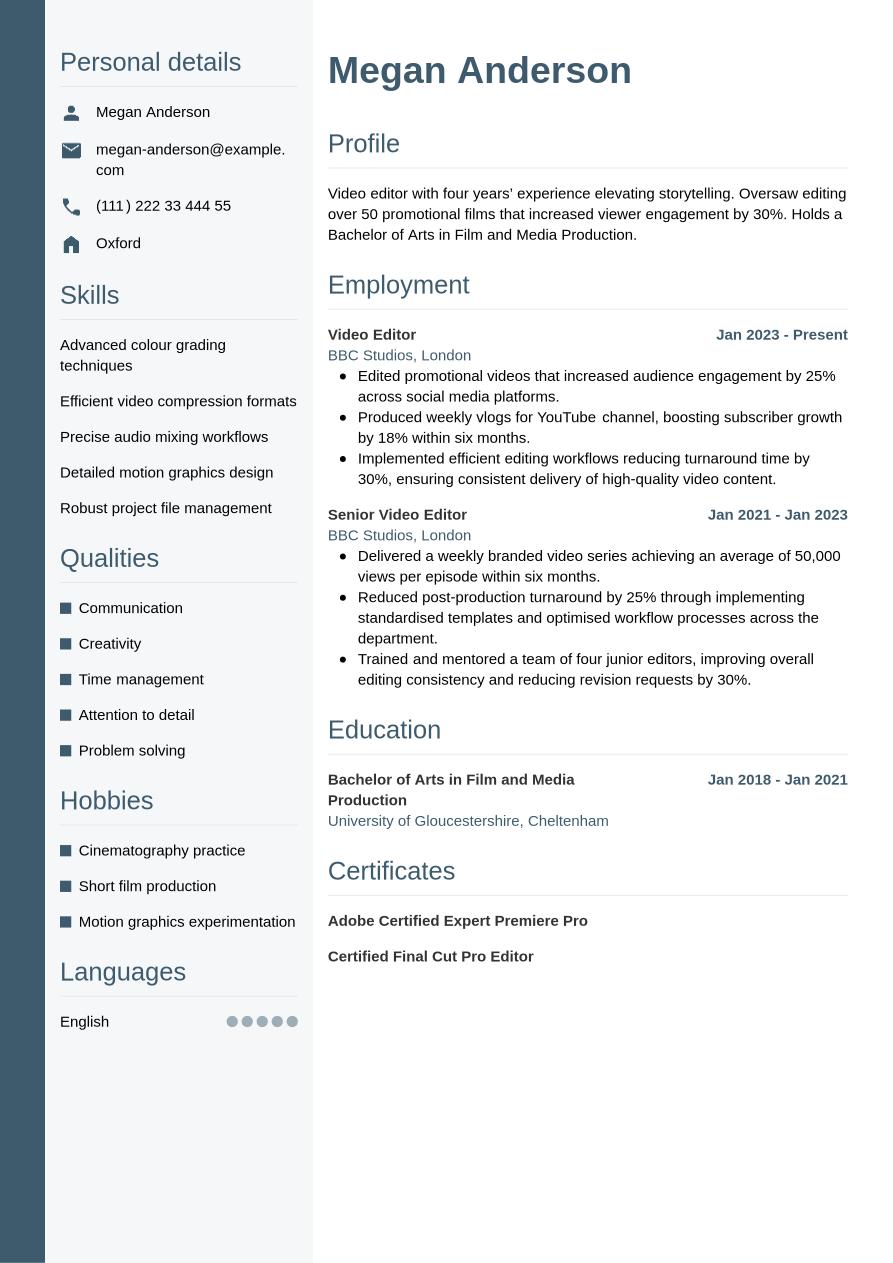
As a senior-level candidate, it's important to produce a CV that gives top billing to your wealth of relevant work experience. Employers will be expecting candidates to provide their expertise and reputation, and their ability to lead a team or organisation. Therefore, you'll want to create a detailed, reverse-chronological CV that shows the depth and extent of your work experience. You might also include optional sections, such as awards, publications or professional memberships.
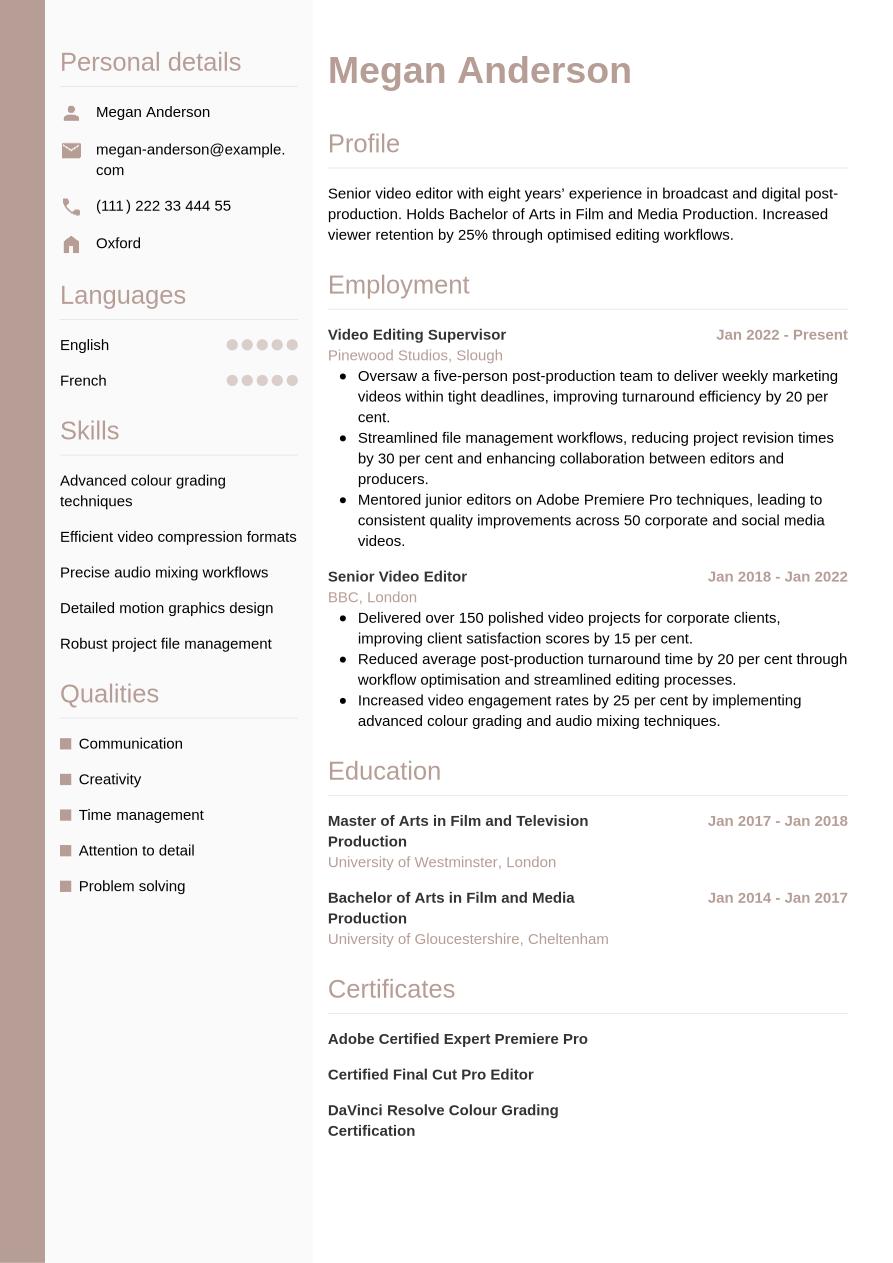
However, no matter where you are in your career, a video editor CV must present a clear, compelling narrative of your professional journey. To help you build that story, we’ll now break down the document piece-by-piece—from the initial contact header to your most significant career milestones.
CV Header
Kick off your video editor CV with a header listing the essential contact information such as your name, email address, phone number and location. You don't typically need to include your full address. Incorporate design elements that set the tone and design language of your document. If you have a LinkedIn profile, consider adding a URL to this in your header, to help the reader easily find more information on your career and credentials.
For jobs in the UK, a personal photo is usually not required on your CV. That, along with any other personal details such as age, gender, ethnicity and nationality, are generally discouraged under the terms of the Equality Act 2010, which aims to reduce and eliminate discriminatory practices, such as recruitment bias.
Megan Anderson
megan-anderson@example.com
(111) 222 33 444 55
Oxford
linkedin․com/in/megan–anderson–123
CV Summary
The first section below your CV header is typically your CV summary. This short paragraph outlines some of your key skills, achievements and experience, so employers can quickly get an impression of whether you have the right credentials for the video editor job. While the CV summary focuses on your key skills and achievements, a CV objective highlights your career ambitions, making it more suitable for junior candidates.
In your summary or objective, write two or three sentences introducing your key skills, unique qualities and career achievements, making sure they match the key requirements listed in the job description.
The most effective way to approach a CV summary is to focus on one or two key skills that reflect the requirements of the job description and show how you've used them to create positive outcomes for previous employers. You'll also want to showcase your unique personal strengths, and touch on how they've contributed to your career progression up to now. Below you'll find an example of a strong video editor CV summary.
Best example:
Experienced video editor with five years’ expertise in post-production and storytelling. Holds a Bachelor of Arts in Film and Media Production. Delivered over 150 videos, increasing audience engagement by 20%.
Unengaging example:
A motivated video editor with an understanding of editing processes and storytelling principles, possessing a relevant degree in film and media production and experienced in delivering projects across multiple formats.
Above is an example of CV summary that doesn't follow best practice, with some subtle shortcomings and failings. For a summary to make less of an impact, it might include generic or vague information, lack evidence of your impact, or fail to highlight specific personal qualities that make you stand out from other candidates. It may also lack tailoring to the job description or include long, poorly structured sentences.
Work Experience
The work experience section of a CV is usually the most important part. Employers look for evidence of how you've developed and used your skills to good effect in your career to date, as an indication of your likely future performance. Remember, it's essential to tailor this section to match the job description, including keywords and phrases to help employers see how you'll fit the role, and how you might put the required skills to good use in the future.
Add your most relevant previous jobs, including the job title, the name of the employer, its location and the dates you worked there. Below each entry, include several bullet points showcasing your skills and explaining how you used these to achieve positive results.
To differentiate your work experience section from other candidates, include action verbs and quantifiable evidence that showcases the impact you made. Show your career progression through the skills you developed and used in each role. See below for an example of how to put the work experience section best practice into action:
Best example:
Video Editor, January 2023 - Present
SilverFrame Studios, Bristol
- Edited weekly tutorial videos, ensuring consistent pacing and clarity for a 15% rise in subscriber retention.
- Created end-of-year highlight reels for corporate clients, meeting all deadlines while maintaining cohesive storytelling.
- Optimised raw footage using colour grading techniques, achieving a polished look that aligned with brand guidelines.
Unengaging example:
Video Editor, January 2023 - Present
SilverFrame Studios, Bristol
- Edited various video projects to enhance audience engagement and maintain production quality.
- Compiled footage into coherent videos to support brand messaging and deliver consistent storytelling.
- Applied post-production techniques to footage to ensure alignment with client expectations and visual standards.
Above you'll find a less effective example of a video editor CV work experience section. A less-effective work experience section could focus too much on irrelevant or out-of-date roles, or include generic information about your responsibilities that fails to show the impact you made. It might lack tailoring to the job description or fail to provide evidence to support the claims made in the bullet points.
Career Portfolio
For some applications, including a link in your CV to a career portfolio or examples of your previous work can be advantageous.
While career portfolios are typically used by creatives to showcase visual work, you could use one for any type of work samples and previous projects, as long as you can upload it or find it online. If you choose to add work samples to your CV, you could either add a link to a portfolio, or separate links to examples of completed projects. If adding a portfolio link, you could do so either in its own section, or in your CV header. If adding separate examples, you could include these are links to a company website, your LinkedIn profile or any other place where your work is hosted.
Education
In your education section you'll want to list your highest and most recent qualifications, particularly if they're a requirement for the role.
Video editor jobs tend to require a relevant university degree just to be eligible for the role, so you'll want to showcase this in your CV. If you have a Bachelor of Arts in Film and Media Production or another related degree that makes you an eligible candidate for the position, add it to your CV. You could also add other degrees or qualifications that highlight your key skills, like robust project file management or advanced colour grading techniques.
When creating your education section, think about which qualifications are most relevant to the role, and list them in reverse-chronological order, starting with the most recent and working back from there. For each qualification, add its name and level, the awarding body or institution, its location (if necessary) and your dates of attendance or graduation. If you want to emphasise your education in your CV, include bullet points showing specialist areas of study, projects, awards, society memberships or anything else that helps show you've got the necessary skills for the job.
If you have any specialist certifications or licences that are necessary for the role, or help you stand out above other candidates, you may wish to mention them here. When adding any special licences, it's a good idea to also reference their expiry or renewal dates, if applicable.
Bachelor of Arts in Film and Media Production, 2018 - 2021
Bournemouth University, Bournemouth
Skills
A CV's skills section is the place to show the reader, in an easily accessible format, that you have the necessary skills for the job. Read the job description to understand the most essential skills, and create a list of both hard and soft skills, ensuring you include some of your strongest, most unique characteristics and qualities to set you apart from the competition. For a video editor CV, it's essential to include relevant skills for the role that match your skill set, such as attention to detail and efficient video compression formats, to impress the reader and show you're qualified for the video editor position.
Hard Skills
Hard and technical skills are the essential skills required for carrying out the everyday duties of the role. They might include specialist operation of certain software or equipment, or knowledge of certain industry standards and regulations. You could gain these skills via training, certifications or industry experience. For video editor jobs, critical hard skills you've gained in your career can include detailed motion graphics design, and efficient video compression formats. After checking the job description, include a list of four or five key hard skills in your CV to confirm that you have the necessary expertise for the role.
The best hard skills section will contain a mix of your strongest technical skills and those listed in the job description as 'essential' or 'desirable'. The closer your skills list is to matching the essential job description skills, the better your chances of success.
Take a look below to see the type of skills that are commonly listed in a video editor CV hard skills section:
- Advanced colour grading techniques
- Efficient video compression formats
- Precise audio mixing workflows
Soft Skills
Soft skills differ from hard skills because they tend to be more transferable and applicable to different roles. Soft skills are the personal strengths and qualities that define your style of working and determine how well you're likely to fit in with the team and wider organisation. As a result of rapid technological changes to modern ways of working, soft skills are becoming more and more valuable to employers. Soft skills can also be particularly useful for junior or entry-level roles where candidates haven't had the time or career experience to develop hard skills and notable achievements.
Adopt the same approach as you did with your hard skills list, reviewing the job description to understand the requirements, before assessing which soft skills you can provide evidence for throughout your video editor CV. Your soft skills list should reflect the job description as closely as possible, while also reflecting your strongest, unique talents and personal qualities. Aim for a list of around five key skills.
Here are typical soft skills candidates include in a video editor CV.
- Communication
- Creativity
- Time management
Expert Insight:
According to the National Careers Service, a professional CV should use simple fonts, structured sections, and consistent formatting to ensure readability. (1)
Certifications
To showcase additional qualifications and training beyond the basic requirements for the role, consider adding a certifications section to your CV. If you've been proactive in pursuing professional development opportunities throughout your career, it's worth showcasing them. Not only do they make you more qualified, they also show a proactive and motivated mindset. In addition, the certifications section can be a valuable addition to your video editor CV if you're applying for a role that cites certain certifications or licences as a necessity in the job description. These might include roles where the use of specialist software or equipment forms part of your everyday duties.
Take a look at this list of example certifications and licences for video editor candidates:
- Adobe Certified Expert Premiere Pro, 2023
- Certified Final Cut Pro Editor, 2023
- DaVinci Resolve Colour Grading Certification, 2023
Languages
If you speak a foreign language, it can be beneficial to include a languages section on your video editor CV. Whether languages are a requirement of the job description or not, if your CV lists additional languages, this typically reflects well on you as a candidate. List any foreign languages you speak, together with an indication of your proficiency level.
There are several ways to cite your proficiency in foreign languages. Firstly, you could use a simple descriptive word to indicate your abilities, such as:
- English: Fluent
- Spanish: Intermediate
Alternatively, use an internationally recognised framework for languages, such as the Common European Framework of Reference (CEFR). This gives your language skills a standardised competence indicator, as follows:
- A1: Beginner
- A2: Elementary
- B1: Intermediate
- B2: Upper intermediate
- C1: Advanced
- C2: Proficiency
Optional Sections
In addition to the core sections of your CV, optional sections can be a useful way of proving you've got the necessary video editor skills. Consider adding optional sections if you're unable to show all the necessary skills for the job through work experience, but could show them through extracurricular activities and other areas of life. This could be especially relevant if you're a junior candidate, or if you're changing careers.
If you're curious about other ways to make your CV more effective, our career resources will help you strengthen your application.
Hobbies and Interests
One valid way to show you have relevant skills for the job is by listing your hobbies and interests. In addition, you can use hobbies and interests to show elements of your personality that might not shine through otherwise, giving you a chance to offer something different to most candidates. However, hobbies and interests can only add value to your CV if they provide evidence of skills and experience that you can use in the role you're applying for. As such, only add hobbies as a way of filling gaps in the skills you've developed or used through work experience.
Achievements
Including an achievements and awards section is an effective way of showing the reader the value you've added for employers in your career to date. Add any awards you've won or career milestones you've reached, so employers can easily see the impact you've made in your career to date.
Volunteering
Another way of showing employers your skills and experience is through volunteer roles. If you're struggling to show you have the necessary credentials through your work experience, volunteering can provide valuable examples of how you've put your skills into action. In your volunteering section, use a similar structure to your work experience section.
Add your job title or a description of the volunteer role, the organisation name, its location and the dates you volunteered (start and end date). Under this, add bullet points to show the skills you used, and evidence of how they contributed to positive achievements for the organisation.
References
When applying for roles in the UK, it's not standard to include references on your CV, and employers only tend to require them later in the process. Nevertheless, it's worth checking the job advert and being ready just in case. If you need to add them to your CV, include two or three references, adding their name, job title, organisation and contact details.
Be sure to ask their permission before you include anyone as a reference in your video editor CV. Alternatively, you could simply add a line to your CV indicating you can provide references when necessary, such as 'references are available upon request'.
Data Insight:
6 in 10 HR specialists look for key skills in CV summaries, with communication, problem-solving and teamwork being the most valued soft skills. (2)
Best action words for a video editor CV
Using strong action verbs in your work experience bullet points is a great way to focus this section and show the impact you've made in your career to date. Starting each bullet point with an action verb that reflects the skills required for the role will help the reader to easily cross-reference your skills to the job description. Remember, it's essential to evidence any action verbs you add to your work experience. This will help show your achievements and the impact you made in previous roles. Use past tense for action verbs that describe previous roles, and present tense for your current position.
- Edit
- Assemble
- Storyboard
- Synchronise
- Trim
- Render
- Export
- Colour correct
- Compress
- Enhance
Video editor CV sample
Now you know how to create a video editor CV for maximum impact, take a look below at this full, completed example:
Oxford
•
megan-anderson@example.com
•
(111) 222 33 444 55
•
linkedin․com/in/megan–anderson–123
Video editor with four years’ experience elevating storytelling. Oversaw editing over 50 promotional films that increased viewer engagement by 30%. Holds a Bachelor of Arts in Film and Media Production.
Video Editor
2023
-2026
BBC Studios (London)
- Edited promotional videos that increased audience engagement by 25% across social media platforms.
- Produced weekly vlogs for YouTube channel, boosting subscriber growth by 18% within six months.
- Implemented efficient editing workflows reducing turnaround time by 30%, ensuring consistent delivery of high-quality video content.
Bachelor of Arts in Film and Media Production
2018
-2021
University of Gloucestershire (Cheltenham)
Advanced colour grading techniques
Efficient video compression formats
Precise audio mixing workflows
Communication
Creativity
Time management
Adobe Certified Expert Premiere Pro
Certified Final Cut Pro Editor
English - Native
French - Advanced
To see how your CV might look after finalising its design and layout, take a look at our CV examples.
Key tips and mistakes to avoid for your video editor CV
Tips to follow
- Start with an engaging CV summary or objective that provides a clear synopsis of your career and highlights your best qualities and achievements.
- Proofread your CV thoroughly before sending, to avoid any spelling and grammar errors that could harm your chances of success.
- Keep your CV concise, aiming to limit it to one side of A4 for junior applications, two for more senior roles or more than two for any high-level, executive or academic applications.
- Quantify your achievements whenever possible, adding key figures and evidence to support your claims.
- Use a clear, professional CV format, choosing a readable font, consistent line spacing and clear headings, to make your CV as accessible as possible.
Common mistakes to avoid
- Leave out any detailed personal information, such as age, gender or marital status, and avoid adding a personal photo unless it's required for the role.
- Don't add a hobbies and interests section unless they're directly related to the position or help you show skills that you can't prove through work experience.
- Don't use overly elaborate CV formatting and designs that make your document harder to read and more confusing for ATS software.
- Don't lie or exaggerate about previous jobs or your qualifications – it can backfire or even be considered fraud.
- Don't crowd your CV with too many details, but try to keep it focused, concise and relevant throughout.
Guide to making your CV ATS compatible
Many employers now use applicant tracking systems (ATS) to assist with managing the recruitment process. One of the key elements of most ATS apps is the ability to scan CVs and rank them according to their likely match to the job description. This task can relieve some of the strain on hiring managers through the recruitment process, which can become very resource-intensive, with roles often eliciting hundreds of applications.
Because ATS software is becoming more common in the recruitment process, it's important to make some concessions in your CV to give yourself the best chance of progressing beyond the initial screening. With that in mind, here are some tips on preparing your CV for ATS screening:
- Include keywords and phrases from the job description that are easy for ATS apps to identify, and help make you appear a strong fit for the role.
- Use standard CV headings that make your CV easier to navigate, such as 'work experience', 'education' and 'skills'.
- Choose a simple, standard CV structure and omit any design elements that might make your CV less easy to read by automated systems, such as text boxes and columns.
- Select a font that increases the readability of your CV, such as popular serif and sans serif fonts, between the sizes of 10 and 12 for main text and 14 and 16 for headings.
- Use bullet points in place of full sentences and paragraphs. This can reduce the overall length of the document, make the keywords stand out and make it easier for ATS apps to scan.
It's easy to get overwhelmed by the steps to creating an ATS-compatible video editor CV, but a few small changes can make a big difference. To smooth the process, use one of our expert-designed, ATS-optimised CV templates to increase your chances of success at this stage of the screening process.
If you're looking to make a strong first impression on hiring managers with your CV, use Jobseeker's eye-catching CV templates, which are approved by HR experts.
Video editor CV FAQs
Should I add a headshot photo to my CV?
Adding personal photo to your CV could seem like a good idea, to improve the look and feel of your CV and help it to stand out.
However, UK CV conventions typically discourage the use of personal photos. They can risk introducing bias (conscious or unconscious) to the selection process, bringing its integrity into question.
Nevertheless, some employers may request a personal photo, depending on the role they're hiring for. Acting and modelling jobs, or anything where your appearance and presentation is a factor, may require a photo on your CV. If you're unsure, check the job advert and if in doubt, leave the photo off your CV.
How do I create an accompanying video editor cover letter for my CV?
A well-crafted cover letter can be just as vital to your chances of success as your CV. To write a cover letter that makes a positive impression on the reader, adopt a formal, professional layout and use a cover letter template that matches the design of your CV.
The standard cover letter format includes three main paragraphs of content. The first paragraph includes a brief introduction to yourself and the role you're applying for, and references your motivation for applying for the job. In the second paragraph, list some key skills and achievements, taking care to differentiate from the content in your CV. The closing paragraph typically contains a recap of your enthusiasm for the role, and adds a call to action that establishes dialogue with the employer.
As an alternative, if you're applying via email, you may wish to write a shorter, more informal cover note. Follow standard email conventions for this, which are more informal than traditional letter-writing norms. Introduce yourself and confirm the role you're applying for, and direct the reader to the attached documents. Add your contact details in your email sign-off or footer.
Jobseeker's cover letter examples for video editor jobs and key media industry roles offer valuable insights from HR experts on how to write a compelling cover letter.
How do I write a persuasive video editor CV without experience?
Even without a history of relevant work experience, you can still write a video editor CV that makes its mark with employers.
Choose a functional CV format, that gives greater emphasis to your skills than to your work experience. In this layout, the skills section comes immediately below your CV summary, followed by education, with work experience taking less priority.
If you're an entry-level candidate with no relevant work experience, focus on your soft and transferable skills in your video editor CV. Employers will be looking for candidates who can show they have the soft skills to learn a new role and adapt to new environments.
How do you write an impactful video editor CV headline?
A CV headline can be a way to grab the attention of the reader early in your CV, indicating that you're a good fit for the role and you offer something different to other candidates.
Look to write a short, engaging sentence that encompasses your best qualities, including the job title to indicate your relevance and suitability for the role.
To give your CV the best shot at success, write a CV headline that focuses on the most essential keywords and phrases from the job description. This will strike a chord with the hiring manager and help your CV to pass the ATS screening stage.
See below for some examples that you can use as inspiration for writing a CV headline for different experience levels:
- Passionate Creative Junior Video Editor
- Creative Video Editor with Flair
- Senior Video Editor Championing Storytelling
A well-designed and concise cover letter can make a big difference to your job applications. Match your cover letter to your CV's design and styling with our HR-approved cover letter templates.
Key takeaways for success with your video editor CV
To grab the attention of the reader with your CV, tailor it to the exact specifications of the job description, incorporating keywords and phrases that match the employer's requirements. Choose the most fitting CV format for your experience level, and focus on showcasing how you've developed the necessary skills for the role, and used them to positive effect in previous roles.
Finally, creating your CV using one of Jobseeker's expert-designed CV templates can give your application the edge, placing you among the leading candidates and positioning you for success with your job applications.
Citations:
- National Careers Service, How to write a CV
- Jobseeker, HR Trends

Impress employers with your CV
Step-by-step guidance to create a professional CV in minutes.