What Personal Information Should You Include on a CV?
Your personal information is the first thing a recruiter sees, but it is also where many candidates make avoidable mistakes. From GDPR compliance to avoiding unconscious bias, the way you present your 'basic details' matters more than ever. Whether you're wondering about postcodes or profile links, here is the definitive guide on what to add, what to bin, and where it all belongs.

The personal information on your CV serves one primary purpose: to let an employer identify you and get in touch. While you want to make it easy for a hiring manager to reach out for an interview, oversharing is a common trap.
Most details beyond your name, phone number, and email address are not strictly necessary. In fact, including sensitive data—like your date of birth or marital status—can actually be detrimental, as it risks triggering unconscious bias before you've even had a chance to speak.
To keep your application professional and compliant, use the table below to see what to include, what is optional, and what to bin altogether:
The must-haves | Good to include | Leave out |
|---|---|---|
|
|
|
In the following sections, we’ll look at how to format these details and—crucially—where to place them for maximum visibility. We will also examine why certain information can create legal or ethical headaches for UK employers, potentially harming your prospects before your experience is even considered.
Where to add personal details on a CV?
As its name suggests, the CV header sits at the top of your CV and includes all the necessary basic information about you that any employer needs.
A header also tends to set the tone for a CV design, and gives you the chance to add colour and other design features that will help your CV look attractive, professional and different to other candidates. With a document that's heavily text-focused such as a CV, there aren't many opportunities to add design elements that catch the eye and help you make an impression with the reader, but the CV header is one of them.
However, it's important to remember that whatever design decisions you make for your CV header, its primary function is still to deliver key information to the reader about yourself. As such, you'll want to opt for a clean, unfussy CV header design and layout that communicates the necessary information while taking up as little space in the document as possible.
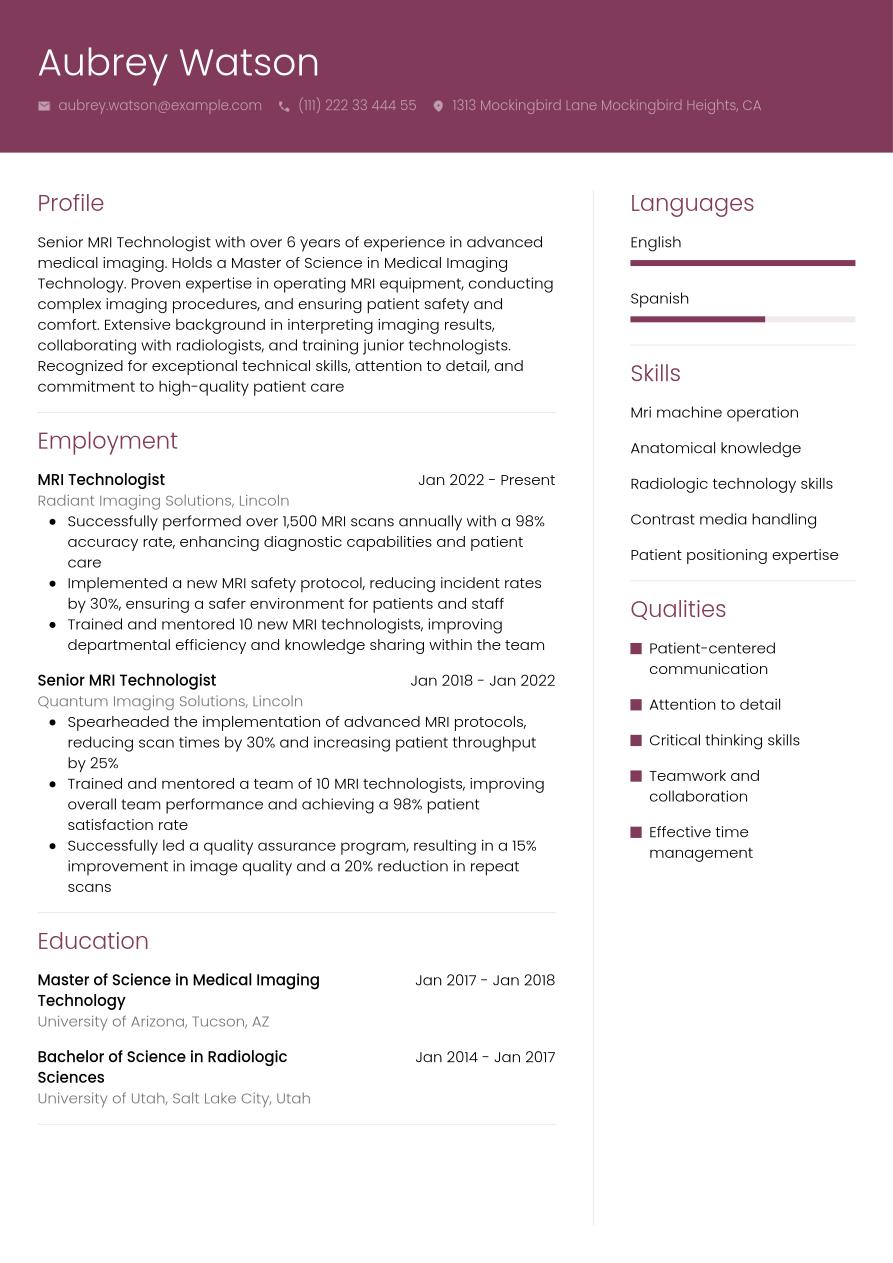
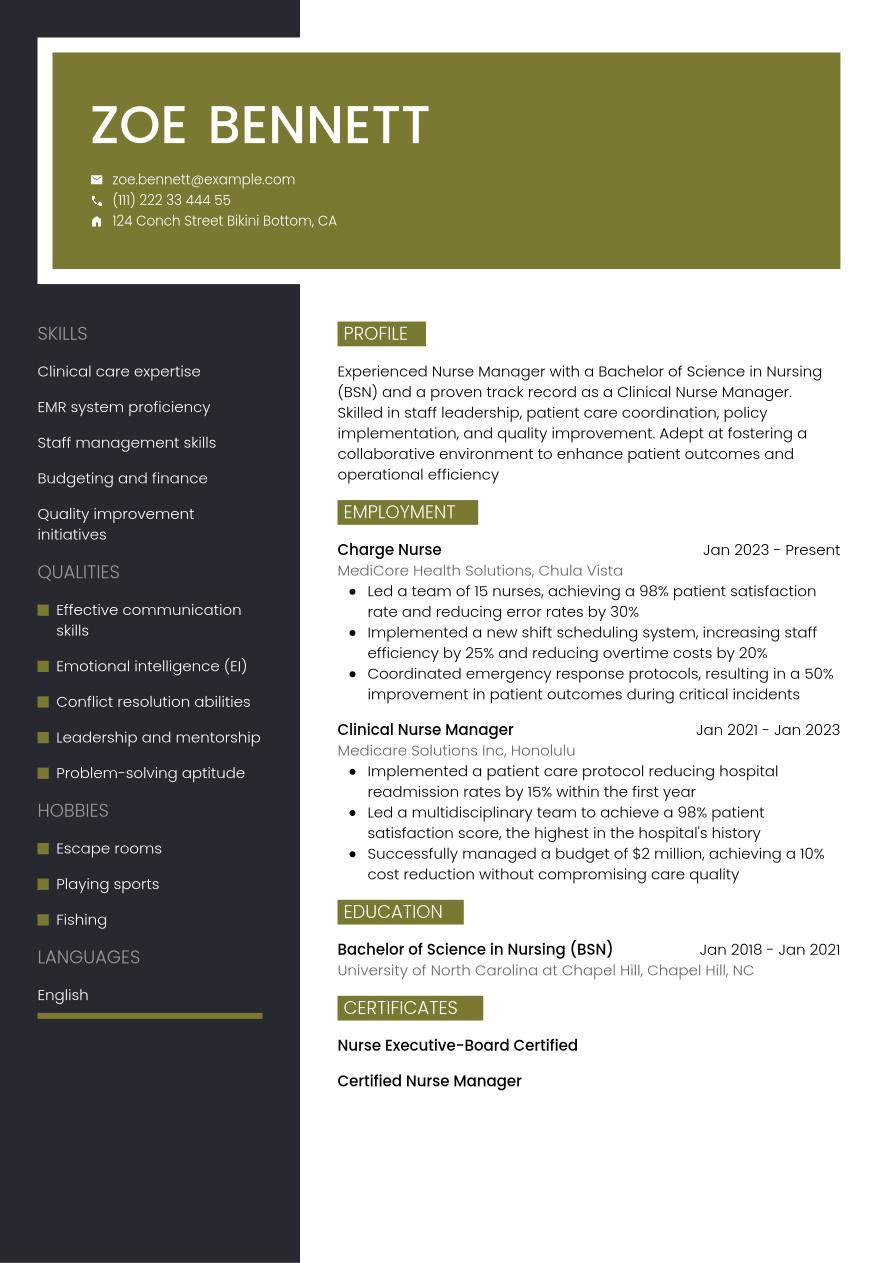
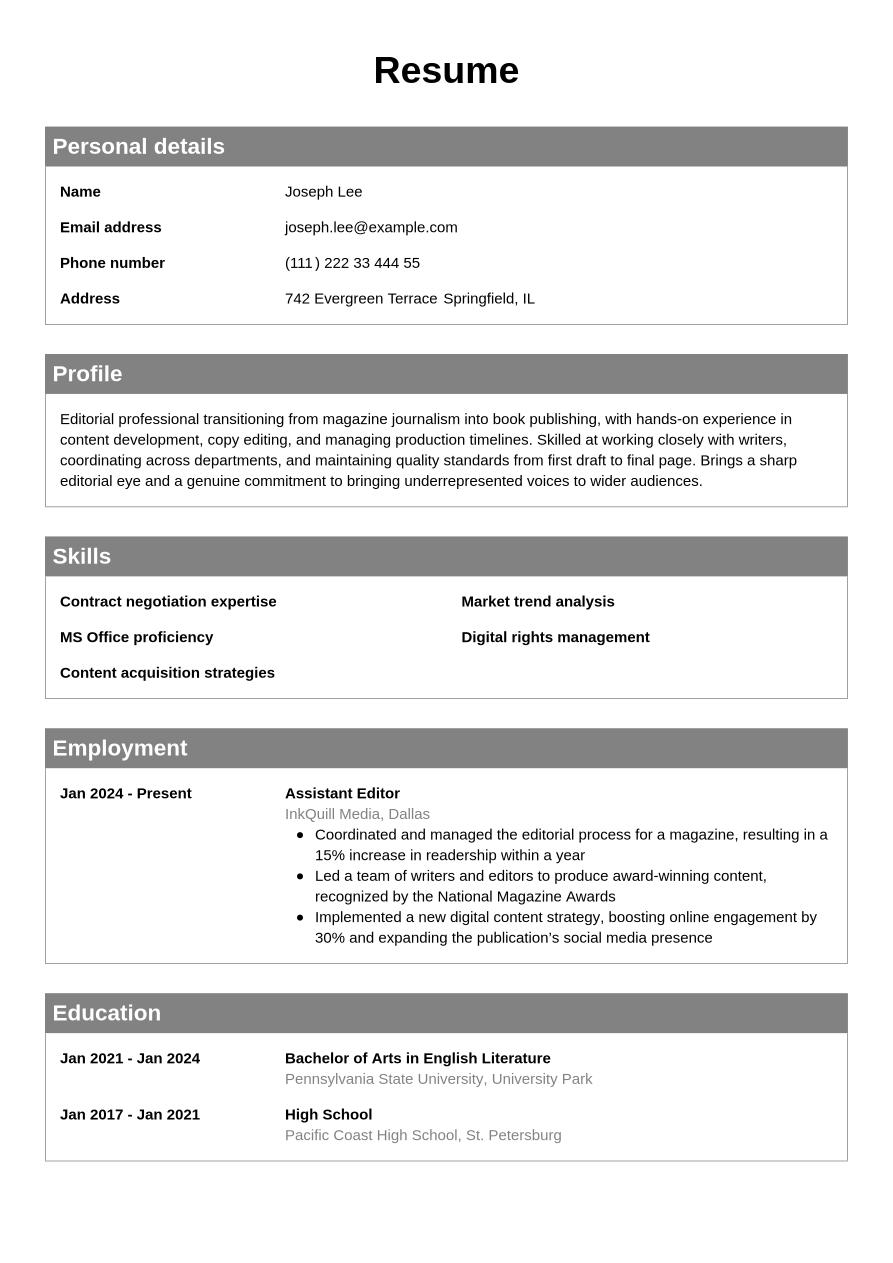
The CV examples below show how different header designs can help you communicate your key personal information in a simple-yet-attractive format:
This CV example showcases a clean, modern header design that clearly communicates all the necessary information.
This dynamic header stands out in the CV design and communicates the necessary personal details with bold use of negative space.
This vertical CV design places the header in the left column, leaving plenty of space for the body content.
Personal information on CV: How to get it right
Now, let's take a detailed look at the key things to consider for each element of your CV's personal information. Using professional CV templates can make it easy to include all the necessary information, but following these tips can help you understand how and why to add each of the essential personal details:
Name and headline
In most cases, you'll want to add your full name to your CV header (your first and last name that is). It isn't necessary to add middle names, unless you use them in your professional life.
The easiest approach is to use the name that matches your ID, allowing the employer to easily carry out any necessary background checks. However, if you're more commonly known by another name, such as your middle name, a shortened version of your name or another preferred name, you can use this instead. Just be aware you may need to answer questions later, or provide your full, legal name for background checks.
The only time you'll want to avoid adding your name to a CV is if the employer requires anonymised CVs, which will be clearly stated in the job advert or recruitment package information. Some recruiters prefer anonymous recruitment processes because they can help reduce hiring bias.
Adding a CV headline
Your name tends to form the headline of your CV. If you're using a design with a stylised CV header, it's typical to include your name in larger or bold font, to make it stand out. However, you could also add a CV headline or title to add extra information to your CV. This tends to sit just below your name, which still takes top billing in the CV header.
A CV headline is a short description of your role, and the key qualities you offer. On the other hand, a CV title is typically just your job title, or a combination of your job title with a simple descriptive word that sums up your qualities. Here's an example to help you distinguish between the two:
- CV Headline: 'Experienced, dynamic sales director with a track record of success'
- CV Title: 'Dynamic sales director'
Including qualifications with your name
If you have relevant professional qualifications that are essential for the role, or which may help you stand out from the competition, you might want to add them alongside your name at the top of your CV. This is usually only worth doing if your qualifications are beyond what's expected, or place you in the upper echelons of experts in your field.
It's rarely worth adding undergraduate degrees or common qualifications to your name. These can probably be left to your education section. However, you might want to add post-nominal initials for postgraduate degrees or professional certifications that qualify you for certain professional industries. These might include medical professions, legal positions or engineering roles.
Expert Tip
If possible, list your post-nominal credits in a smaller font than your name. If you're using a CV design with a large font headline for the name that you can't adapt, again it might be best to leave your credentials for your CV's education section.
Contact information
The key pieces of contact information to add to your CV are your phone number and email address. Here are some general rules for both:
Adding your phone number to a CV
- Use a personal phone number such as your mobile or a home phone number.
- Avoid adding a work phone number.
- If you're applying for a role abroad, include your country code so the employer can reach you easily.
Adding your email address to a CV
- Use a professional-looking email address, with a combination of your name, initials or other basic information such as your profession.
- Avoid using old email addresses that could make you look immature or unprofessional (such as any using nicknames, in-jokes or any other informal language).
- Avoid using your work email address or any unfamiliar email domains.
- If necessary, set up a new, professional-looking email address just for your job applications.
Address
Generally, it's not necessary to include your full address on your CV. Employers are unlikely to contact you via mail, and if they need to, it will be much later in the recruitment process, at which point you can provide your postal address. Initially, a simple indication of your location should be sufficient. This will confirm to the employer that you live in a viable location to commute or travel for the job.
Ways to reference your location in your CV include:
- Town/village and county
- City
- Postcode
- Region
- Country
Which of these you choose to use for your location will depend on the type of job, and the location demands and requirements:
- For an office-based role, you might wish to be more specific about your proximity to the workplace, to show you can commute regularly.
- For a role that requires travel, you could be more vague about your location, but still make it clear you live within a wider catchment area for the travelling you'll be doing.
- For a remote or home-based position, you may simply wish to confirm you're located in the appropriate country and therefore you're eligible to work for the employer.
- When applying for a role overseas, you might wish to add your current location, but include further information later in your CV, or in your cover letter, to confirm you're eligible to work in the country.
While employers shouldn't make final hiring decisions based on your location (for example, giving you priority over another candidate because you live closer to the office), it can be useful information for them to know. Take note of the job listing and any clues the employer gives about the working routines and conditions before deciding how to describe your location. There may be cues within the job description that help make up your mind.
Social media or portfolio links
Adding social media links to your CV can be a useful way of providing the reader with easy access to more information that can boost your credentials. Employers often check your social media accounts to verify your credentials or screen for any red flags, so providing these up front is also just a way of being transparent as a candidate.
LinkedIn is the standard for social media profiles to add to your CV. Owing to its professional nature, your LinkedIn is likely to be a much more appropriate source of information than any social media accounts you have for personal use. Adding other social media accounts, like Twitter/X, Instagram, TikTok or Snapchat is usually unnecessary, unless you use them professionally or they're required for the role.
However, occasionally it can be valuable to add other social media profile links to your CV. These are some useful platforms to add to your CV for different roles and industries
Industry | Platform |
|---|---|
Marketing |
|
Design |
|
Tech/IT |
|
Hospitality |
|
Freelancers |
|
Trades |
|
Professional/academic |
|
How to add social media profiles to your CV for maximum impact
Follow these three tips for creating maximum impact when adding social media profiles to your CV:
- Add a clean profile URL: Make sure the URL or handle you add to your CV is clean. For example, don't add 'https://www.' to your URL. For X (formerly known as Twitter) or Instagram, you might even just add the name of the platform, followed by your handle (for example, 'Instagram: @elliereynolds'). With LinkedIn, set up a custom URL with a professional tone, and include it as follows: 'LinkedIn.com/in/Pete-Young-Suveryor'.
- Ensure your profile is up-to-date: Only add social media links if your accounts are active and up-to-date. A dormant account, one that you rarely post to or one that includes old, outdated information (such as not featuring your latest job, or including expired licences) will add nothing and could even reflect poorly on you. If you're including a social profile, particularly LinkedIn, make sure you post to it regularly.
- Avoid conflicting, irrelevant or repetitive information: Before you add your LinkedIn or other social profiles to your CV, check them for conflicting information or irrelevant details that don't add anything of value for the reader that can help them assess your suitability for the role. Equally, don't include profiles if they just repeat the details of your CV — you'll want your LinkedIn or other socials to show something different, and of value to the employer.
What personal details to leave out of your CV
Now that we've covered what personal information to include in your CV, let's take a look at what you should leave out. There are various reasons for omitting personal details from your CV, from saving space to avoiding complications regarding anti-discrimination laws.
Information protected under the 2010 Equality Act
In the UK, the 2010 Equality Act protects individuals from certain forms of discrimination, harassment, and victimisation in relation to their personal details. There are several personal details listed in this act that you should leave out of your CV:
- Marital status: It's illegal for recruiters or employers to make a hiring decision based on your status as married, single, divorced or any other marital status. It's best to leave it out of your CV as it should make no difference in your ability do the job.
- Family/Children: Your family situation, whether you have children, and however complex it is, should have no basis in the employer's decision over whether to hire you. In the UK, all employees have the legal right to request flexible working conditions from day one of employment, so that factors like children and family commitments have no impact on their ability to work.
- Nationality: National identity is included as a protected characteristic under the umbrella of 'race'. As long as you have permission to work in the country you're applying to, can speak the language required for the role and can show the employer you're a good fit for the position, your nationality should be completely irrelevant. If you are applying for a role with a government or embassy, check the job description before applying, and if your nationality is required, list it in your CV header. For example: 'Nationality: British'.
- Age: Employers can't favour a candidate for a job because of their age. Employers should be able to make a fair and balanced judgement from the content of your CV, including your skills and career achievements, rather than simply looking at your age.
- Religion: The only time when you might wish to add your religion to your CV is when you're applying to work for a religious organisation. If religious belief is a genuine requirement for the role, it's legal for the hiring organisation to stipulate the religious belief of candidates. This is called a 'Genuine Occupational Requirement' (GOR).
Aside from what is listed under the 2010 Equality Act, there are other personal details worth leaving out of your CV.
National Insurance number
Employers only need to know your National Insurance (NI) number, if they offer you the job, as they'll need to add you to the company payroll. As such, there's no reason to include this on your CV.
Your NI number is actually considered sensitive personal data, because it can be used to identify you personally. This means that adding it to your CV reduces your personal data security and increases the risk of identity theft. Employers should handle your CV as personal data under GDPR and store it securely, but there's still no reason to include sensitive personal information that could make your identity less secure.
Expert Tip
The only time you might wish to add information regarding your eligibility to work on a CV is when applying for a job overseas. In this situation, employers might require proof of your legal eligibility to work in the country. However, in this case, it's still better to simply list your visa status rather than offering personal information such as an NI number, or its local equivalent.
Key takeaways: CV personal details checklist
This article should give you a good idea of the best personal details to add to your CV, as well as which details to omit, and why. As with anything to do with writing a CV, if you're not sure whether to include something or not, check the job listing. With anything other than your name, contact details, location and social profiles, if it's not mentioned in the job description, it's best to leave it out.
When writing your CV, follow this checklist to ensure your personal details meet the expectations of most employers:
CV personal details checklist |
|---|
Did you use your full legal name and job title? |
Have you added your mobile phone number along with a professional email address? |
Are the included links up-to-date and working properly? |
Are any other details you've added directly related to the job? |
Is your personal details section formatted correctly? |
For more information on how to write a CV, Jobseeker has the answers. With its wealth of CV and cover letter resources, you can learn everything you need to know for writing an impactful, engaging CV that gets you interviews. Jobseeker's CV templates provide ready-made CV designs, so it's easier than ever to create a CV with an eye-catching header that contains all the right information. Sign up today to get started on your next winning CV with Jobseeker.
FAQs for CV personal details
Should I use icons in my personal details section?
Adding icons to your CV's personal details section can be a way of introducing visual elements and making your CV more appealing and engaging. It can also save space and reduce the amount of text in your CV.
However, when choosing icons to add to your CV, there are a few things to consider:
- Make sure the icons are consistent with the overall design of the CV.
- Choose icons that are from the same icon set to ensure continuity between visual elements.
- Pick icons that have a clear and obvious meaning. Ambiguous or confusing icons can make your CV harder to read.
- Keep the icons small so they don't intrude on the written content of the CV.
- Use a simple colour palette for your icons that contrasts the main colour of your CV or header background. For example, use white (or very light) icons on a black background. Avoid using multicolour icons.
Can I include my preferred name on a CV?
If, in your professional life, you go by a different name to your legal name, it's acceptable to use that name on your CV. However, avoid using nicknames and keep the name on your CV fairly formal. For example, if your name's William, but you go by Will, this is fine for your CV. However, if you have a nickname that's less well-recognised as a first name, it might be best to stick with your given name.
If you do use a different name on your CV to that on your passport or ID, be prepared to provide your legal first name to the employer, as they may require it for various background checks and paperwork. As such, you might wish to list your legal name somewhere else on your CV or cover letter.
Should I include my pronouns on my CV?
It's up to you whether you add your pronouns to your CV. If it's particularly important to you personally, you might wish to include them, and it can be useful as a way of demystifying a gender-neutral name or showing your commitment to inclusivity and diversity.
However, it's also worth considering that adding detailed personal information to your CV could risk introducing bias to the recruitment process. Omitting potentially sensitive personal details, including pronouns, should make the recruitment process more objective.
What should be at the top of your CV?
At the top of your CV you'll want to add a header with all the essential personal information on it. This typically includes your full name, your location, your contact details (phone number and email address), and sometimes links to your social profiles or portfolios, particularly LinkedIn.
Avoid adding other personal information to this section, unless it's strictly required for the role. You might wish to present your header in an eye-catching design to set the tone for your application, like these CV and cover letter templates from Jobseeker.
Should I include a photo on my CV?
In the UK, it's not standard practice to include a personal photo on your CV. A photo is just one more way that you could introduce potential hiring bias into the recruitment process, so it's best to submit a CV without a photo.
In some countries, it's more normal to add a photo to a CV, so if you're applying for a role outside the UK, check the local customs before you send your CV. You may also need to add a photo for certain roles where your physical appearance is a factor, though these are few and far between and include modelling and acting roles. For most other types of jobs, it's unnecessary to include a photo in your CV.
How to mention ‘open to relocate’ in my personal details?
If you don't currently live in the same area as the role you're applying for, you might feel that adding your location to your CV could put you at a disadvantage. If this is the case, you could mention in your CV that you're willing to relocate.
You could add this in your personal details section, alongside your current location, for example, 'Canterbury, Kent (willing to relocate)' or 'Stockton-on-Tees (open to relocation)'. However, you could also reference this in your CV's personal statement, or in your cover letter. For guidance on what else to include in a cover letter, see Jobseeker's cover letter examples.

Impress employers with your CV
Step-by-step guidance to create a professional CV in minutes.