Secretary CV Example
If you're hoping to launch a career in the administration industry, including secretary roles, it's essential to write a CV that shows your skills and achievements in the best light. You'll want to focus on key responsibilities that are essential for the role and match your experience, such as answering phone calls and maintaining filing systems. In this comprehensive guide, you'll learn the steps to producing a secretary CV that puts you in pole position to progress to the interview stage.
A stronger, more engaging secretary CV gives you the best chance of success. It can help you pass the ATS CV screening stage and impress the recruiter or hiring manager, increasing your prospects of reaching the interview stage. We’ll now go through the key sections of a CV and explain how to write them strategically.
Key sections for a secretary CV
Your secretary CV strategy will depend on various factors, including your previous experience, your seniority and the details listed in the job description.
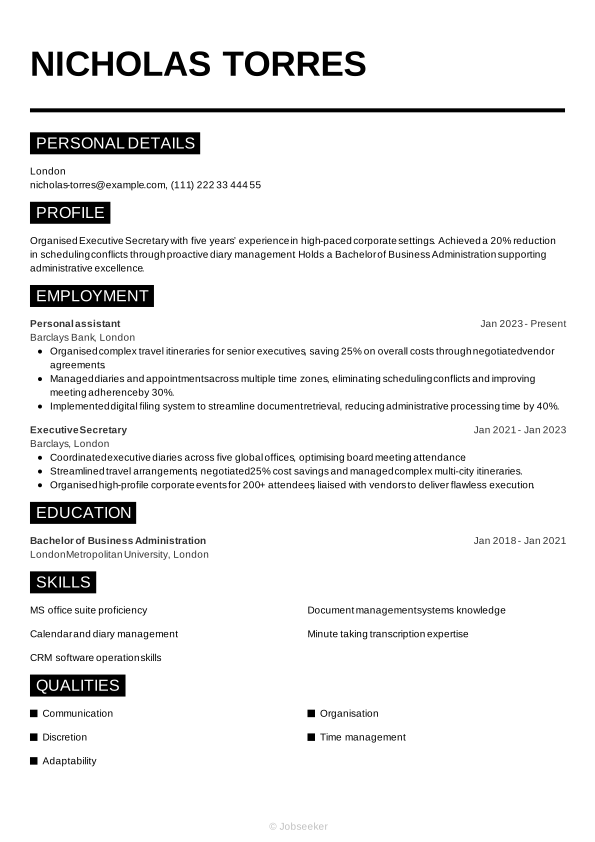
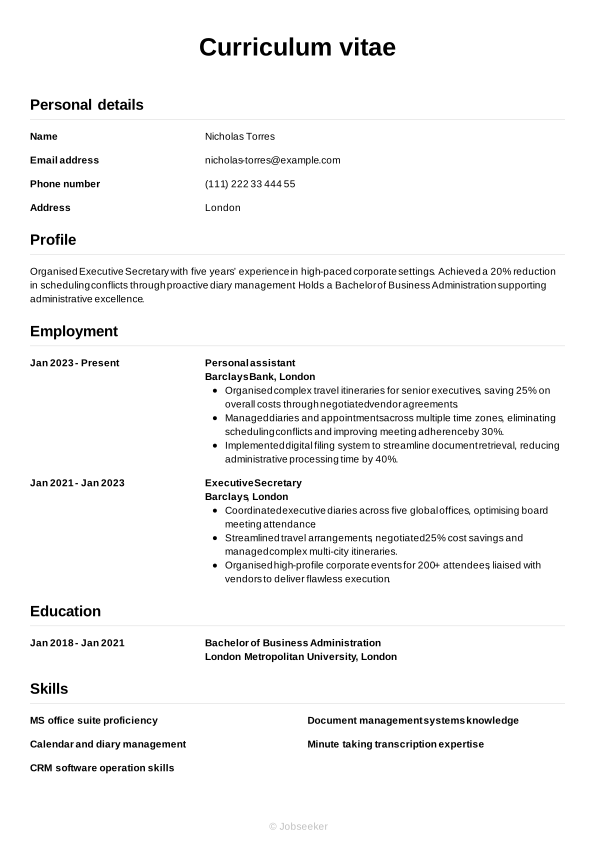
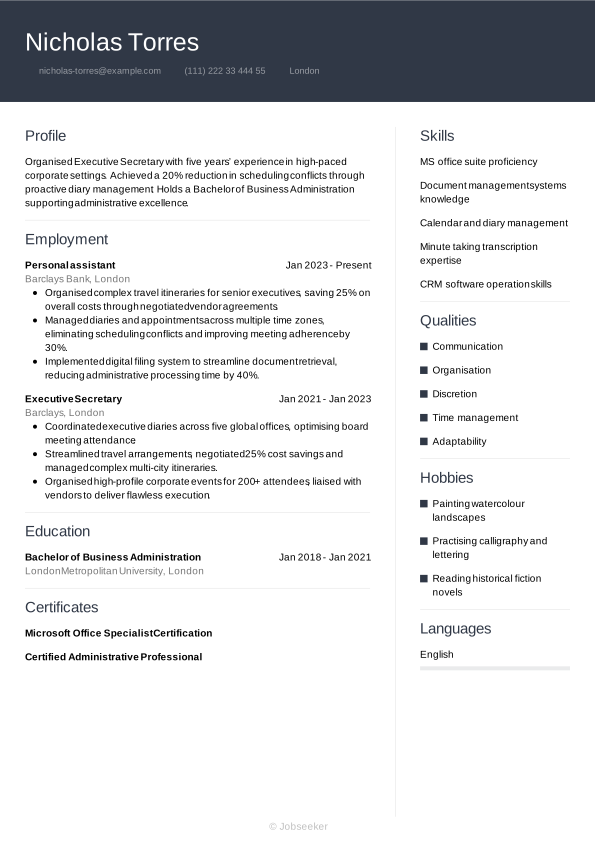
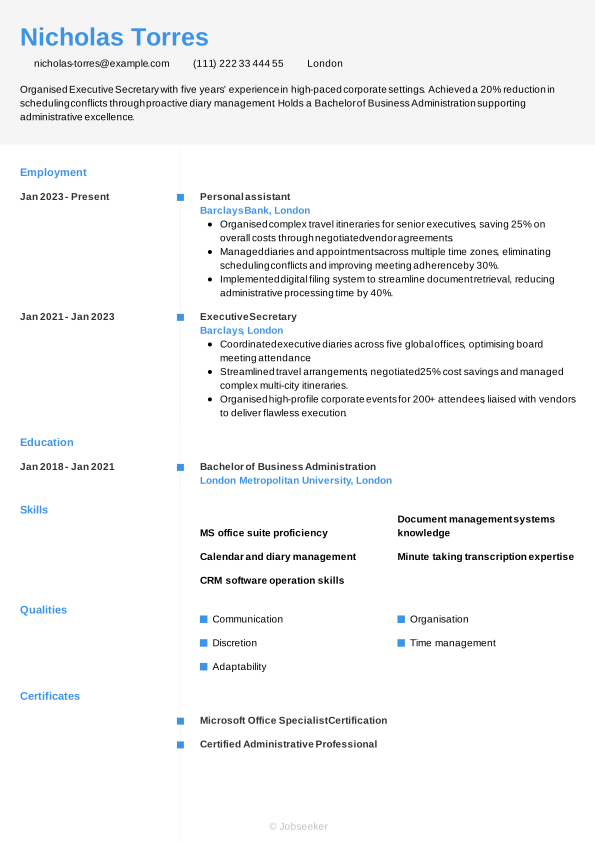
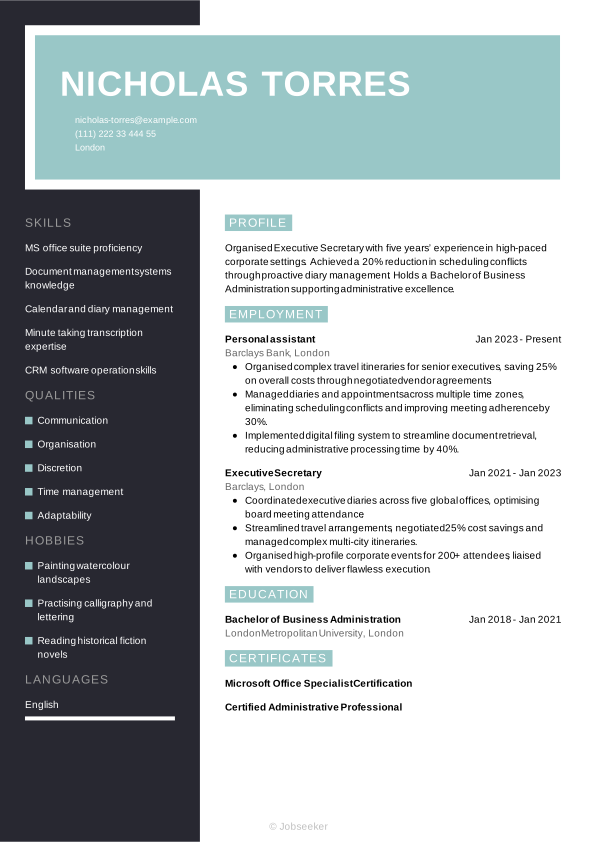
However, regardless of your years of experience, a secretary CV needs to connect the dots of your career into a cohesive story. In the following sections, we’ll dive into the specific chapters of your CV step-by-step, showing you how to refine everything from your initial introduction to your long-term achievements.
CV Header
At the top of your secretary CV, add a header that establishes the design language of the document. Include the necessary contact information: your full name, email address, phone number and location. It's not typically necessary to include your full address. Additionally, add your LinkedIn profile, if this is in use and up-to-date. A well-utilised LinkedIn profile can give further information to the reader about your skills, experience, industry knowledge and career achievements.
For UK jobs, it's generally not a good idea to add a photo or any other personal details beyond your basic contact information. This means leaving off details such as your age, gender, ethnicity and nationality, as these can introduce bias to the selection process and complications related to the Equality Act 2010.
Nicholas Torres
nicholas-torres@example.com
(111) 222 33 444 55
London
linkedin․com/in/nicholas–torres–123
CV Summary
The first section below your CV header is typically your CV summary. This short paragraph outlines some of your key skills, achievements and experience, so employers can quickly get an impression of whether you have the right credentials for the secretary job. While the CV summary focuses on your key skills and achievements, a CV objective highlights your career ambitions, making it more suitable for junior candidates.
Both a CV summary and objective should be concise, with an ideal length of two or three sentences. List your key skills, personal strengths and career achievements or ambitions, taking care to ensure the content reflects the requirements listed in the job description.
An effective CV summary will focus on a few of the key skills required for the role and show how you've put them to good use in your career to date. You'll want to give the reader a good impression of your unique qualities and briefly provide evidence of their impact in previous roles. Find an example below of a positive secretary CV summary, characterised by evidence to support your claims and well-structured, easy-to-read sentences.
Best example:
Proactive secretary with five years’ experience as Executive Secretary managing schedules and correspondence. Achieved a 25% reduction in scheduling conflicts by streamlining appointment systems. Holds a BA (Hons) in Business Administration.
Poor example:
Experienced secretary offering general administrative support, efficient handling of schedules and correspondence, adaptable in diverse office environments and holding a BA (Hons) in Business Administration to assist executives.
Above is an example of a less effective CV summary, with some subtle, yet notable differences. Common mistakes that lead to an ineffective summary include a lack of quantifiable experience, vague statements or failing to tailor your summary to the job description. Long, rambling sentences that lack structure can also make your summary harder to read.
Work Experience
A CV's work experience section is usually its most important element. Employers will want to see how you've developed relevant skills in previous roles, and how you've put them to good use in successful projects and career achievements. Ensure you tailor your work experience section to reflect the job description and show you meet all the essential requirements. This means picking out skills and qualities as keywords and reflecting them back in your work experience bullet points, so employers can assess your likely fit for the role.
List only your most relevant jobs, and go back up to 10 or 15 years, depending on your experience levels. List your job title, the name of the employer, its location and the dates you worked there. Also include bullet points for each entry, highlighting how you used your skills to add value for the employer.
What differentiates one CV work experience section from all the others is the use of action verbs and quantifiable evidence in your bullet points. It should showcase how your actions led to positive outcomes for the employer, and show a progression in your skills throughout your career. See below for an example of a strong work experience section for a secretary CV.
Best example:
Executive Secretary, January 2023 - Present
Ashford & Blake Associates, Bristol
- Organised monthly executive board meetings, coordinating schedules and preparing detailed minutes to streamline senior management decision-making.
- Managed a complex diary system for the CEO, reducing scheduling conflicts by 40 per cent through proactive planning and liaising.
- Implemented a new electronic filing system, improving document retrieval time by 50 per cent and enhancing overall office efficiency.
Poor example:
Executive Secretary, January 2023 - Present
Ashford & Blake Associates, Bristol
- Managed diaries and schedules to support daily administration tasks.
- Handled general enquiries and facilitated communication across teams.
- Maintained office supplies and organised routine clerical processes.
The example above shows what not to do with your secretary CV work experience section. A less-effective work experience section could focus too much on irrelevant or out-of-date roles, or include generic information about your responsibilities that fails to show the impact you made. It might lack tailoring to the job description or fail to provide evidence to support the claims made in the bullet points.
Key Skills
In your CV's skills section, you'll want to draw attention to some of your strongest skills that make you suitable for the role. Review the job description to get an idea of the most essential skills, and create a list of hard and soft skills, including some of your strongest, most unique qualities that set you apart from other candidates. In a secretary CV, only list the most relevant and essential skills you possess, such as organisation and minute taking transcription expertise, to make a positive first impression and show you're qualified for the secretary position.
Hard Skills
Hard and technical skills are the essential skills required for carrying out the everyday duties of the role. They might include specialist operation of certain software or equipment, or knowledge of certain industry standards and regulations. You could gain these skills via training, certifications or industry experience. For secretary jobs, critical hard skills you've gained in your career can include minute taking transcription expertise, and document management systems knowledge. After reviewing the job description, compile a list of four or five key hard skills for your secretary CV to show you're capable of carrying out the duties required for the role.
You'll want to include a list of hard skills that closely matches the skills listed as 'essential' or 'desirable' in the job description, while also reflecting your own strongest technical skills.
Below, you can find the types of skills typically featured in the hard skills section of a secretary CV:
- MS office suite proficiency
- Document management systems knowledge
- Calendar and diary management
Soft Skills
Soft skills are distinct from hard skills and tend to reflect your inherent personal qualities and strengths. These are often more transferable to different roles, and help the reader understand your working style, and your likely fit to the team and the organisational culture. The world of work is evolving at a rapid pace, changing the types of hard skills required for many roles, and therefore rendering soft and transferable skills more valuable than ever. Soft skills are also extremely valuable for junior and entry-level roles, where candidates aren't necessarily expected to have a wealth of relevant work experience.
Similar to your hard skills section, it's best to first review the job description to know which soft skills to focus on in your secretary CV. You'll want to include a combination of soft skills that you can provide evidence for throughout your CV. Your soft skills list should reflect the job description as closely as possible, while also reflecting your strongest, unique talents and personal qualities. Aim for a list of around five key skills.
Explore the examples below to identify soft skills commonly presented in a secretary CV.
- Communication
- Organisation
- Discretion
Education
In your education section you'll want to list your highest and most recent qualifications, particularly if they're a requirement for the role.
For careers as a secretary, you don't generally need a specific degree. However, it can still be useful to include relevant certifications, training or formal qualifications in your CV's education section, even if these aren't requested by the employer. These could include Diploma in Office Technology, or any training that shows your skills development in CRM software operation skills or MS office suite proficiency.
When creating your education section, think about which qualifications are most relevant to the role, and list them in reverse-chronological order, starting with the most recent and working back from there. For each entry into your education section, add the qualification name and level, the institution or awarding body, its location and your dates of study or graduation. For extra emphasis on your education section, include bullet points showcasing projects you worked on, modules you studied, awards you won or societies you participated in, if they help you to prove you're a suitable candidate.
Specialist licences or certifications can also be a valuable addition to your CV's education section. If these are essential for the job and are referenced in the job description, it's a good idea to include them here rather than further down your CV. Include any expiration or renewal dates for certifications, if applicable.
BA (Hons) in Business Administration, 2018 - 2021
University of Westminster, London
Certifications, Training and Licences
Depending on the role and your qualifications, it might be necessary to include a certifications section. It can enhance your chances of success to show specific training and certifications. Not only do these prove you're qualified for the role, but they also indicate proactivity and a dedication to professional development. In addition, the certifications section can be a valuable addition to your secretary CV if you're applying for a role that cites certain certifications or licences as a necessity in the job description. These might include roles where the use of specialist software or equipment forms part of your everyday duties.
Here is a list of some key certifications and licences that can be particularly useful for secretary applications:
- Microsoft Office Specialist Certification, 2023
- Certified Administrative Professional, 2023
- Diploma in Office Technology, 2023
Language Skills
Including a section on language skills can be beneficial, if you speak at least one language to a reasonable level of competency, in addition to your mother tongue. This is true even if language skills aren't a requirement for the role, as foreign language abilities often correlate to other valuable soft skills. List any foreign languages you speak, together with an indication of your proficiency level.
There are a few acceptable ways of citing your foreign language proficiency levels. The simplest way is to assign a basic descriptive word to indicate your skills, such as:
- English: Fluent
- Spanish: Intermediate
You could otherwise use an internationally recognised language standard, such as the Common European Framework of Reference (CEFR). This assigns your language skills a standardised level of competence, as follows:
- A1: Beginner
- A2: Elementary
- B1: Intermediate
- B2: Upper intermediate
- C1: Advanced
- C2: Proficiency
Expert Tip:
JobHelp recommends showcasing transferable skills such as teamwork, communication, adaptability and time management even if you have no formal work experience. (1)
Optional Sections
In addition to the core sections of your CV, optional sections can be a useful way of proving you've got the necessary secretary skills. If you're unable to show you have all the necessary skills for the job through your work experience, optional sections can be a valid way of providing further evidence of your suitability, to give you the chance of gaining an interview. If you're an entry-level candidate or a career changer, optional sections can be particularly valuable.
Explore our career resources for practical strategies to make your CV stand out and move you closer to landing an interview.
Hobbies and Interests
One valid way to show you have relevant skills for the job is by listing your hobbies and interests. Additionally, hobbies and interests are an ideal way to show the employers some elements of your personality and interests beyond work, which can set you apart from other candidates. However, a hobbies and interests section is only valuable if it helps you to show relevant skills you've been unable to evidence in other parts of your CV. If your hobbies and interests are unrelated to the job, it's best to leave them off your CV.
Voluntary Roles
Listing volunteer roles is another effective way of showing employers your skills and experience. If you're lacking work experience, either as a junior candidate or a career changer, adding volunteering activities gives you a chance to show how you've put your skills into action. Your volunteering section should follow much the same structure as your work experience section.
Add a description of the volunteer role or a job title if you had one, the name of the organisation, its location and the start and end date of your volunteering. List bullet points that show how you put relevant skills to good use to create positive results for the organisation.
References
For UK job applications, it's rare to include references on a CV and employers don't tend to request them until later in the recruitment process. However, it's worth checking the job advert just in case. If the employer requests references on your CV, choose two or three, and always approach them for permission before including them.
Add their name, their job title, the organisation and their contact details. As an alternative, you could add a brief line confirming you're able to supply references when necessary, such as 'references are available upon request'.
Analytical Insight:
A majority of recruiters think relevant skills are among the most crucial elements of a CV. With little or no experience, the significance of skills is even greater. (2)
Best action words for a secretary CV
Using strong action verbs in your work experience bullet points gives you the opportunity to show how you've applied skills to good effect in previous roles. Starting each bullet point with an action verb, such as 'delivered', 'collaborated' or 'developed' also allows you to show your key skills and qualities in a way that's easily identifiable for the reader. You'll also want to back up any action verbs you're using with quantifiable evidence that showcases the value you added for previous employers. Use the past tense for action verbs that describe previous roles, with the present tense for any current responsibilities and achievements.
- Organise
- Schedule
- Coordinate
- Liaise
- Manage
- File
- Draft
- Prioritise
- Communicate
- Proofread
Secretary CV example
Now you know how to create a secretary CV for maximum impact, take a look below at this full, completed example:
London
•
nicholas-torres@example.com
•
(111) 222 33 444 55
•
linkedin․com/in/nicholas–torres–123
Organised Executive Secretary with five years’ experience in high-paced corporate settings. Achieved a 20% reduction in scheduling conflicts through proactive diary management. Holds a Bachelor of Business Administration supporting administrative excellence.
Personal assistant
2023
-2026
Barclays Bank (London)
- Organised complex travel itineraries for senior executives, saving 25% on overall costs through negotiated vendor agreements.
- Managed diaries and appointments across multiple time zones, eliminating scheduling conflicts and improving meeting adherence by 30%.
- Implemented digital filing system to streamline document retrieval, reducing administrative processing time by 40%.
Bachelor of Business Administration
2018
-2021
London Metropolitan University (London)
MS office suite proficiency
Document management systems knowledge
Calendar and diary management
Communication
Organisation
Discretion
Microsoft Office Specialist Certification
Certified Administrative Professional
English - Native
French - Advanced
If you want to get a feel for how your CV will look once you finalise its design and layout, check out our CV examples for inspiration.
The dos and don'ts of a successful secretary CV
Tips to follow
- Keep your CV as concise as possible, aiming for a length of one side of A4 for junior roles, or two for more experienced candidates (longer than two sides is only necessary for senior or academic positions).
- Highlight your key skills with a dedicated skills section that matches both the hard and soft skills listed in the job description.
- Tailor your CV to match the key skills and experience necessary for the role, reflecting both the job description and your key qualities.
- Select a clear, professional CV format that helps your application to be as readable and accessible as possible, including standard fonts, consistent line spacing and clear headings.
- Use a reverse-chronological timeline for listing your previous jobs, starting with your most recent relevant roles and working back from there.
Common mistakes to avoid
- Don't make exaggerated claims or lie about jobs, qualifications or career achievements – it can backfire and disqualify you from the selection process.
- Don't forget to review your contact details to ensure everything is up-to-date, including regularly checking your LinkedIn profile and updating any relevant information.
- Don't fixate on irrelevant work experience that might take up valuable space and won't contribute significantly to your chances of success.
- Don't design your CV with overly complex or elaborate formatting that can make it difficult to read or less likely to pass the ATS stage.
- Don't include a section for hobbies and interests unless they're clearly relevant to the role and help you show skills you can't prove through other core CV sections.
How to optimise your CV for ATS screening
Employers and recruiters now routinely use applicant tracking systems (ATS) to ease the burden of the selection process. One of the key functions of these systems is CV screening, which reviews CVs and ranks them based on their likely fit for the role. By assuming this role in the recruitment process, ATS apps can reduce the amount of time employers need to spend reviewing CVs. With hundreds of applications for a single vacancy becoming increasingly commonplace, this increased efficiency is extremely valuable for employers.
The growing prevalence of ATS apps requires a shift in approach by jobseekers, to prepare a CV with the best chance of passing the ATS screening stage. That's why we've put together a list of key ATS CV tips, to maximise your chances of success:
- Include keywords and phrases that match the job description, making it easy for ATS apps to identify a strong fit for the role.
- Use standard CV headings that clearly identify each section, such as 'work experience', 'education' and 'skills'.
- Opt for a simple CV layout with consistent formatting, avoiding any special design elements that could make your CV harder for ATS apps to scan.
- Select a font that's widely used and maximises readability, including popular serif and sans serif fonts between size 10 and 12 for body text, and 14 and 16 for headings.
- Use bullet points rather than writing long, full sentences, as this will make your CV easier to scan and parse, and help your keywords and phrases to stand out.
It might seem like there's a lot to remember when it comes to making an ATS-compatible CV, but taking care with this stage can really improve your chances of success. To make the process as easy as possible, use one of our expert-designed, ATS-optimised CV templates and boost your chances of success.
If you want to stand out from other candidates with your CV, use Jobseeker's expert-designed CV templates, to instantly improve the look and feel of your application.
Secretary CV FAQs
How do I write a secretary cover letter for my job application?
An engaging and gently persuasive cover letter can enhance your chances of success with your job applications. Opt for a formal, professional letter format and choose a cover letter template with a design consistent with your CV.
Most cover letters include three main paragraphs of written content. In the first paragraph, confirm the role you're applying for and reference your reasons for applying, including how it fits with your career journey and why you want to work for the organisation. Secondly, write a brief paragraph outlining your key skills and achievements, taking care not to simply repeat the details in your CV. Finally, express your gratitude and enthusiasm, and leave a call to action that encourages the reader to reach out to you to arrange an interview or establish a dialogue.
Alternatively, if you're sending your application via email and prefer a more informal tone, you might wish to include a short cover note. This can adopt more casual email conventions rather than following a professional letter format, and simply needs to introduce you, confirm the role you're applying for and direct the reader to the attached CV or application form. Include your contact details at the end of your CV.
Jobseeker's cover letter examples for secretary jobs and key administration industry roles offer valuable insights from HR experts on how to write a compelling cover letter.
How should I approach a CV for an experienced secretary role?
If you're an experienced secretary, it's important to write a CV that effectively showcases your work experience.
As such, a traditional reverse-chronological CV format tends to be the most effective. This layout prioritises work experience above other core CV sections. Show how, in each role, you've developed key relevant skills and put them to use to add value for employers and achieve key career milestones.
Additionally, you might want to make your secretary CV go back further than the standard 10 to 15 years, giving employers an insight into the depth of your administration industry expertise.
How do I write a secretary CV headline for maximum impact?
A CV headline can help you add relevant keywords into your CV, aiding ATS compatibility while catching the attention of the reader from the outset.
Aim for a short, snappy sentence that includes the job title and introduces one of your strongest, most relevant skills or qualities.
The most impactful CV headlines focus on the most critical keywords and phrases from the job description, helping the reader to make a snap judgement on whether to read your CV in more depth, while increasing the likelihood of passing the ATS stage.
See these examples to understand best practice for writing a CV headline for different experience levels:
- Organised Junior Administrative Support Assistant
- Experienced Executive Administrative Support Specialist
- Experienced Senior Executive Office Administrator
What's the most effective CV format for a secretary CV in 2026?
The format that gives the best chance of success for your secretary CV in 2026 depends on various factors, such as your experience levels, the type and level of role you're applying for and the norms of the company and industry.
Generally, the most effective CV format for candidates with some work experience is the traditional reverse-chronological structure. This layout prioritises your work experience section to show how you meet the job description, with examples of your key skills and achievements.
Alternatively, for entry-level candidates or career changers who don't have much relevant work experience, a functional CV format tends to work better. This layout places skills and qualifications above work experience.
A compelling cover letter is an essential part of a successful job application. Ensure your cover letter matches the style and design of your CV with our professional cover letter templates.
Key takeaways for your secretary CV
To grab the attention of the reader with your CV, tailor it to the exact specifications of the job description, incorporating keywords and phrases that match the employer's requirements. Select a suitable CV format for your experience level, and show the reader how you've used skills relevant to the role, to create a positive impact in your career to date.
Finally, using a clean, professional CV template like those offered by Jobseeker, can help your CV stand out among its competitors and give you the best chance of success with your applications.
References:
- JobHelp (UK Department for Work & Pensions campaign), No work experience? Focus on what you do have
- Jobseeker, HR Insights

Impress employers with your CV
Step-by-step guidance to create a professional CV in minutes.