Application Support CV Example
Successfully pursuing a career as an application support specialist requires a CV that gives you the edge over other candidates and shows your skills and achievements in context. It's the mention of key responsibilities from your career, such as monitoring SLA compliance metrics and implementing security patch deployments that will show employers you're a good fit for the role. In this article, you'll discover all the advice you'll need for writing an application support CV that sets you apart from the crowd and boosts your chances of success.
An application support CV that's well-written, engaging and showcases the most relevant skills and experience gives you the best chance of progressing to the next stage of the recruitment process. Let’s break down the core components of a CV and examine how to build them effectively.
Main application support CV sections
Your strategy for writing an application support CV will depend heavily on your experience, your level of seniority and the requirements listed in the job description.
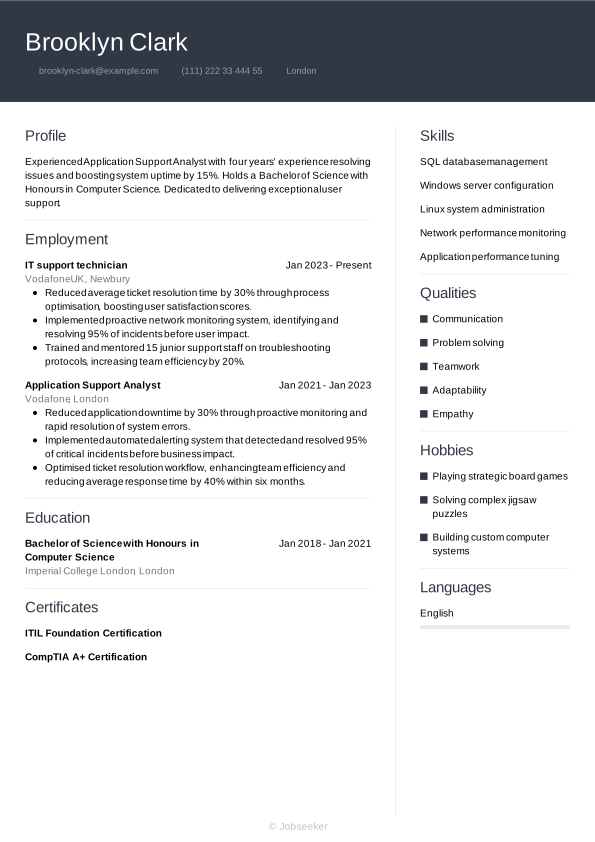
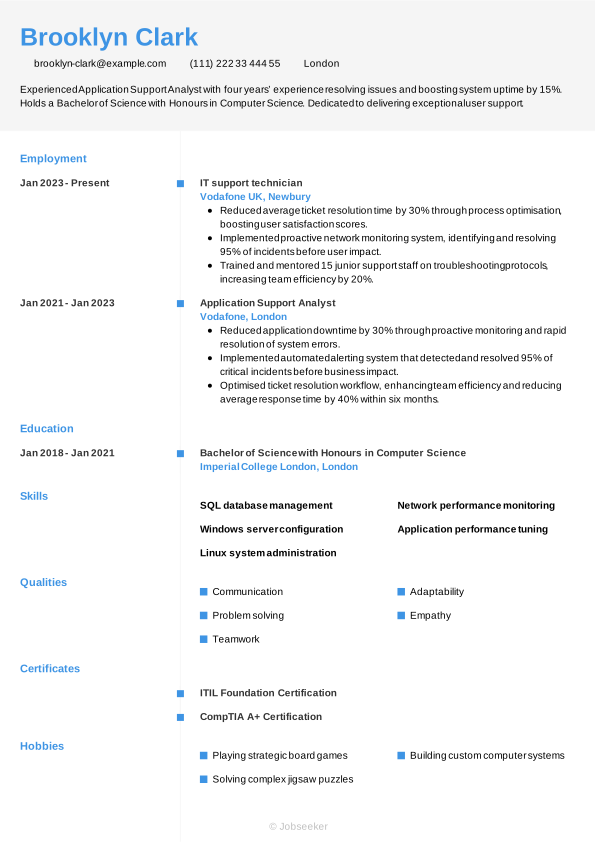
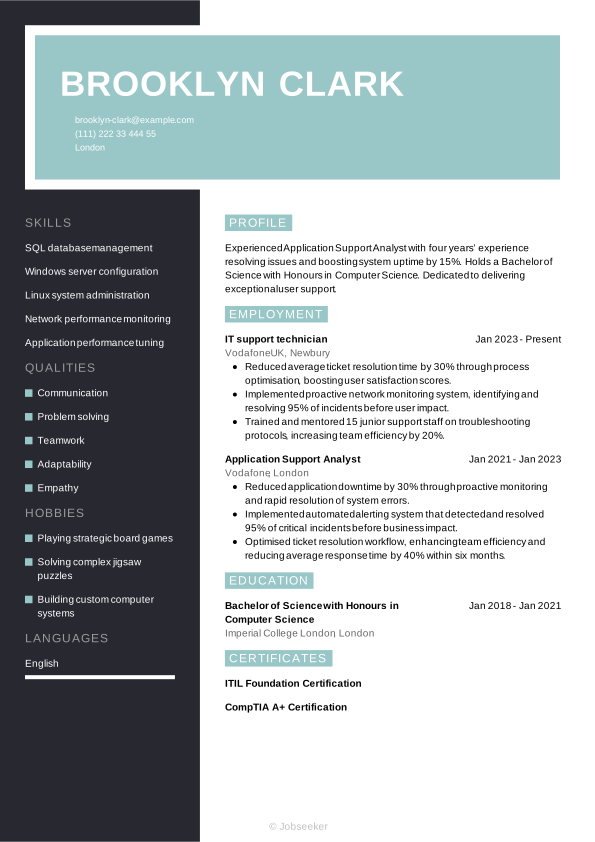
At the end of the day, though, an application support CV is just a way to tell the story of how you’ve grown in your career. Regardless of your experience level, you want that progression to feel seamless and easy to follow for recruiters. To help you get there, we’re going to walk through each part of the CV step-by-step, starting with the basics in your header and working our way through to your professional achievements.
CV Header
Start your application support CV by adding a professional-looking header that contains all your relevant contact information. Include your name, email address, phone number and location (your full address isn't typically necessary for UK job applications). Additionally, listing your LinkedIn profile in your CV header can be valuable. It serves to provide more detailed information about your career journey, your qualifications and your industry standing, in an easily accessible way.
When you're applying for jobs in the UK, it's generally not advisable to include a photo or more personal details than are strictly necessary, such as your age, gender, ethnicity or nationality. Including these can jeopardise the recruitment process by introducing bias, and can fall foul of the Equality Act 2010.
Brooklyn Clark
brooklyn-clark@example.com
(111) 222 33 444 55
London
linkedin․com/in/brooklyn–clark–123
CV Summary
Under your header, write a brief CV summary or CV objective, outlining a few of your key skills, qualities and achievements. This short paragraph can help employers to quickly assess your suitability for the role, setting the tone for your application support CV. The CV objective provides an alternative to the standard CV summary. While the CV summary focuses on your skills and achievements through your work experience, a CV objective highlights your ambitions and plans for the future, including how the role fits with these. This makes it ideal for junior candidates.
In your summary or objective, write up to three sentences outlining your key skills, unique personal qualities and career achievements or ambitions, taking care to always reflect the requirements listed in the job description.
A good CV summary would typically focus on a couple of key skills that match the job description, demonstrating how you've used them to good effect in previous roles. It's important to focus on your unique qualities and provide a preview of how they've made an impact in your career to date, which you'll unpack later in the document. Here's an example of an effective application support CV summary, with evidence of your impact and neat, well-structured sentences:
Strong example:
Application support analyst with five years’ experience resolving 500+ incidents and achieving 99.9% uptime. Streamlined workflows to reduce response times by 30%. Holds a Bachelor of Science in Information Technology.
Unengaging example:
Application support analyst with a solid technical background, committed to ensuring reliable system performance, supporting user needs and collaborating effectively within teams to maintain efficient operational processes.
The CV summary above contains various red flags and things to avoid. While the differences are subtle, they can make all the difference. There are several factors that could make your summary less engaging. These include using long, poorly-structured sentences, failing to add evidence of your impact, being too generic with the skills you mention and not adapting your CV summary to specifically respond to the job description.
Employment History
As with most CVs, your application support CV work experience section tends to be the most vital part of your application. Employers tend to look to this section for evidence of how you've developed useful and relevant skills, and used them to add value for previous employers. Ensure you tailor your work experience section to reflect the job description and show you meet all the essential requirements. This means picking out skills and qualities as keywords and reflecting them back in your work experience bullet points, so employers can assess your likely fit for the role.
List only your most relevant jobs, and go back up to 10 or 15 years, depending on your experience levels. List your job title, the name of the employer, its location and the dates you worked there. Also include bullet points for each entry, highlighting how you used your skills to add value for the employer.
The difference between an average CV work experience section and an outstanding one is the use of action verbs and quantifiable evidence. You'll want to show how your actions led to measurable positive outcomes for employers, and indicate a progression in your skills throughout your career. Here's an example of best practice in an application support CV work experience section:
Strong example:
Application Support Analyst, January 2023 - Present
TechWave Solutions, Cambridge
- Oversaw migration of support processes to a centralised ticketing system, improving response times by 40 per cent.
- Automated daily incident reports using PowerShell scripts, reducing manual workload by two hours per day and improving accuracy.
- Coordinated cross functional team collaboration to resolve critical application outages, achieving 99.9 per cent service uptime.
Unengaging example:
Application Support Analyst, January 2023 - Present
TechWave Solutions, Cambridge
- Provided technical assistance to users encountering application issues across various environments.
- Collaborated with cross-functional teams to resolve routine system incidents and improve overall service delivery.
- Monitored application performance and escalated potential issues to ensure minimal disruption to business operations.
Above is an example of what not to do with your application support CV. An unengaging work experience section could be too generic, focusing too much on day-to-day duties rather than skills and achievements. It could also fail to address the job description or lack evidence to show the impact you've made in your career to date.
Skills
In your CV's skills section, you'll want to draw attention to some of your strongest skills that make you suitable for the role. Review the job description to get an idea of the most essential skills, and create a list of hard and soft skills, including some of your strongest, most unique qualities that set you apart from other candidates. In an application support CV, only list the most relevant and essential skills you possess, such as problem solving and network performance monitoring, to make a positive first impression and show you're qualified for the application support specialist position.
Hard Skills
Hard and technical skills are the essential skills required for carrying out the everyday duties of the role. They might include specialist operation of certain software or equipment, or knowledge of certain industry standards and regulations. You could gain these skills via training, certifications or industry experience. For application support specialist roles, key hard skills you've gained, such as SQL database management, and linux system administration, are typically among the most critical for the job. Check the skills specified in the job description, and add four or five key hard skills to your CV that show employers you're capable of completing the key duties of the role.
The best hard skills section would be based around skills listed as 'essential' or 'required' in the job description. To give yourself the best chance of success, you'll want your strongest skills to match closely with those most desired by the employer, and your hard skills list should reflect this.
Below, you can find the types of skills typically featured in the hard skills section of an application support CV:
- SQL database management
- Windows server configuration
- Linux system administration
Soft Skills
Soft skills are distinct from hard skills and tend to reflect your inherent personal qualities and strengths. These are often more transferable to different roles, and help the reader understand your working style, and your likely fit to the team and the organisational culture. The world of work is evolving at a rapid pace, changing the types of hard skills required for many roles, and therefore rendering soft and transferable skills more valuable than ever. Soft skills are also extremely valuable for junior and entry-level roles, where candidates aren't necessarily expected to have a wealth of relevant work experience.
As with your application support CV hard skills list, review the job description to learn the key soft skills for the role. Include the best soft skills that you can provide evidence for throughout your CV. Craft a list of up to five key soft and transferable skills that reflect the job description, while also including some of your strongest, most unique skills to stand out from the crowd.
Explore the examples below to identify soft skills commonly presented in an application support CV.
- Communication
- Problem solving
- Teamwork
Education
In your education section, list any formal qualifications you've gained, particularly those that are most recent or required for the role.
To embark on a career as an application support specialist, you don't tend to need a specific degree. However, you should still add your highest and most relevant certifications, training and formal qualifications to your CV's education section, even if not specified in the job description. These might include ITIL Foundation Certification, or any training that shows your skills in network performance monitoring or windows server configuration.
When listing your qualifications in your education section, select only the most suitable qualifications and list them in reverse-chronological order, starting with the most recent and working backwards. When adding each qualification, include the name and level of the award, the institution, its location (if necessary), and the dates you attended or graduated. It can also be valuable to add bullet points outlining your key achievements and activities, such as projects you worked on, modules you completed, awards you won or societies you participated in while studying.
Specialist licences or certifications can also be a valuable addition to your CV's education section. If these are essential for the job and are referenced in the job description, it's a good idea to include them here rather than further down your CV. Include any expiration or renewal dates for certifications, if applicable.
Bachelor of Science in Information Technology, 2018 - 2021
University of Greenwich, London
Certifications
To showcase additional qualifications and training beyond the basic requirements for the role, consider adding a certifications section to your CV. If you've been proactive in pursuing professional development opportunities throughout your career, it's worth showcasing them. Not only do they make you more qualified, they also show a proactive and motivated mindset. Furthermore, the CV certifications and training section is a great showcase for official licences and certifications when applying for roles where these are a key requirement listed in the job description. These could include positions where the use of specialist software and equipment is a routine part of your everyday responsibilities.
Take a look at this list of example certifications and licences for application support specialist candidates:
- ITIL Foundation Certification, 2023
- CompTIA A+ Certification, 2023
- AWS Certified Cloud Practitioner, 2023
Language Skills
Adding foreign language skills to your application support CV can be a valuable addition that reflects well on you as a candidate. Even if language skills aren't listed as a requirement in the job description, if you speak a foreign language, it can be beneficial to add it to your CV. Within this section, list the foreign languages you speak to a reasonable degree of competence, together with an indicator of your skill levels.
There are a few acceptable ways of citing your foreign language proficiency levels. The simplest way is to assign a basic descriptive word to indicate your skills, such as:
- English: Fluent
- Spanish: Intermediate
You could otherwise use an internationally recognised language standard, such as the Common European Framework of Reference (CEFR). This assigns your language skills a standardised level of competence, as follows:
- A1: Beginner
- A2: Elementary
- B1: Intermediate
- B2: Upper intermediate
- C1: Advanced
- C2: Proficiency
Pro Tip:
According to JobHelp, your CV can stand out by featuring achievements from volunteering, hobbies or community efforts, as these demonstrate initiative and ability. (1)
Additional Sections
Optional sections can be useful to add to your CV, to provide additional evidence that you have the skills for the application support specialist job. Consider including a few optional sections to your CV if you think you need to provide extra information to prove your credentials. These sections can be particularly valuable if you lack relevant work experience, such as for entry-level roles, or if you're changing careers to a completely new field or specialism.
And if you'd like more tips on making your CV stand out, explore our career resources. They’re designed to help you showcase your strengths and boost your chances of landing the job.
Hobbies and Interests
Hobbies and interests are a legitimate way to showcase your skills, if you have any hobbies relevant to the role. Additionally, this section gives you the chance to show employers different facets of your personality and interests beyond work, which can help them to differentiate you from other applicants. However, it's important to only mention hobbies and interests that are relevant, or related to, the role you're applying for. If your hobbies don't help you to show skills required for the role, that are missing elsewhere in your CV, it's best to leave this section out.
Volunteering
Listing volunteer roles is another effective way of showing employers your skills and experience. If you're lacking work experience, either as a junior candidate or a career changer, adding volunteering activities gives you a chance to show how you've put your skills into action. For this section, use a similar structure to your work experience section.
List your job title or a description of the role, the organisation name, its location and the dates you occupied the role. Use bullet points to show employers how you put your skills to use, and any positive achievements from your time in the role.
References
For UK job applications, it's rare to include references on a CV and employers don't tend to request them until later in the recruitment process. However, it's worth checking the job advert just in case. If references are needed, opt for two or three, and always make sure you approach them for permission before including them.
Add their name, their job title, the organisation they work for and their contact details. Alternatively, if references aren't required you could simply add a line to your CV confirming you can provide them when needed, such as 'references are available upon request'.
Data-Driven Finding:
It takes on average 30 seconds for HR professionals to review a CV and decide if it’s worth reading. This means highlighting your key skills, qualifications and quantifiable achievements is critical, even when you don't have much work experience. (2)
Top action words to use in an application support CV
Including strong action verbs with your work experience bullet points can help you show the impact you made in previous roles. Starting each bullet point with an action verb is a great way to match your experience and achievements to the job description, giving the reader an easy way of identifying your key skills and seeing how you've applied them. Always remember to back up any action verbs you use with evidence that shows the impact it made and the achievements that it led to. Use past tense for action verbs that describe previous roles, and present tense for your current position.
- Analyse
- Troubleshoot
- Resolve
- Monitor
- Maintain
- Configure
- Document
- Escalate
- Test
- Implement
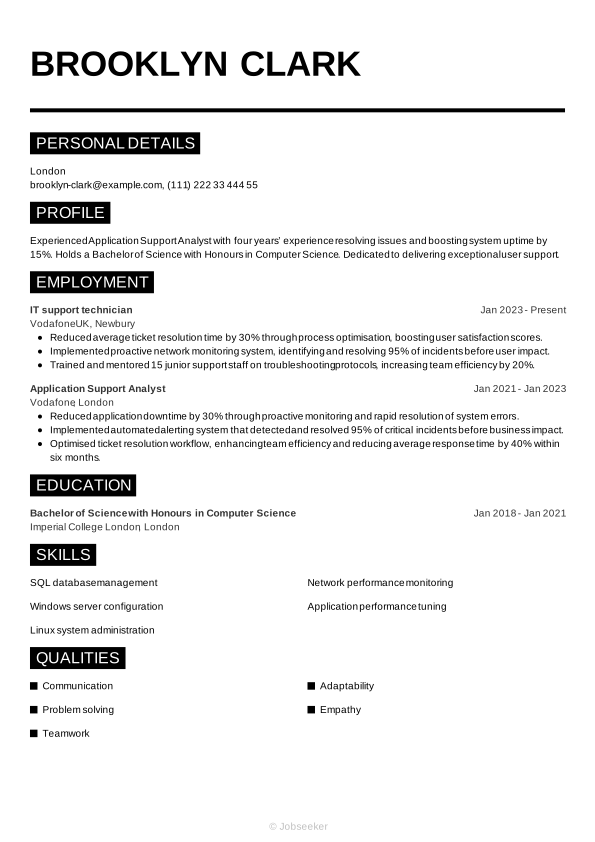
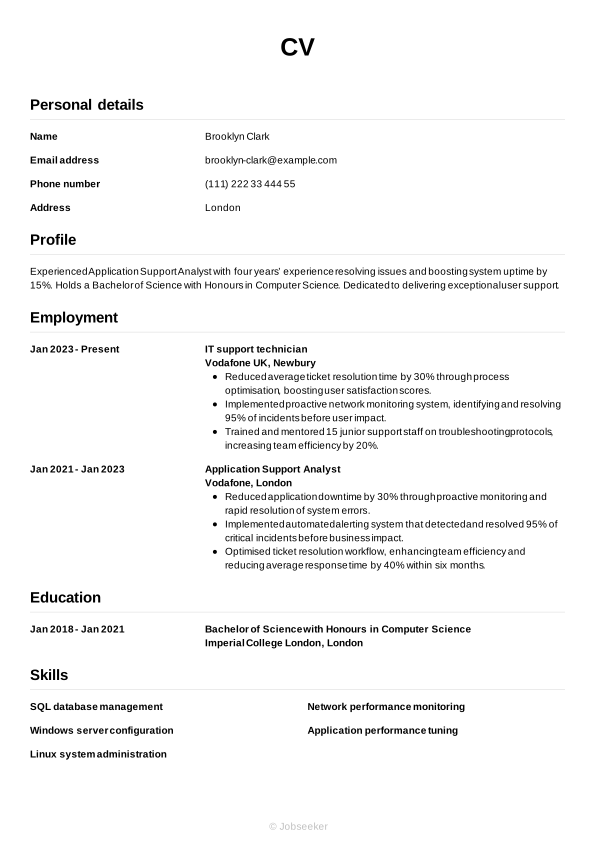
Application support CV example
Now we've shown you everything that needs to go into your application support CV, we can take a look at how it comes together in its final form in the following example:
London
•
brooklyn-clark@example.com
•
(111) 222 33 444 55
•
linkedin․com/in/brooklyn–clark–123
Experienced Application Support Analyst with four years’ experience resolving issues and boosting system uptime by 15%. Holds a Bachelor of Science with Honours in Computer Science. Dedicated to delivering exceptional user support.
IT support technician
2023
-2026
Vodafone UK (Newbury)
- Reduced average ticket resolution time by 30% through process optimisation, boosting user satisfaction scores.
- Implemented proactive network monitoring system, identifying and resolving 95% of incidents before user impact.
- Trained and mentored 15 junior support staff on troubleshooting protocols, increasing team efficiency by 20%.
Bachelor of Science with Honours in Computer Science
2018
-2021
Imperial College London (London)
SQL database management
Windows server configuration
Linux system administration
Communication
Problem solving
Teamwork
ITIL Foundation Certification
CompTIA A+ Certification
English - Native
French - Advanced
To see how your CV might look after finalising its design and layout, take a look at our CV examples.
Best practice and common mistakes for your application support CV
Tips to follow
- Use a reverse-chronological approach to listing your work experience and education, starting with your most recent activities and working back from there.
- List your relevant qualifications in a dedicated education section, adding any outstanding grades or awards you won, to help you stand out from the competition.
- Quantify your achievements by offering evidence that supports your claims throughout your CV wherever possible, such as key metrics, awards, and positive feedback.
- Proofread your CV in detail before sending it, to avoid unnecessary errors in spelling and grammar that could undermine your chances.
- Start your CV with a CV summary or objective that grabs the attention of the reader, clearly summarising your key skills and achievements.
Common mistakes to avoid
- Don't try to impress with industry jargon or acronyms that can make your CV less readable, when simple, clear language will do the same job.
- Don't include a hobbies and interests section unless you need to prove skills that you can't showcase through work experience, and unless your hobbies are particularly relevant.
- Don't lie or exaggerate about previous jobs or your qualifications – it can backfire or even be considered fraud.
- Don't use complex formatting or confusing layouts that can make your CV less accessible for the reader or less scannable by ATS apps.
- Don't forget to review your contact details to ensure everything is up-to-date, including regularly checking your LinkedIn profile and updating any relevant information.
Guide to making your CV ATS compatible
Applicant tracking systems (ATS) are now commonly used by employers, to help them manage the recruitment process. One of the main functions of ATS software is the scanning and ranking of CVs according to their likely suitability for the role. By taking on this task, the systems can save hiring managers the time and effort of reviewing every CV in detail. With vacancies regularly receiving hundreds of applications, this can increase the efficiency of the recruitment process.
With ATS apps becoming more prominent, it's essential for candidates to optimise their CVs to increase their chances of passing the initial screening stage. You can read a list of the top tips for ATS optimisation below:
- Include keywords and phrases that match the job description, giving you the best chance of appearing as a strong fit for the role.
- Use standard CV headings that make your CV easier to navigate, such as 'work experience', 'education' and 'skills'.
- Opt for a simple CV layout with consistent formatting, avoiding any special design elements that could make your CV harder for ATS apps to scan.
- Select a font that increases the readability of your CV, such as popular serif and sans serif fonts, between the sizes of 10 and 12 for main text and 14 and 16 for headings.
- Use bullet points instead of writing full sentences, to reduce the overall length of your CV, make it more keyword-dense and help ATS apps to scan it more easily.
You might feel there are a lot of steps to creating an ATS-compatible application support CV, but with just a few small changes, you can ensure your CV passes this stage. Use one of our ATS-compatible CV templates, which are designed by experts to give you the best chances of success.
If you want to stand out from other candidates with your CV, use Jobseeker's expert-designed CV templates, to instantly improve the look and feel of your application.
Application support CV FAQs
How do I produce an effective application support specialist cover letter for my application?
An engaging and gently persuasive cover letter can enhance your chances of success with your job applications. Opt for a formal, professional letter format and choose a cover letter template with a design consistent with your CV.
Most cover letters include three main paragraphs of written content. In the first paragraph, confirm the role you're applying for and reference your reasons for applying, including how it fits with your career journey and why you want to work for the organisation. Secondly, write a brief paragraph outlining your key skills and achievements, taking care not to simply repeat the details in your CV. Finally, express your gratitude and enthusiasm, and leave a call to action that encourages the reader to reach out to you to arrange an interview or establish a dialogue.
Alternatively, if applying via email, you may wish to write a shorter, more simple cover note. You can use traditional email conventions for this, which are less formal than standard letter conventions. Simply introduce yourself and confirm the role you're applying for, direct the reader to the attached documents and add your contact details in your email footer/sign-off.
Jobseeker's cover letter examples for application support specialist jobs and key information technology industry roles offer valuable insights from HR experts on how to write a compelling cover letter.
How do I create an experienced application support CV?
As an experienced application support specialist, you'll want your CV to reflect your expertise and showcase your relevant work experience.
As such, you'll be best served with a traditional reverse-chronological CV format that places the emphasis on your work experience section. Use this section to show how you've developed valuable key skills and put them to use to create positive outcomes in previous roles.
Additionally, it could be worth making your application support CV stretch back further than the standard 10 to 15 years, to give employers a greater insight into your information technology industry expertise and reputation.
How do you write an impactful application support CV headline?
A well-written CV headline can be an effective way of introducing your CV, helping it be more compatible with ATS apps and engaging the reader early in the document.
Look to write a short, engaging sentence that encompasses your best qualities, including the job title to indicate your relevance and suitability for the role.
For an impactful CV headline, focus on the most critical keywords and phrases from the job description, as this will mark you out as a strong fit for the role and give you a strong ranking in the ATS screening stage.
Below you can find some examples of best practice for CV headlines at different levels of experience:
- Junior Application Support Specialist
- Dedicated Application Support Specialist
- Proactive Senior Application Support Specialist
What's the most effective CV format for an application support CV in 2026?
The most suitable format for your application support CV in 2026 will depend heavily on numerous factors, such as your career stage and experience levels, the type and level of the role, the organisation and established industry norms.
For candidates with work experience, the traditional reverse-chronological CV is typically the best choice. This layout focuses mainly on your work experience, providing examples of key achievements, and how you've used your skills in your career to date.
Alternatively, for less-experienced candidates who might not want to emphasise previous employment (such as recent graduates or career changers), a functional format is more suitable. This layout prioritises your skills and qualifications.
A well-written cover letter is an essential element of any job application. Take a look at our HR-approved cover letter templates to find a design and layout that matches your CV.
Key takeaways for your application support CV
For the best chance of impressing employers, always tailor your CV for every application and include keywords and phrases that reflect the job description. Pick a CV format that matches your experience level, and focus on showing the reader how you've developed relevant skills and put them to good use to add value for previous employers.
Finally, using an eye-catching, expert-designed CV template from Jobseeker can really give your CV an edge over those from rival candidates, helping you to achieve success in your job applications.
Sources:
- JobHelp (UK Department for Work & Pensions campaign), No work experience? Focus on what you do have
- Jobseeker, Hiring Trends

Impress employers with your CV
Step-by-step guidance to create a professional CV in minutes.