Office Coordinator CV Example
If you're hoping to launch a career in the administration industry, including office coordinator roles, it's essential to write a CV that shows your skills and achievements in the best light. You'll want to showcase strong skills that are relevant to the role and reflect your experience, including organising travel and coordinating internal team communication. In this guide, we'll equip you with all the key tips and advice you'll need to craft an office coordinator CV that sets you up for success in your job applications.
A meticulously crafted, tailored office coordinator CV gives your application the best chance of passing the ATS screening stage, impressing the hiring manager and progressing to the interview stage. We’ll now review the essential sections of a CV and outline how to write each for the strongest results.
Standard office coordinator CV sections
Your office coordinator CV writing strategy may vary significantly according to numerous factors, such as your previous experience, your seniority and the requirements in the job description.
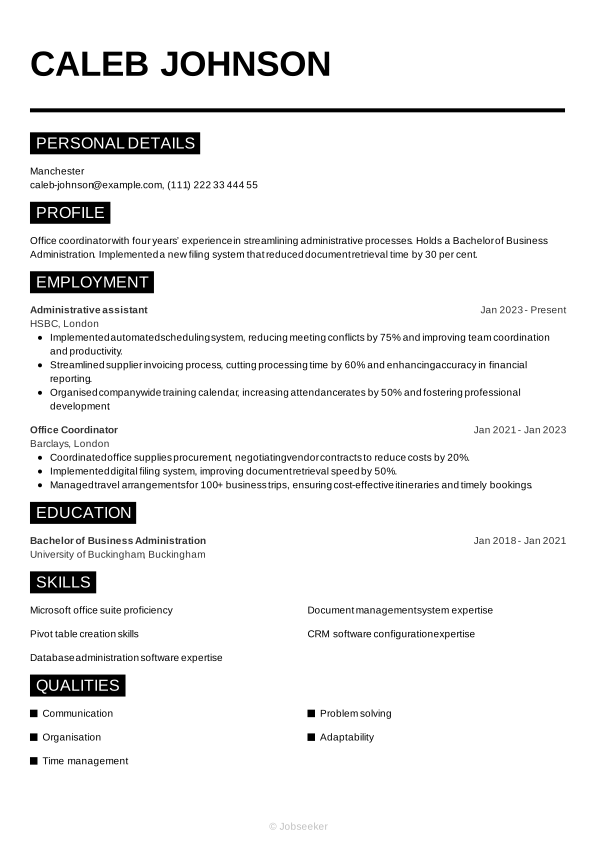
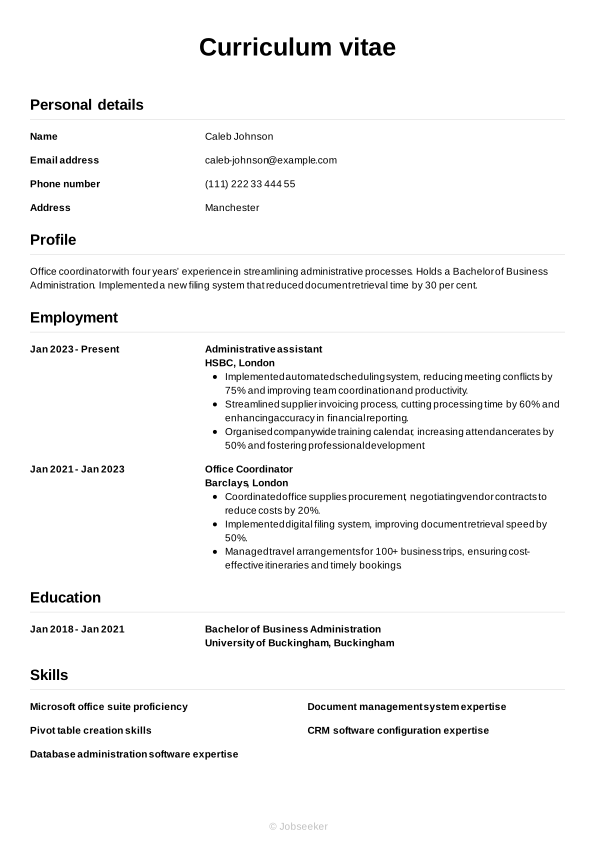
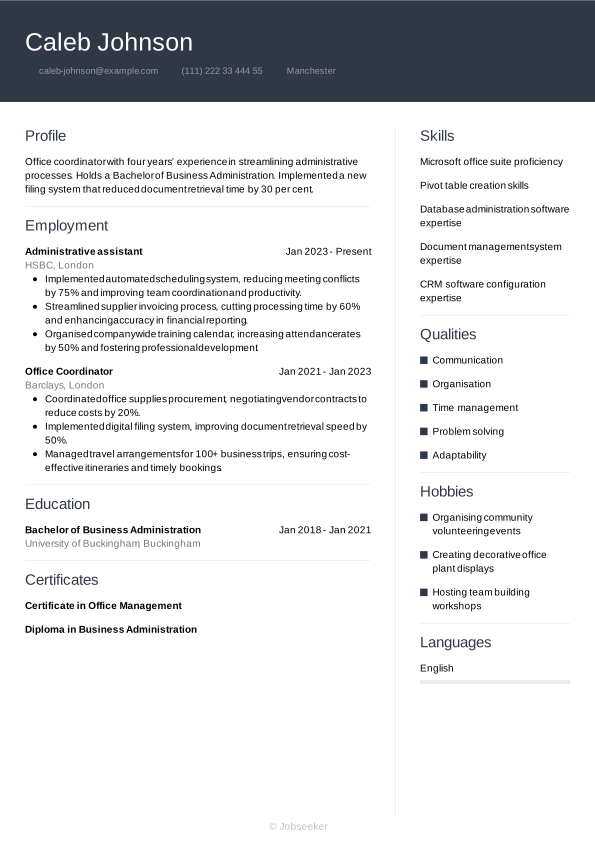
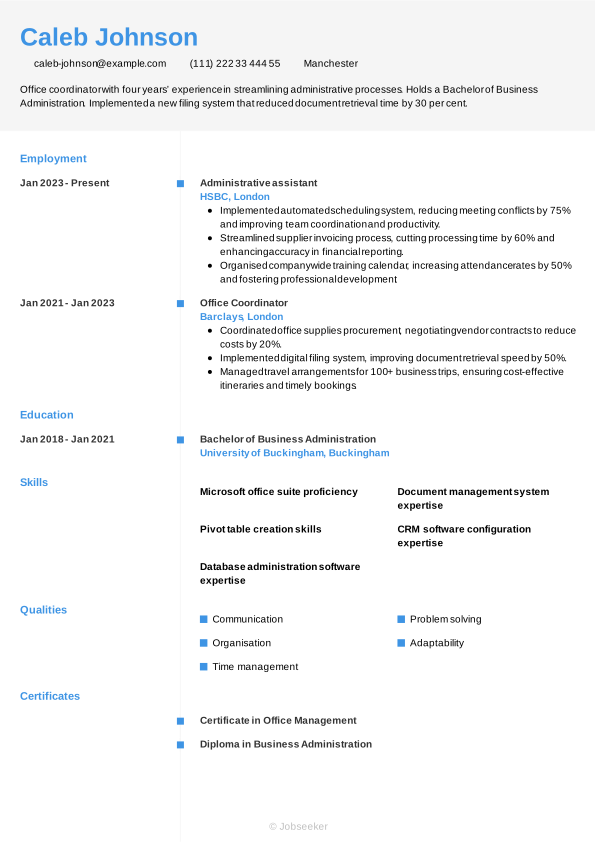
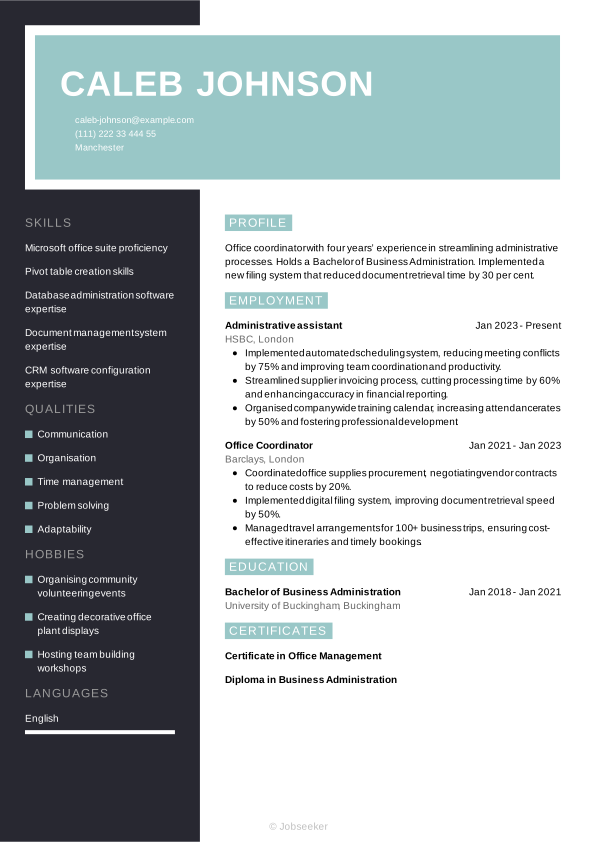
However, regardless of your seniority, an office coordinator CV needs to tell a cohesive story of your professional growth. In the following sections, we’ll dive into each part of the CV step-by-step, starting with your header and moving through to your professional achievements.
CV Header
Start your office coordinator CV with a professional-looking header that includes all the relevant contact information. This usually includes your name, your email address, your phone number and your location, but not your full address. Additionally, including your LinkedIn profile as a URL can be useful, as it will help the reader to quickly and easily access further information about your career and credentials.
For UK jobs, it's generally not a good idea to add a photo or any other personal details beyond your basic contact information. This means leaving off details such as your age, gender, ethnicity and nationality, as these can introduce bias to the selection process and complications related to the Equality Act 2010.
Caleb Johnson
caleb-johnson@example.com
(111) 222 33 444 55
Manchester
linkedin․com/in/caleb–johnson–123
CV Summary or Objective
Below your CV header, the next section tends to be a CV summary or CV objective. This paragraph briefly explains a few of your key skills and qualities, so employers can easily understand whether you're likely to be a suitable candidate for the office coordinator job. While the CV summary focuses on your key skills and achievements, a CV objective highlights your career ambitions, making it more suitable for junior candidates.
In your summary or objective, write up to three sentences outlining your key skills, unique personal qualities and career achievements or ambitions, taking care to always reflect the requirements listed in the job description.
The most effective way to approach a CV summary is to focus on one or two key skills that reflect the requirements of the job description and show how you've used them to create positive outcomes for previous employers. You'll also want to showcase your unique personal strengths, and touch on how they've contributed to your career progression up to now. Below you'll find a good example of how to write an effective office coordinator CV summary. The example shows quantifiable achievements and well-structured sentences.
Engaging example:
Proactive office coordinator with five years’ experience coordinating administrative functions and optimising processes. Achieved a 20% reduction in office expenses through streamlining supplier contracts. Holds a Bachelor of Business Administration.
Worst example:
Versatile office coordinator with a background in managing daily tasks and supporting team operations, skilled in administrative responsibilities, adaptable to workplace demands and eager to contribute to general office needs.
Above is an example of a less effective CV summary, with some subtle, yet notable differences. Your summary could miss the mark if it's too generic and doesn't describe unique personal qualities and strengths. It might also be vague, use long, unstructured sentences, lack quantifiable evidence of your impact, or not be tailored to the job description.
Professional Experience
Work experience is usually the most important section of any CV. Employers will be looking for evidence of how you've developed relevant skills in your career to date, and how you've used them to positive effect in previous roles. Always tailor this section of your CV, focusing on keywords and phrases that match the job description, so employers can assess how you might put the same skills and qualities to good use in the future.
List only your most relevant jobs, and go back up to 10 or 15 years, depending on your experience levels. List your job title, the name of the employer, its location and the dates you worked there. Also include bullet points for each entry, highlighting how you used your skills to add value for the employer.
Standing out with your CV work experience section means using action verbs and measurable outcomes to show the impact you made. You'll want to outline a progression in your skills development, and list evidence of the value you added. Here's an example of best practice in an office coordinator CV work experience section:
Engaging example:
Office Administrator, January 2023 - Present
Harbourview Business Support, Southampton
- Implemented digital filing system that reduced document retrieval times by 40%.
- Streamlined office supply procurement process by negotiating vendor contracts, saving 25% on annual expenses.
- Coordinated onboarding for over 50 new employees, reducing orientation time by 30% and improving staff retention.
Worst example:
Office Administrator, January 2023 - Present
Harbourview Business Support, Southampton
- Coordinated daily office operations and maintained smooth workflow across departments.
- Monitored office supplies and processed routine purchase orders to support seamless operations.
- Facilitated communication among staff and external stakeholders to uphold efficient office procedures.
The example above shows what not to do with your office coordinator CV work experience section. A less-engaging work experience section might include irrelevant roles or jobs from a long time ago, and generic information that fails to address the requirements of the job description. It could also lack evidence to support the claims made in the bullet points.
Education
Your education section should showcase your most recent and highest qualifications, paying particular attention to anything that's specifically required for the role.
Working as an office coordinator doesn't tend to require a specific degree. However, while employers may not request a degree in the job description, it can be useful to include other relevant qualifications, certifications or training in your CV's education section. These might include Diploma in Business Administration, or courses that show your skills, such as database administration software expertise or document management system expertise.
When adding your qualifications to your education section, choose the highest relevant qualifications, and list them in reverse-chronological order, starting with your most recent. For each entry, include the name and level of the degree or certification, the institution, its location and your graduation date or dates of study. To emphasise your qualifications and achievements, you might wish to include one or two bullet points, which highlight things like specialist areas of study, projects, dissertations or society memberships.
If the job description requires any specialist certifications or licences, you may wish to add these in your education section. If you add these, it's also a good idea to include the expiration date of the licence or qualification, if it has one.
Bachelor of Business Administration, 2018 - 2021
University of Westminster, London
Key Skills
The skills section of an office coordinator CV provides space for showcasing the key skills and qualities that set you apart as a candidate. You'll want to only include the most relevant skills, so review the job description and list hard and soft skills that match the requirements, while reserving some space to mention your own unique characteristics. In an office coordinator CV, focus on the most relevant and essential skills in your skills portfolio, such as communication and CRM software configuration expertise, to show you're qualified for the office coordinator position and to put you in a strong position to progress.
Hard Skills
Hard skills and technical skills are specialist skills that are essential for carrying out the main responsibilities of the role. You might acquire hard skills through study, or through on-the-job training, and some hard skills may require a certification or licence. For office coordinator roles, key hard skills you've gained, such as microsoft office suite proficiency, and database administration software expertise, are typically among the most critical for the job. Review the job description, and include four or five key hard skills in your CV that show employers you're capable of completing the key duties of the role.
The ideal hard skills section will feature the most essential hard skills from the job description, while closely reflecting your own best technical abilities. The closer your strongest skills are to matching the job description, the higher your chances of success.
Below, you can find the types of skills typically featured in the hard skills section of an office coordinator CV:
- Microsoft office suite proficiency
- Pivot table creation skills
- Database administration software expertise
Soft Skills
Soft skills differ from hard skills because they tend to be more transferable and applicable to different roles. Soft skills are the personal strengths and qualities that define your style of working and determine how well you're likely to fit in with the team and wider organisation. As a result of rapid technological changes to modern ways of working, soft skills are becoming more and more valuable to employers. Soft skills can also be particularly useful for junior or entry-level roles where candidates haven't had the time or career experience to develop hard skills and notable achievements.
As with your office coordinator CV hard skills list, review the job description to learn the key soft skills for the role. Include the best soft skills that you can provide evidence for throughout your CV. Craft a list of up to five key soft and transferable skills that reflect the job description, while also including some of your strongest, most unique skills to stand out from the crowd.
Consider the following soft skills that frequently appear in an office coordinator CV.
- Communication
- Organisation
- Time management
Language Skills
Adding foreign language skills to your office coordinator CV can be a valuable addition that reflects well on you as a candidate. Even if language skills aren't listed as a requirement in the job description, if you speak a foreign language, it can be beneficial to add it to your CV. List any foreign languages you speak, together with an indication of your proficiency level.
There are a few acceptable ways of citing your foreign language proficiency levels. The simplest way is to assign a basic descriptive word to indicate your skills, such as:
- English: Fluent
- Spanish: Intermediate
Alternatively, use an internationally recognised framework for languages, such as the Common European Framework of Reference (CEFR). This gives your language skills a standardised competence indicator, as follows:
- A1: Beginner
- A2: Elementary
- B1: Intermediate
- B2: Upper intermediate
- C1: Advanced
- C2: Proficiency
Certifications and Licences
Depending on the role and your qualifications, it might be necessary to include a certifications section. It can be a valuable way of differentiating yourself from other candidates and showing employers your dedication, motivation and commitment to professional development. Furthermore, the CV certifications and training section is a great showcase for official licences and certifications when applying for roles where these are a key requirement listed in the job description. These could include positions where the use of specialist software and equipment is a routine part of your everyday responsibilities.
Here are some key examples of certifications and licences that you could add to your CV for office coordinator positions:
- Certificate in Office Management, 2023
- Diploma in Business Administration, 2023
- Advanced Excel for Administrators, 2023
Pro Tip:
Since recruiters give under ten seconds to each CV, Barnet Council advises starting with a clear summary that grabs attention quickly. (1)
Additional Sections
Including optional sections in addition to the core sections of your office coordinator CV can help you to show employers you're a strong candidate for the job. If you're unable to show you have all the necessary skills for the job through your work experience, optional sections can be a valid way of providing further evidence of your suitability, to give you the chance of gaining an interview. If you're an entry-level candidate or a career changer, optional sections can be particularly valuable.
Explore our career resources for practical strategies to make your CV stand out and move you closer to landing an interview.
Hobbies and Interests
If you have any hobbies and interests that can showcase skills relevant to the job description, it might be worth including them. Additionally, hobbies and interests are an ideal way to show the employers some elements of your personality and interests beyond work, which can set you apart from other candidates. However, only mention hobbies and interests that are relevant to the role, and that help you prove skills that you haven't been able to show in your work experience or other CV sections.
Key Achievements
Creating a section for your achievements and awards can help you draw attention to the things you're most proud of in your career to date. In your list, add any awards you've won, industry recognition or key career milestones that tell a story about your suitability for the role and place you ahead of other candidates.
Voluntary Work
Listing volunteer roles is another effective way of showing employers your skills and experience. If you're lacking work experience, either as a junior candidate or a career changer, adding volunteering activities gives you a chance to show how you've put your skills into action. Approach your volunteering section in much the same way as your work experience section.
For each entry, include a job title or description of your role, the organisation, its location and the dates you volunteered. Adding bullet points can also help you to show how you developed relevant skills, and used them to good effect.
Evidence-Based Insight:
Hiring managers spend an average of 30 seconds reviewing a CV to assess its likely fit for the role, so it's essential to clearly highlight your skills, experience, and evidence of your achievements. (2)
Best action words for an office coordinator CV
Using strong action verbs in your work experience bullet points gives you the opportunity to show how you've applied skills to good effect in previous roles. Starting each bullet point with an action verb, such as 'delivered', 'collaborated' or 'developed' also allows you to show your key skills and qualities in a way that's easily identifiable for the reader. Remember to always back up the action verbs you use with quantifiable evidence that shows the impact you made. You can use past tense for any action verbs describing previous jobs, with present tense for action verbs to describe your current role and responsibilities.
- Organise
- Coordinate
- Schedule
- Manage
- Communicate
- Liaise
- Prepare
- Maintain
- Support
- Supervise
Office coordinator CV example
Now that you know exactly what to include in your office coordinator CV, we can take a look at a final, finished example below:
Manchester
•
caleb-johnson@example.com
•
(111) 222 33 444 55
•
linkedin․com/in/caleb–johnson–123
Office coordinator with four years’ experience in streamlining administrative processes. Holds a Bachelor of Business Administration. Implemented a new filing system that reduced document retrieval time by 30 per cent.
Administrative assistant
2023
-2026
HSBC (London)
- Implemented automated scheduling system, reducing meeting conflicts by 75% and improving team coordination and productivity.
- Streamlined supplier invoicing process, cutting processing time by 60% and enhancing accuracy in financial reporting.
- Organised companywide training calendar, increasing attendance rates by 50% and fostering professional development.
Bachelor of Business Administration
2018
-2021
University of Buckingham (Buckingham)
Microsoft office suite proficiency
Pivot table creation skills
Database administration software expertise
Communication
Organisation
Time management
Certificate in Office Management
Diploma in Business Administration
English - Native
French - Advanced
If you want a sneak preview of what your one-page, fully designed and finalised CV might look like, see our completed examples.
Dos and don'ts for a winning office coordinator CV
Tips to follow
- Quantify your achievements whenever possible, adding key figures and evidence to support your claims.
- Open your CV with a strong CV summary or objective, providing a brief account of your career achievements and skills.
- Showcase your strongest skills, both hard and soft, in a dedicated skills section that references the key skills listed in the job description.
- Use strong action verbs that show how you've used your skills to add value for employers in your career to date.
- List your relevant qualifications in a dedicated education section, adding any outstanding grades or awards you won, to help you stand out from the competition.
Common mistakes to avoid
- Leave out any detailed personal information, such as age, gender or marital status, and avoid adding a personal photo unless it's required for the role.
- Don't lie or exaggerate to make your application look stronger – misleading claims about jobs or qualifications can be considered fraud.
- Don't use passive voice, such as 'the target was achieved', but instead use strong action verbs to show the value you added to previous roles.
- Don't use overly elaborate CV formatting and designs that make your document harder to read and more confusing for ATS software.
- Don't forget to review your contact details to ensure everything is up-to-date, including regularly checking your LinkedIn profile and updating any relevant information.
A compelling cover letter is an essential part of a successful job application. Ensure your cover letter matches the style and design of your CV with our professional cover letter templates.
How to make your CV ATS compatible
Applicant tracking systems (ATS) are now commonly used by employers, to help them manage the recruitment process. One of the main functions of ATS software is the scanning and ranking of CVs according to their likely suitability for the role. By assuming this role in the recruitment process, ATS apps can reduce the amount of time employers need to spend reviewing CVs. With hundreds of applications for a single vacancy becoming increasingly commonplace, this increased efficiency is extremely valuable for employers.
The increasing usage of ATS apps by recruiters and employers means it's critical to adapt and prepare your applications to successfully navigate this stage of the selection process. Following the tips below will give you everything you need for an ATS-compatible CV:
- Include keywords and phrases that match the job description, giving you the best chance of appearing as a strong fit for the role.
- Use clear headings that reflect standard CV conventions, such as 'work experience', 'education' and 'skills'.
- Choose a standard CV layout, avoiding special design elements such as text boxes, columns or unlabelled graphics that can confound ATS scanning apps.
- Select a font that's widely used and maximises readability, including popular serif and sans serif fonts between size 10 and 12 for body text, and 14 and 16 for headings.
- Use bullet points in place of full sentences and paragraphs. This can reduce the overall length of the document, make the keywords stand out and make it easier for ATS apps to scan.
It's easy to get overwhelmed by the steps to creating an ATS-compatible office coordinator CV, but a few small changes can make a big difference. To smooth the process, use one of our expert-designed, ATS-optimised CV templates to increase your chances of success at this stage of the screening process.
If you want to stand out from other candidates with your CV, use Jobseeker's expert-designed CV templates, to instantly improve the look and feel of your application.
Office coordinator CV FAQs
How do I create an accompanying office coordinator cover letter for my CV?
Your cover letter can have just as strong an impact on your chances of success as your CV. When writing a cover letter, use a professional, formal letter structure and select a cover letter template to match the look and feel of your CV.
Most cover letters include three standard paragraphs of information. The letter opens with a brief personal introduction and confirmation of the role you're applying for, and your motivations for applying. In the next paragraph, list some key skills and career achievements related to the role, taking care not to repeat your CV. Finally, end your cover letter with an expression of gratitude for considering your application, and a call to action that puts the ball in the court of the employer to arrange an interview or establish dialogue with you.
As an alternative, if you're applying via email, you may wish to write a shorter, more informal cover note. Follow standard email conventions for this, which are more informal than traditional letter-writing norms. Introduce yourself and confirm the role you're applying for, and direct the reader to the attached documents. Add your contact details in your email sign-off or footer.
Jobseeker's cover letter examples for office coordinator roles and other key administration industry positions provide useful HR-expert tips and guidance on how to write a compelling cover letter.
How do I write a persuasive office coordinator CV without experience?
Even without a history of relevant work experience, you can still write an office coordinator CV that makes its mark with employers.
Choose a CV format that places greater emphasis on your skills over your work experience, such as the functional format. In this CV layout, your skills section and education typically come before your work experience.
For junior positions, it's important to emphasise your soft and transferable skills. Employers will be looking less for office coordinator candidates with a depth of experience, and more for candidates who can show they have the soft skills, such as ability to adapt and learn, to thrive in a new role and environment.
How do you write an impactful office coordinator CV headline?
A well-written CV headline can be an effective way of introducing your CV, helping it be more compatible with ATS apps and engaging the reader early in the document.
Aim to write a short, engaging sentence that includes the job title and shows you to be a good match for the job description.
For the most effective CV headline, make sure it reflects the most critical keywords and phrases from the job description. This will also help your CV to pass the ATS screening stage of the recruitment process.
Below you'll find some examples of CV headlines for different experience levels:
- Junior Office Coordinator Delivering Results
- Detail-Oriented Office Coordination Specialist
- Senior Office Coordinator Driving Efficiency
What's the best CV format for an office coordinator CV in 2026?
The best CV format for an office coordinator CV in 2026 depends on both your experience levels, and the role you're applying for, including its level, the company and industry norms.
Generally, the most effective CV format for candidates with some work experience is the traditional reverse-chronological structure. This layout prioritises your work experience section to show how you meet the job description, with examples of your key skills and achievements.
Conversely, for candidates without relevant work experience (such as recent graduates or career changers), a functional format can be beneficial, as this emphasises skills and qualifications over work experience.
Key takeaways for an impactful office coordinator CV
To grab the attention of the reader with your CV, tailor it to the exact specifications of the job description, incorporating keywords and phrases that match the employer's requirements. Pick a CV format that matches your experience level, and focus on showing the reader how you've developed relevant skills and put them to good use to add value for previous employers.
Finally, using an eye-catching, expert-designed CV template from Jobseeker can really give your CV an edge over those from rival candidates, helping you to achieve success in your job applications.
Sources:
- Barnet Council (UK local government), Recruitment tips: How to write a supporting statement
- Jobseeker, HR Statistics

Impress employers with your CV
Step-by-step guidance to create a professional CV in minutes.