Admin Officer CV Example
Successfully pursuing a career as an admin officer requires a CV that gives you the edge over other candidates and shows your skills and achievements in context. It's the mention of key responsibilities from your career, such as managing office correspondence and preparing HR reports that will show employers you're a good fit for the role. In this comprehensive guide, you'll learn the steps to producing an admin officer CV that puts you in pole position to progress to the interview stage.
A stronger, more engaging admin officer CV gives you the best chance of success. It can help you pass the ATS CV screening stage and impress the recruiter or hiring manager, increasing your prospects of reaching the interview stage. We’ll now review the essential sections of a CV and outline how to write each for the strongest results.
Key sections of an admin officer CV
Your strategy for writing an admin officer CV will depend heavily on your experience, your level of seniority and the requirements listed in the job description.
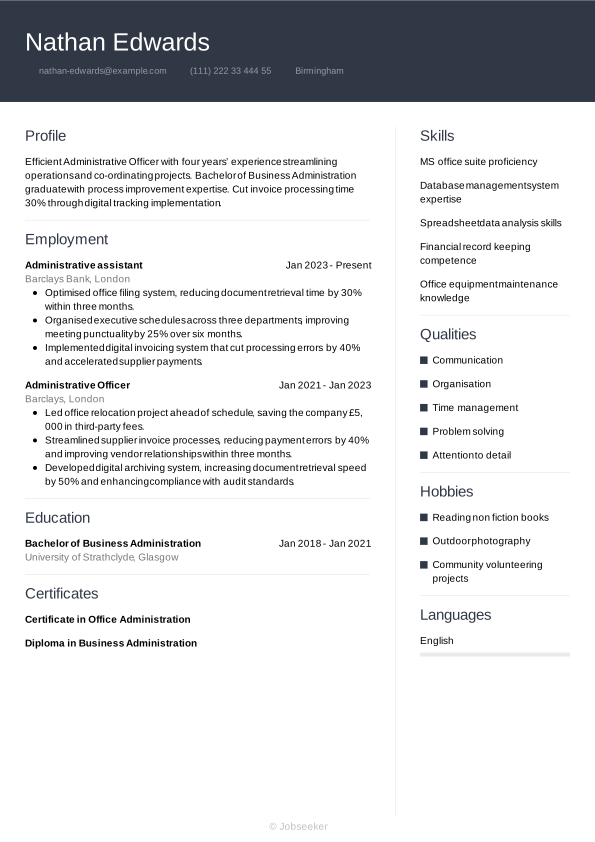
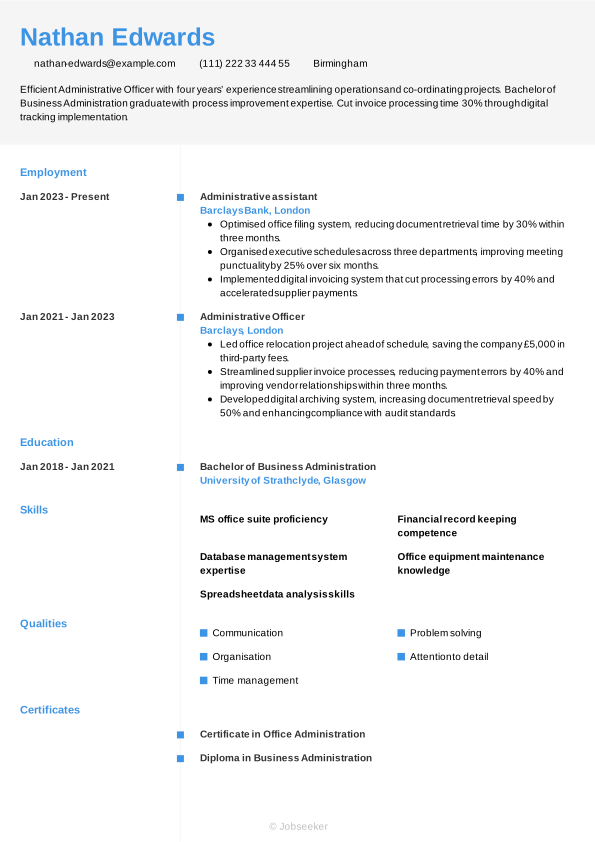
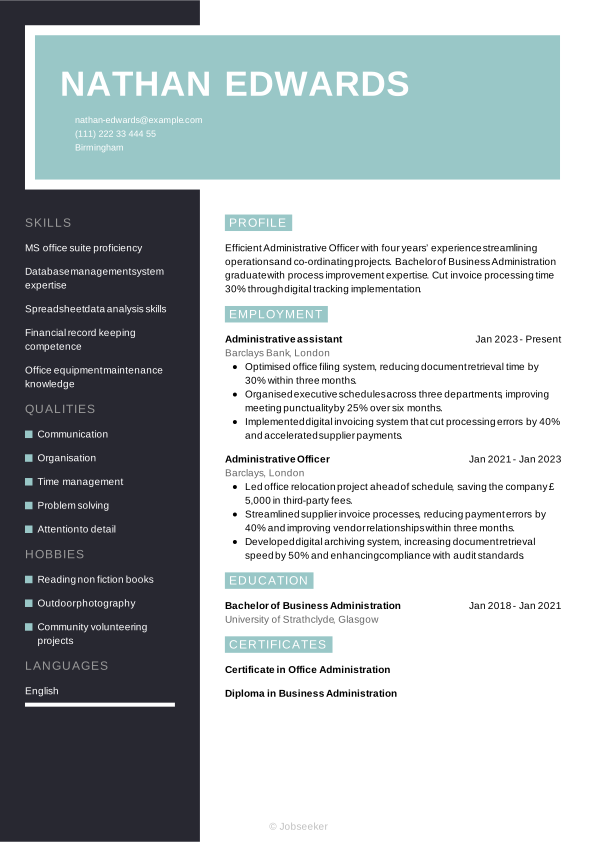
At the end of the day, though, an admin officer CV is just a way to tell the story of how you’ve grown in your career. Regardless of your experience level, you want that progression to feel seamless and easy to follow for recruiters. To help you get there, we’re going to walk through each part of the CV step-by-step, starting with the basics in your header and working our way through to your professional achievements.
CV Header
Kick off your admin officer CV with a header listing the essential contact information such as your name, email address, phone number and location. You don't typically need to include your full address. Incorporate design elements that set the tone and design language of your document. Additionally, listing your LinkedIn profile in your CV header can be valuable. It serves to provide more detailed information about your career journey, your qualifications and your industry standing, in an easily accessible way.
For jobs in the UK, a personal photo is usually not required on your CV. That, along with any other personal details such as age, gender, ethnicity and nationality, are generally discouraged under the terms of the Equality Act 2010, which aims to reduce and eliminate discriminatory practices, such as recruitment bias.
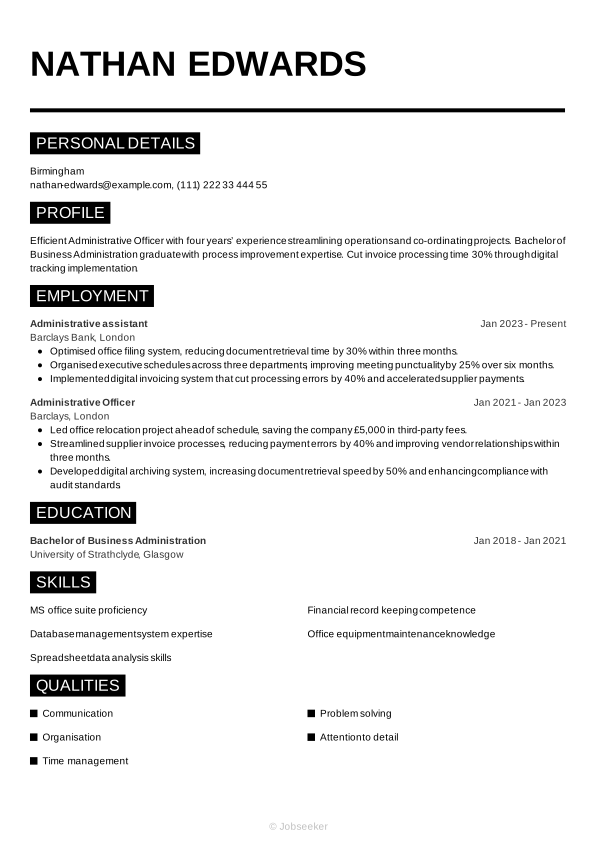
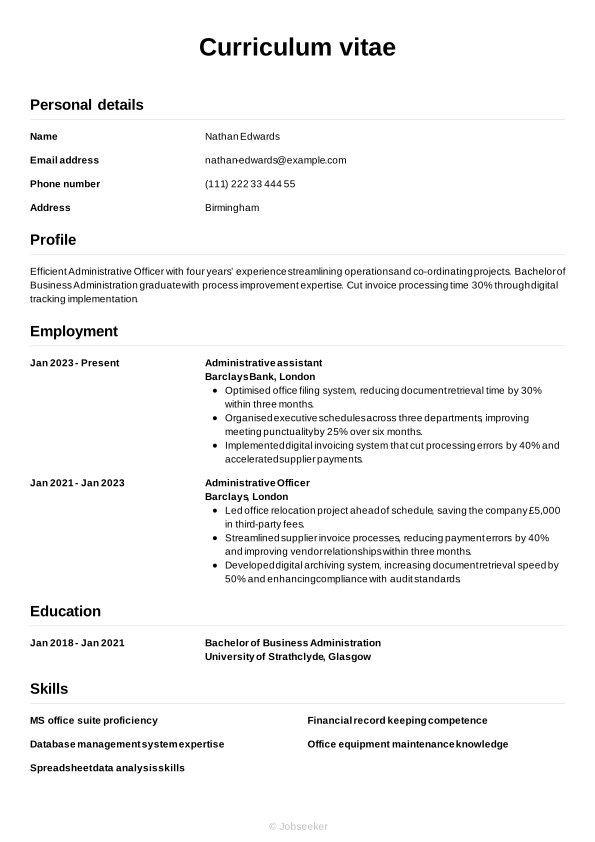
Nathan Edwards
nathan-edwards@example.com
(111) 222 33 444 55
Birmingham
linkedin․com/in/nathan–edwards–123
CV Summary or Objective
Under your header, write a brief CV summary or CV objective, outlining a few of your key skills, qualities and achievements. This short paragraph can help employers to quickly assess your suitability for the role, setting the tone for your admin officer CV. A CV summary focuses on your key skills and achievements, while a CV objective provides an alternative approach, showcasing your career ambitions and how the role fits with these. This makes a CV objective ideal for entry-level candidates.
For either a CV summary or an objective, aim for a length of two or three sentences. Showcase a few key skills, personal qualities and career achievements or ambitions, always reviewing the job description as you write, to show how you fulfil the requirements of the role.
A good CV summary will highlight one or two key skills that match those listed in the job description, and show how you've put them to good use in your career to date. You'll want to set yourself apart from other candidates by focusing on unique qualities or particular areas of strength that have shaped your career to date. See below for an example of a strong admin officer CV summary, featuring quantifiable evidence of your impact and concise, easy-to-read sentences.
Good example:
Experienced Administrative Officer with 5 years’ expertise in streamlining office operations and coordinating cross-departmental support. Successfully reduced office expenditure by 15% through process improvements. Holds a BA in Business Administration.
Poor example:
A versatile administrative officer with experience in general office tasks, effective at handling daily reports, scheduling meetings, supporting teams and maintaining records, aiming to contribute broadly in a business environment.
Above is an example of CV summary that doesn't follow best practice, with some subtle shortcomings and failings. An ineffective summary might be vague or generic, failing to highlight specific personal qualities that help you stand out and failing to address the requirements specified in the job description. They might also lack firm evidence of your skills, and be structured with long, hard-to-read sentences.
Professional Experience
A CV's work experience section is usually its most important element. Employers tend to value the work experience section, as it shows evidence of how you've put your relevant skills to good use in your career to date. Always take the time to tailor this section, including keywords and phrases that match the job description. This will help employers to judge how strong a fit you are for the role, and how you might apply your skills for the benefit of the organisation.
This section should contain a list of your most relevant previous jobs in the last 10 or 15 years. Add the job title, the name of the employer, its location and your dates of employment. Include detail in bullet points, outlining the skills you used in the role and the impact they made.
To differentiate your work experience section from other candidates, include action verbs and quantifiable evidence that showcases the impact you made. Show your career progression through the skills you developed and used in each role. Take a look at this admin officer CV example work experience section for inspiration:
Good example:
Administrative Officer, January 2023 - Present
Clarendon Business Support, Manchester
- Streamlined office supply procurement process, reducing costs by 15% and improving invoice processing efficiency within six months.
- Coordinated cross-departmental scheduling for over 200 staff, optimising meeting room utilisation and reducing scheduling conflicts by 30%.
- Developed and maintained electronic filing system, cutting document retrieval time by 40% and ensuring data accuracy.
Poor example:
Administrative Officer, January 2023 - Present
Clarendon Business Support, Manchester
- Coordinated daily administrative functions and maintained effective communication with internal and external stakeholders to support office efficiency.
- Managed office supplies and equipment procurement, ensuring resources were available to facilitate smooth operational performance.
- Handled incoming correspondence and documentation, maintaining organised records and supporting cross-departmental information flow.
Above you'll find a less effective example of an admin officer CV work experience section. A less-effective work experience section could focus too much on irrelevant or out-of-date roles, or include generic information about your responsibilities that fails to show the impact you made. It might lack tailoring to the job description or fail to provide evidence to support the claims made in the bullet points.
Education and Qualifications
Your education section should showcase your most recent and highest qualifications, paying particular attention to anything that's specifically required for the role.
Admin officer jobs tend to require a relevant university degree just to be eligible for the role, so you'll want to showcase this in your CV. If you have a Bachelor of Business Administration or another related degree that makes you an eligible candidate for the position, add it to your CV. You could also add other degrees or qualifications that highlight your key skills, like office equipment maintenance knowledge or MS office suite proficiency.
Creating the education section of your CV means selecting the most relevant and highest qualifications, and listing them in reverse-chronological order, starting with your most recent achievements and working back from there. Add the name and level of the award, the institution, its location and your dates of study or graduation. If you have space or if you particularly want to emphasise your qualifications, you could add one or two bullet points under each entry, highlighting specialist areas of study, projects you worked on, awards you won or societies you were a member of.
It may also be useful for you to add any specialist industry qualifications, certifications or licences that you might require for the role. If you choose to add these, remember also to add an expiration date, if the licence requires renewal in the future.
Bachelor of Arts in Business Administration, 2018 - 2021
University of Manchester, Manchester
Key Skills
A CV's skills section is the place to show the reader, in an easily accessible format, that you have the necessary skills for the job. Read the job description to understand the most essential skills, and create a list of both hard and soft skills, ensuring you include some of your strongest, most unique characteristics and qualities to set you apart from the competition. In an admin officer CV, focus on the most relevant and essential skills in your skills portfolio, such as communication and office equipment maintenance knowledge, to show you're qualified for the admin officer position and to put you in a strong position to progress.
Hard Skills
Hard and technical skills are the essential skills required for carrying out the everyday duties of the role. They might include specialist operation of certain software or equipment, or knowledge of certain industry standards and regulations. You could gain these skills via training, certifications or industry experience. For admin officer roles, key hard skills you've gained, such as MS office suite proficiency, and spreadsheet data analysis skills, are typically among the most critical for the job. After checking the job description, include a list of four or five key hard skills in your CV to confirm that you have the necessary expertise for the role.
The best hard skills section will contain a mix of your strongest technical skills and those listed in the job description as 'essential' or 'desirable'. The closer your skills list is to matching the essential job description skills, the better your chances of success.
Below, you can find the types of skills typically featured in the hard skills section of an admin officer CV:
- MS office suite proficiency
- Database management system expertise
- Spreadsheet data analysis skills
Soft Skills
Soft skills differ from hard skills because they tend to be more transferable and applicable to different roles. Soft skills are the personal strengths and qualities that define your style of working and determine how well you're likely to fit in with the team and wider organisation. As a result of rapid technological changes to modern ways of working, soft skills are becoming more and more valuable to employers. Soft skills can also be particularly useful for junior or entry-level roles where candidates haven't had the time or career experience to develop hard skills and notable achievements.
Just like the hard skills section, begin by reviewing the job description to learn the most desirable soft skills to include in your admin officer CV. Only add soft skills that you can provide evidence for throughout your CV. Create a list of four or five transferable skills, combining the most essential skills from the job description with the skills that help you to stand out as a unique and compelling candidate for the position.
Here are typical soft skills candidates include in an admin officer CV.
- Communication
- Organisation
- Time management
Language Skills
If you speak any languages in addition to your mother tongue, you might want to include them in your admin officer CV as a languages section. These can be valuable for your application, whether languages are specified as a requirement in the job description or not. List any foreign languages you speak, together with an indication of your proficiency level.
There are a few acceptable ways of citing your foreign language proficiency levels. The simplest way is to assign a basic descriptive word to indicate your skills, such as:
- English: Fluent
- Spanish: Intermediate
You could otherwise use an internationally recognised language standard, such as the Common European Framework of Reference (CEFR). This assigns your language skills a standardised level of competence, as follows:
- A1: Beginner
- A2: Elementary
- B1: Intermediate
- B2: Upper intermediate
- C1: Advanced
- C2: Proficiency
Certifications
Depending on the role you're applying for, and the type of qualifications you have, you might want to include a separate section for certifications, in addition to the education section. It's often beneficial to include it as it can illustrate a positive attitude towards self-improvement and professional development, as well as a proactive mindset. All these qualities will appeal to most employers and decision-makers. In addition, the certifications section can be a valuable addition to your admin officer CV if you're applying for a role that cites certain certifications or licences as a necessity in the job description. These might include roles where the use of specialist software or equipment forms part of your everyday duties.
These example certifications and licences are ideal for candidates applying for admin officer roles:
- Certificate in Office Administration, 2023
- Diploma in Business Administration, 2023
- Advanced Microsoft Excel Skills, 2023
Specialist Insight:
With recruiters scanning CVs in less than nine seconds, Barnet Council highlights the importance of a short and compelling personal summary. (1)
Optional Sections
Including optional sections in addition to the core sections of your admin officer CV can help you to show employers you're a strong candidate for the job. Consider including a few optional sections to your CV if you think you need to provide extra information to prove your credentials. These sections can be particularly valuable if you lack relevant work experience, such as for entry-level roles, or if you're changing careers to a completely new field or specialism.
And if you'd like more tips on making your CV stand out, explore our career resources. They’re designed to help you showcase your strengths and boost your chances of landing the job.
Hobbies and Interests
If you have any hobbies and interests that can showcase skills relevant to the job description, it might be worth including them. Additionally, hobbies and interests are an ideal way to show the employers some elements of your personality and interests beyond work, which can set you apart from other candidates. However, hobbies and interests can only add value to your CV if they provide evidence of skills and experience that you can use in the role you're applying for. As such, only add hobbies as a way of filling gaps in the skills you've developed or used through work experience.
Awards and Achievements
Creating a list of your key career achievements can be an effective way of drawing attention to the things you're most proud of from your career. If you've won any awards or achieved any key milestones in your career to date, you might want to mention them here.
Voluntary Roles
Another valuable optional section for your CV is volunteering. This section can offer a great alternative showcase for your skills and experience, if you don't have much relevant work experience. Consider adding this section if you have any relevant unpaid experience, either as a junior candidate or a career changer. In your volunteering section, use a similar structure to your work experience section.
Add your job title or a description of the volunteer role, the organisation name, its location and the dates you volunteered (start and end date). Under this, add bullet points to show the skills you used, and evidence of how they contributed to positive achievements for the organisation.
Data-Driven Finding:
9 out of 10 HR professionals want CVs to be tailored to the job description. (2)
Most impactful action verbs for an admin officer CV
Using strong action verbs in your work experience bullet points is a great way to focus this section and show the impact you've made in your career to date. Starting each bullet point with an action verb that reflects the skills required for the role will help the reader to easily cross-reference your skills to the job description. When adding action verbs to your work experience bullet points, just remember to always provide quantifiable evidence that shows the value you added for each employer. Use past tense for any action verbs that describe previous roles (for example, 'developed') and present tense for current roles (for example 'collaborating').
- Organise
- Coordinate
- Administer
- Schedule
- Manage
- Maintain
- Liaise
- Process
- Compile
- Oversee
Admin officer CV example
Now that you're aware of the key steps to creating a winning admin officer CV, you can review a complete example to see how a final CV looks:
Birmingham
•
nathan-edwards@example.com
•
(111) 222 33 444 55
•
linkedin․com/in/nathan–edwards–123
Efficient Administrative Officer with four years’ experience streamlining operations and co-ordinating projects. Bachelor of Business Administration graduate with process improvement expertise. Cut invoice processing time 30% through digital tracking implementation.
Administrative assistant
2023
-2026
Barclays Bank (London)
- Optimised office filing system, reducing document retrieval time by 30% within three months.
- Organised executive schedules across three departments, improving meeting punctuality by 25% over six months.
- Implemented digital invoicing system that cut processing errors by 40% and accelerated supplier payments.
Bachelor of Business Administration
2018
-2021
University of Strathclyde (Glasgow)
MS office suite proficiency
Database management system expertise
Spreadsheet data analysis skills
Communication
Organisation
Time management
Certificate in Office Administration
Diploma in Business Administration
English - Native
French - Advanced
If you want to get a feel for how your CV will look once you finalise its design and layout, check out our CV examples for inspiration.
Key tips and mistakes to avoid for your admin officer CV
Tips to follow
- List your qualifications in a dedicated education section, with any outstanding grades or awards, if applicable, to help your application stand out.
- Use action verbs to showcase how you put your strongest skills to good use in previous roles, and demonstrate the impact they had.
- Keep your CV concise, with a target length of one side of A4 for junior roles, two for more experienced candidates and longer only for high-level, executive or academic positions.
- Start with a strong CV summary or objective, providing a snapshot of your best qualities and achievements to help employers form a positive first impression.
- Quantify your achievements as much as possible, offering evidence to support your claims, such as key performance metrics, other data or feedback you received.
Common mistakes to avoid
- Don't use an email address that could be considered inappropriate, such as one that includes informal language or nicknames. If necessary, create an email address for your applications, based on your name, initials and/or profession.
- Don't use passive voice, such as 'the target was achieved', but instead use strong action verbs to show the value you added to previous roles.
- Don't lie or exaggerate to make your application look stronger – misleading claims about jobs or qualifications can be considered fraud.
- Don't add personal information such as your age, gender, marital status or personal photo (unless necessary for the role).
- Don't add too much irrelevant or unrelated information to your CV regarding work or other experience – it takes up valuable space and doesn't help your chances of success.
A well-designed and concise cover letter can make a big difference to your job applications. Match your cover letter to your CV's design and styling with our HR-approved cover letter templates.
How to make your CV ATS compatible
Applicant tracking systems (ATS) are now commonly used by employers, to help them manage the recruitment process. One of the main functions of ATS software is the scanning and ranking of CVs according to their likely suitability for the role. This saves recruiters and hiring managers the time and effort of reading every CV in detail. With many vacancies often receiving hundreds of applications, ATS software can really relieve the burden on hiring teams and free them up to focus only on the most suitable candidates.
The growing prevalence of ATS apps requires a shift in approach by jobseekers, to prepare a CV with the best chance of passing the ATS screening stage. That's why we've put together a list of key ATS CV tips, to maximise your chances of success:
- Include keywords and phrases that mirror the job description to maximise your chances of ranking highly in the ATS screening stage.
- Use clear headings that reflect standard CV conventions, such as 'work experience', 'education' and 'skills'.
- Choose a simple, straightforward CV layout with clear, consistent formatting, that avoids text boxes, graphics or other special design elements, as these can make your CV harder to scan.
- Select a widely-used font in either serif or sans serif style, with a font size between 10 and 12 for body text and 14 and 16 for heading text.
- Use bullet points rather than writing long, full sentences, as this will make your CV easier to scan and parse, and help your keywords and phrases to stand out.
It might seem like there's a lot to remember when it comes to making an ATS-compatible CV, but taking care with this stage can really improve your chances of success. To make the process as easy as possible, use one of our expert-designed, ATS-optimised CV templates and boost your chances of success.
If you want to stand out from other candidates with your CV, use Jobseeker's expert-designed CV templates, to instantly improve the look and feel of your application.
Admin officer CV FAQs
How do I produce an effective admin officer cover letter for my application?
A well-written cover letter can be just as important as a CV for your chances of job application success. When writing your cover letter, choose a formal professional letter format and use a cover letter template that matches the design of your CV.
The typical cover letter includes three key sections of content. Firstly, introduce yourself, confirm the role you're applying for and explain why you're applying for the position. Next, outline some relevant key skills and achievements from your career without repeating the details in your CV. Finally, express your gratitude to the employer for considering your application and leave a call to action that encourages them to contact you for an interview, or to establish dialogue.
As an alternative, if you're applying via email, you may wish to write a shorter, more informal cover note. Follow standard email conventions for this, which are more informal than traditional letter-writing norms. Introduce yourself and confirm the role you're applying for, and direct the reader to the attached documents. Add your contact details in your email sign-off or footer.
Jobseeker's cover letter examples for administration industry job titles can help you gain valuable insights from HR specialists on how to craft the most engaging, professional cover letter.
How do I write a persuasive admin officer CV without experience?
Even without relevant work experience, it's possible to write an admin officer CV that impresses employers.
Consider a structure that emphasises your skills rather than your work experience, such as a functional, or skills-based, CV format. In this CV layout, the skills and education sections are placed above the work experience section.
For entry-level roles, employers tend to look more for candidates with the right soft skills to show they can learn and develop on the job. As such, place extra emphasis on your soft skills for an entry-level admin officer CV.
How do I write an admin officer CV headline?
A well-crafted CV headline can draw the reader in, providing a hint of your suitability for the role, while increasing the likelihood of passing the ATS screening stage.
Look to craft a short. eye-catching sentence that demonstrates your greatest skills and natural strengths, and includes the job title.
The most impactful CV headlines focus on the most critical keywords and phrases from the job description, helping the reader to make a snap judgement on whether to read your CV in more depth, while increasing the likelihood of passing the ATS stage.
See below for some examples that you can use as inspiration for writing a CV headline for different experience levels:
- Highly Organised Junior Administrative Officer
- Resourceful Administrative Officer Optimising Efficiency
- Senior Administrative Officer and Strategist
What admin officer CV format gives me the best chance of success in 2026?
The most suitable format for your admin officer CV in 2026 will depend heavily on numerous factors, such as your career stage and experience levels, the type and level of the role, the organisation and established industry norms.
In most cases, the traditional reverse-chronological CV format is most effective, as it showcases your work experience, providing examples of relevant skills and how you've used them to contribute towards key achievements in your career to date.
Alternatively, for entry-level candidates or career changers who don't have much relevant work experience, a functional CV format tends to work better. This layout places skills and qualifications above work experience.
Key takeaways for success with your admin officer CV
For the best chance of impressing employers, always tailor your CV for every application and include keywords and phrases that reflect the job description. Select a suitable CV format for your experience level, and show the reader how you've used skills relevant to the role, to create a positive impact in your career to date.
Finally, enhancing the look and feel of your CV using one of Jobseeker's HR-approved CV templates can help leave a lasting impression on the reader, and boost your chances of success with your job applications.
References:
- Barnet Council (UK local government), Recruitment tips: How to write a supporting statement
- Jobseeker, HR Trends

Impress employers with your CV
Step-by-step guidance to create a professional CV in minutes.