Motion Designer CV Example
If you're considering applying for motion designer positions, you'll want to draft a CV that gives your skills and career achievements a chance to shine. You'll want to showcase strong skills that are relevant to the role and reflect your experience, including collaborating with clients and designing motion sequences. In this guide, we'll equip you with all the key tips and advice you'll need to craft a motion designer CV that sets you up for success in your job applications.
A meticulously crafted, tailored motion designer CV gives your application the best chance of passing the ATS screening stage, impressing the hiring manager and progressing to the interview stage. Next, we’ll go through the primary sections of a CV and explain how to construct them strategically while leaving room for personality and style.
Key sections of a motion designer CV
How you approach writing your motion designer CV will vary according to your experience, your level and the details outlined in the job description.
However, regardless of your years of experience, a motion designer CV needs to connect the dots of your career into a cohesive story. In the following sections, we’ll dive into the specific chapters of your CV step-by-step, showing you how to refine everything from your initial introduction to your long-term achievements.
CV Header
Kick off your motion designer CV with a header listing the essential contact information such as your name, email address, phone number and location. You don't typically need to include your full address. Incorporate design elements that set the tone and design language of your document. Additionally, add your LinkedIn profile, if this is in use and up-to-date. A well-utilised LinkedIn profile can give further information to the reader about your skills, experience, industry knowledge and career achievements.
For UK applications, it's not usually a good idea to add a personal photo or any other personal details, such as your age, gender, nationality or ethnicity. These can risk introducing bias to the selection process and, as such, are often discouraged in job adverts under the terms of the Equality Act 2010.
Melissa Cooper
melissa-cooper@example.com
(111) 222 33 444 55
London
linkedin․com/in/melissa–cooper–123
CV Summary or Objective
Underneath your contact information, write a brief CV summary or CV objective to introduce yourself and highlight a few key skills and qualities. This can help the employer to quickly form a first impression on your suitability for the motion designer role. As an alternative to the CV summary, you might wish to write a CV objective. This serves a similar purpose, but instead of focusing on your experience, it highlights you career ambitions and objectives.
In your summary or objective, write two or three sentences introducing your key skills, unique qualities and career achievements, making sure they match the key requirements listed in the job description.
An effective CV summary will focus on a few of the key skills required for the role and show how you've put them to good use in your career to date. You'll want to give the reader a good impression of your unique qualities and briefly provide evidence of their impact in previous roles. Below you'll find an example of a strong motion designer CV summary.
Strong example:
Creative and detail-oriented motion designer with five years’ experience as Senior Motion Designer. Led rebrand animations that increased client engagement by 35%. Holds a BA in Animation and Motion Design.
Worst practice example:
Experienced motion designer with a passion for creating dynamic visual content, offering strong creative skills and a versatile background in animation and motion design to support various project requirements.
The CV summary above contains various red flags and things to avoid. While the differences are subtle, they can make all the difference. Common mistakes that lead to an ineffective summary include a lack of quantifiable experience, vague statements or failing to tailor your summary to the job description. Long, rambling sentences that lack structure can also make your summary harder to read.
Professional Experience
A CV's work experience section is usually its most important element. Employers tend to value the work experience section, as it shows evidence of how you've put your relevant skills to good use in your career to date. Remember, it's essential to tailor this section to match the job description, including keywords and phrases to help employers see how you'll fit the role, and how you might put the required skills to good use in the future.
This section should contain a list of your most relevant previous jobs in the last 10 or 15 years. Add the job title, the name of the employer, its location and your dates of employment. Include detail in bullet points, outlining the skills you used in the role and the impact they made.
What differentiates an excellent work experience section from an average one is the use of action verbs and quantifiable evidence, showing how your actions led directly to positive results in previous roles. You'll also want to show how you've added relevant skills and increased your impact throughout your career progression. See below for an example of a strong work experience section for a motion designer CV.
Strong example:
Senior Motion Designer, January 2023 - Present
BrightFrame Studios, Manchester
- Created concise product demonstration animations that improved user comprehension by 20 per cent across three mobile app launches.
- Developed brand guidelines for motion graphics that streamlined production and reduced project turnaround by two days on average.
- Collaborated with marketing and UX teams to deliver six animated explainer videos under budget and within a three-week timeframe.
Worst practice example:
Senior Motion Designer, January 2023 - Present
BrightFrame Studios, Manchester
- Created engaging motion graphics to support various digital campaigns and enhance visual storytelling.
- Collaborated with cross-functional teams to produce multimedia assets aligned with brand standards and project objectives.
- Managed animation workflows across multiple projects, ensuring consistent deliverables and adherence to creative guidelines.
Above you'll find a less effective example of a motion designer CV work experience section. A less-effective work experience section could focus too much on irrelevant or out-of-date roles, or include generic information about your responsibilities that fails to show the impact you made. It might lack tailoring to the job description or fail to provide evidence to support the claims made in the bullet points.
Portfolio and Work Samples
For some applications, including a link in your CV to a career portfolio or examples of your previous work can be advantageous.
While this is most common for creative roles or positions where the appearance and presentation is particularly important, you could include any type of work in a portfolio, as long as it can be showcased online. If you're hosting your work in a dedicated portfolio, add a link to it in your CV. Alternatively, you could include separate links to pieces of work hosted online, such as on a company website, or uploaded to your LinkedIn profile. If your portfolio is a particularly critical element of your job application, you might wish to add a link to it in your CV header.
Education
In your education section you'll want to list your highest and most recent qualifications, particularly if they're a requirement for the role.
Motion designer jobs tend to require a relevant university degree just to be eligible for the role, so you'll want to showcase this in your CV. If you have a Bachelor of Arts with Honours in Motion Design or another related degree that makes you an eligible candidate for the position, add it to your CV. You could also add other degrees or qualifications that highlight your key skills, like vector illustration software proficiency or Adobe After Effects proficiency.
When listing your qualifications in your education section, select only the most suitable qualifications and list them in reverse-chronological order, starting with the most recent and working backwards. For each entry, include the name and level of the degree or certification, the institution, its location and your graduation date or dates of study. To emphasise your qualifications and achievements, you might wish to include one or two bullet points, which highlight things like specialist areas of study, projects, dissertations or society memberships.
It may also be useful for you to add any specialist industry qualifications, certifications or licences that you might require for the role. If you choose to add these, remember also to add an expiration date, if the licence requires renewal in the future.
Bachelor of Arts in Animation and Motion Design, 2018 - 2021
University for the Creative Arts, Canterbury
Key Skills
The skills section of a motion designer CV provides space for showcasing the key skills and qualities that set you apart as a candidate. You'll want to only include the most relevant skills, so review the job description and list hard and soft skills that match the requirements, while reserving some space to mention your own unique characteristics. For a motion designer CV, it's valuable to highlight essential skills from your skill set, such as time management and Adobe After Effects proficiency, to grab the attention of hiring managers and show you're qualified for the motion designer position.
Hard Skills
Hard skills refer to the technical and specialist skills required for the everyday duties of the job. They might include specialist knowledge, or the use of certain software and equipment. You can gain these skills through study, training or industry experience, and they might require a licence or certification. For motion designer positions, hard skills that match your abilities, such as Adobe Premiere Pro mastery, and Cinema 4D modelling skills tend to be valued by recruiters and hiring managers. Review the job description, and include four or five key hard skills in your CV that show employers you're capable of completing the key duties of the role.
The ideal hard skills section will feature the most essential hard skills from the job description, while closely reflecting your own best technical abilities. The closer your strongest skills are to matching the job description, the higher your chances of success.
See below for examples of skills that are frequently included in the hard skills section of a motion designer CV:
- Adobe After Effects proficiency
- Adobe Premiere Pro mastery
- Cinema 4D modelling skills
Soft Skills
Soft skills are distinct from hard skills and tend to reflect your inherent personal qualities and strengths. These are often more transferable to different roles, and help the reader understand your working style, and your likely fit to the team and the organisational culture. The world of work is evolving at a rapid pace, changing the types of hard skills required for many roles, and therefore rendering soft and transferable skills more valuable than ever. Soft skills are also extremely valuable for junior and entry-level roles, where candidates aren't necessarily expected to have a wealth of relevant work experience.
As with your motion designer CV hard skills list, review the job description to learn the key soft skills for the role. Include the best soft skills that you can provide evidence for throughout your CV. Aim to add up to five soft and transferable skills, including a mix of the most essential skills from the job description, together with some skills that make you stand out as a unique and compelling candidate.
Explore the examples below to identify soft skills commonly presented in a motion designer CV.
- Communication
- Creativity
- Collaboration
Expert Insight:
The UK’s National Careers Service advises keeping a CV easy to read with clear fonts such as Arial or Calibri, supported by headings and bullet points. (1)
Certifications, Training and Licences
To showcase additional qualifications and training beyond the basic requirements for the role, consider adding a certifications section to your CV. If you've been proactive in pursuing professional development opportunities throughout your career, it's worth showcasing them. Not only do they make you more qualified, they also show a proactive and motivated mindset. In addition, some roles require specific licences or training just to be eligible for the job, making the certifications section more important. This might include technical roles or positions which require the operation of specialist software, equipment or machinery.
Take a look at this list of example certifications and licences for motion designer candidates:
- Adobe Certified After Effects Expert, 2023
- Maxon Certified Cinema 4D Artist, 2023
- Houdini Certified Procedural Artist, 2023
Languages
If you speak any languages in addition to your mother tongue, you might want to include them in your motion designer CV as a languages section. These can be valuable for your application, whether languages are specified as a requirement in the job description or not. In the languages section, list the languages you speak to at least a reasonable level, with an indicator of your competency level.
There are several methods of confirming your foreign language skills on your CV. The simplest way is by assigning a basic descriptive word, such as:
- English: Fluent
- Spanish: Intermediate
You might choose to adopt an international standard framework for languages, such as the Common European Framework of Reference (CEFR). This assigns a standardised level to your language skills, for example:
- A1: Beginner
- A2: Elementary
- B1: Intermediate
- B2: Upper intermediate
- C1: Advanced
- C2: Proficiency
Optional Sections
Including optional sections in addition to the core elements of your motion designer CV can help you provide further evidence of your suitability for the role. Consider adding optional sections if you're unable to show all the necessary skills for the job through work experience, but could show them through extracurricular activities and other areas of life. This could be especially relevant if you're a junior candidate, or if you're changing careers.
If you're curious about other ways to make your CV more effective, our career resources will help you strengthen your application.
Hobbies and Interests
If you participate in hobbies and activities that are related to the role, or use some of the same skill set, you could include them in a hobbies and interests section. Additionally, this section gives you the chance to show employers different facets of your personality and interests beyond work, which can help them to differentiate you from other applicants. However, a hobbies and interests section is only valuable if it helps you to show relevant skills you've been unable to evidence in other parts of your CV. If your hobbies and interests are unrelated to the job, it's best to leave them off your CV.
Key Achievements
Creating a list of your key career achievements can be an effective way of drawing attention to the things you're most proud of from your career. In this section, add any awards or recognition you've received for achievements, and any career milestones you've reached that show you're a strong candidate for the job.
Volunteering
Listing volunteer roles is another effective way of showing employers your skills and experience. If you're lacking work experience, either as a junior candidate or a career changer, adding volunteering activities gives you a chance to show how you've put your skills into action. Structure your volunteering section the same as your work experience section.
Add your job title or the name of the volunteer role, the organisation, its location and the dates you volunteered. Also add some bullet points outlining your skills and experience in the role, as well as any key achievements.
References
For UK job applications, it's rare to include references on a CV and employers don't tend to request them until later in the recruitment process. However, it's worth checking the job advert just in case. If you need to add them to your CV, include two or three references, adding their name, job title, organisation and contact details.
Be sure to ask their permission before you include anyone as a reference in your motion designer CV. Alternatively, you could simply add a line to your CV indicating you can provide references when necessary, such as 'references are available upon request'.
Data Insight:
40% of recruiters think formatting is critical for ATS readability. Tables or images can be difficult for ATS to read, which is worth considering if you want to use a unique design for your CV. (2)
Most effective action verbs for a motion designer CV
Including strong action verbs with your work experience bullet points can help you show the impact you made in previous roles. Starting each bullet point with an action verb is a great way to match your experience and achievements to the job description, giving the reader an easy way of identifying your key skills and seeing how you've applied them. Remember to always back up the action verbs you use with quantifiable evidence that shows the impact you made. You can use past tense for any action verbs describing previous jobs, with present tense for action verbs to describe your current role and responsibilities.
- Animate
- Conceptualise
- Storyboard
- Illustrate
- Visualise
- Synchronise
- Render
- Composite
- Edit
- Refine
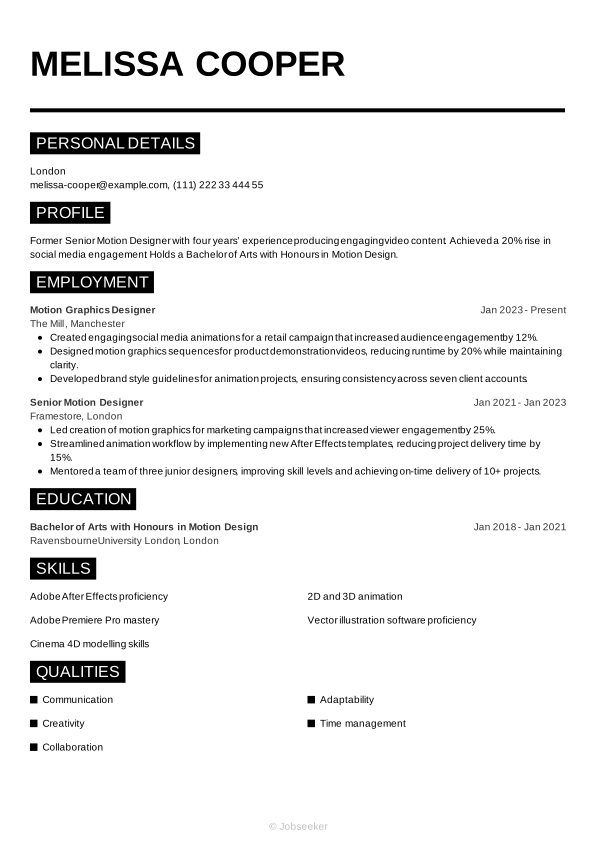
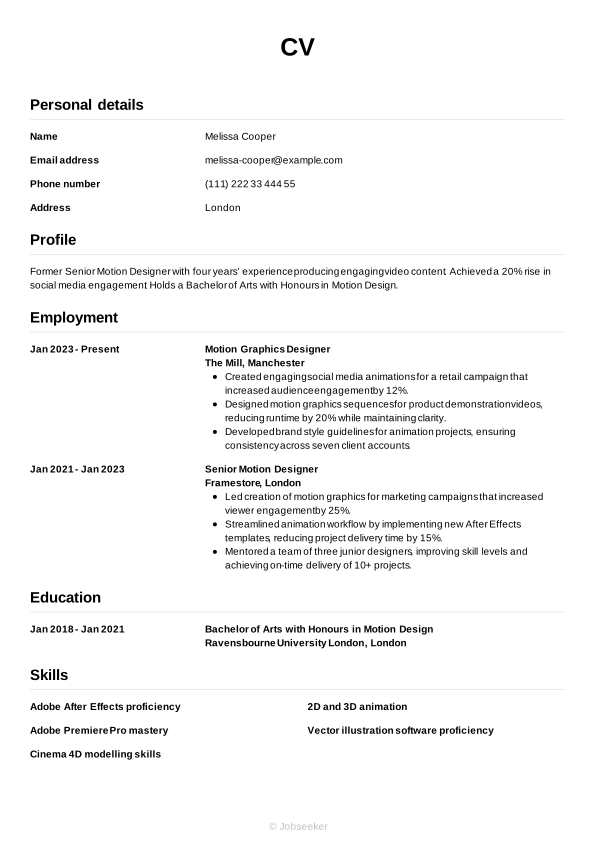
Full example of motion designer CV
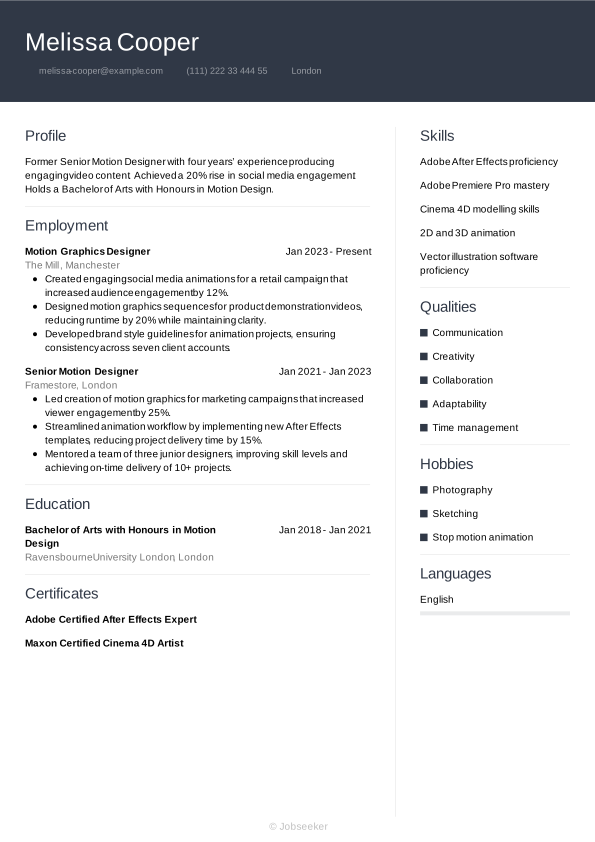
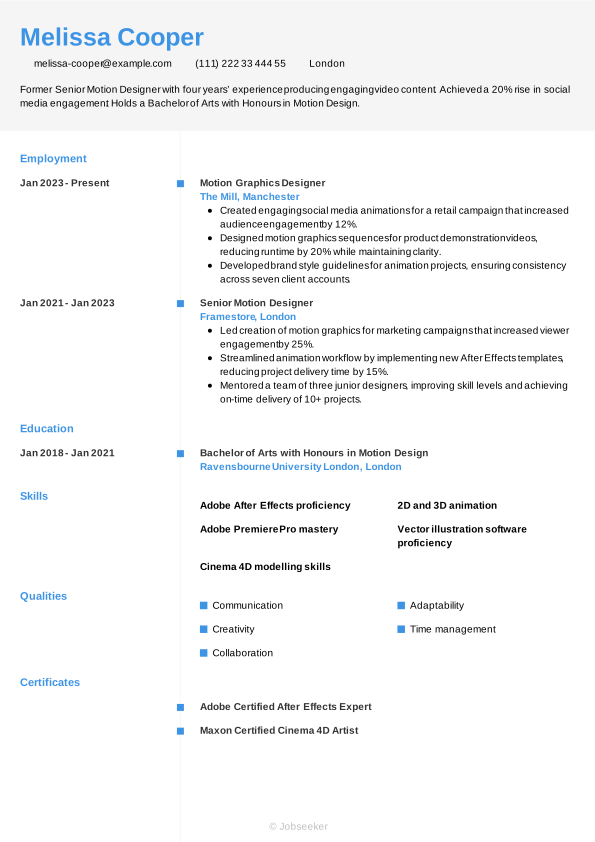
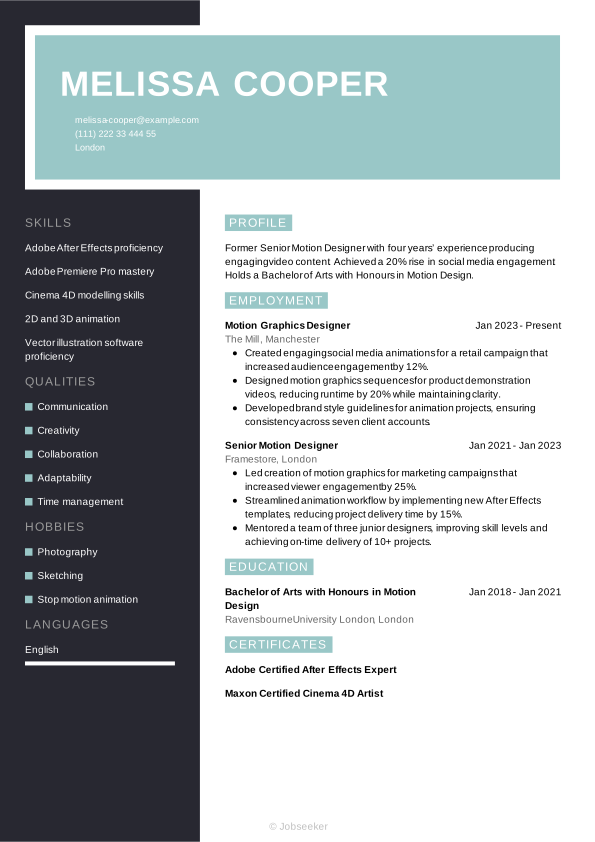
Now that you know exactly what to include in your motion designer CV, we can take a look at a final, finished example below:
London
•
melissa-cooper@example.com
•
(111) 222 33 444 55
•
linkedin․com/in/melissa–cooper–123
Former Senior Motion Designer with four years’ experience producing engaging video content. Achieved a 20% rise in social media engagement. Holds a Bachelor of Arts with Honours in Motion Design.
Motion Graphics Designer
2023
-2026
The Mill (Manchester)
- Created engaging social media animations for a retail campaign that increased audience engagement by 12%.
- Designed motion graphics sequences for product demonstration videos, reducing runtime by 20% while maintaining clarity.
- Developed brand style guidelines for animation projects, ensuring consistency across seven client accounts.
Bachelor of Arts with Honours in Motion Design
2018
-2021
Ravensbourne University London (London)
Adobe After Effects proficiency
Adobe Premiere Pro mastery
Cinema 4D modelling skills
Communication
Creativity
Collaboration
Adobe Certified After Effects Expert
Maxon Certified Cinema 4D Artist
English - Native
French - Advanced
To get an idea of how your completed, one-page CV will look once its been fully designed, see our selection of CV examples.
Dos and don'ts for a winning motion designer CV
Tips to follow
- Use a reverse-chronological approach to listing your career timeline and education, starting with your most recent roles and courses, and working back from there.
- Use action verbs to showcase how you put your strongest skills to good use in previous roles, and demonstrate the impact they had.
- Quantify your achievements throughout your CV whenever possible, drawing on evidence from your career in the form of key data, client feedback or other metrics.
- Start your CV with a CV summary or objective that grabs the attention of the reader, clearly summarising your key skills and achievements.
- List your relevant qualifications in a dedicated education section, adding any outstanding grades or awards you won, to help you stand out from the competition.
Common mistakes to avoid
- Avoid adding personal information, for example your age, gender or marital status, or a personal photo, unless this is required for the role.
- Don't add a hobbies and interests section unless they're directly related to the position or help you show skills that you can't prove through work experience.
- Don't forget to review your contact details to ensure everything is up-to-date, including regularly checking your LinkedIn profile and updating any relevant information.
- Don't use passive voice, such as 'the target was achieved', but instead use strong action verbs to show the value you added to previous roles.
- Don't focus on irrelevant work experience that takes up valuable space and won't improve your chances of getting the job.
How to optimise your CV for ATS screening
Many employers now use applicant tracking systems (ATS) to assist with managing the recruitment process. One of the key elements of most ATS apps is the ability to scan CVs and rank them according to their likely match to the job description. By taking on this task, the systems can save hiring managers the time and effort of reviewing every CV in detail. With vacancies regularly receiving hundreds of applications, this can increase the efficiency of the recruitment process.
The growing prevalence of ATS apps requires a shift in approach by jobseekers, to prepare a CV with the best chance of passing the ATS screening stage. That's why we've put together a list of key ATS CV tips, to maximise your chances of success:
- Include keywords and phrases that match the job description, making it easy for ATS apps to identify a strong fit for the role.
- Use standard CV headings that make your CV easier to navigate, such as 'work experience', 'education' and 'skills'.
- Opt for a simple CV layout with consistent formatting, avoiding any special design elements that could make your CV harder for ATS apps to scan.
- Select a widely-used font in either serif or sans serif style, with a font size between 10 and 12 for body text and 14 and 16 for heading text.
- Use bullet points throughout your CV in place of full sentences. This serves a few purposes, reducing the overall length, helping keywords stand out and making it overall more scannable by ATS apps.
There are lots of things to think about when crafting an effective, engaging motion designer CV, but ATS compatibility is something that's easy to overcome. Use one of our expert-designed, ATS-compatible CV templates and remove the stress from creating a CV that puts you in the frame for the role.
Jobseeker's CV templates can help your CV to make a strong first impression with recruiters. Each template is expertly designed and approved by HR specialists to help you craft a winning application.
Motion designer CV FAQs
Should I add a personal photo to my CV?
You might want to include a personal photo to your CV to enhance the overall design and help it stand out from more basic CVs.
However, this is generally not a good idea for UK CVs. This is because, under the 2010 Equality Act, it's best to avoid sharing personal information on your CV, as this could risk introducing bias into the selection process.
Nevertheless, some employers may request a personal photo, depending on the role they're hiring for. Acting and modelling jobs, or anything where your appearance and presentation is a factor, may require a photo on your CV. If you're unsure, check the job advert and if in doubt, leave the photo off your CV.
How do I write a motion designer cover letter to accompany my CV?
A well-crafted cover letter can be just as vital to your chances of success as your CV. To write a cover letter that makes a positive impression on the reader, adopt a formal, professional layout and use a cover letter template that matches the design of your CV.
A typical cover letter layout includes three key paragraphs of written content. Firstly, the opening paragraph includes an introduction to yourself and confirms the role you're applying for, as well as outlining your motivation for applying. Secondly, you'll want to detail some of your key skills and achievements, without repeating your CV. Close your cover letter by expressing your gratitude and enthusiasm, and leaving a call to action that encourages the reader to make contact with you.
Alternatively, if applying via email, you may wish to write a shorter, more simple cover note. You can use traditional email conventions for this, which are less formal than standard letter conventions. Simply introduce yourself and confirm the role you're applying for, direct the reader to the attached documents and add your contact details in your email footer/sign-off.
Jobseeker's cover letter examples for motion designer and digital media industry roles provide useful tips and guidance from HR experts on how to write a compelling cover letter.
How do I write an engaging motion designer CV without experience?
Even without work experience that fits the job description, there are ways to write a motion designer CV that leaves a strong impression on employers.
Choose a functional CV format, that gives greater emphasis to your skills than to your work experience. In this layout, the skills section comes immediately below your CV summary, followed by education, with work experience taking less priority.
For junior or entry-level roles, employers may be more keen to know whether you have the right soft and transferable skills to adapt to the requirements of the role. In this case, place greater emphasis on soft skills for a junior motion designer CV.
How do I write a motion designer CV headline?
A CV headline can be a way to grab the attention of the reader early in your CV, indicating that you're a good fit for the role and you offer something different to other candidates.
Aim to write a short, engaging sentence that includes the job title and shows you to be a good match for the job description.
For the most attention-grabbing CV headline, match your sentence to the most critical keywords and phrases from the job description. This will catch the eye of the reader as well as giving you the best chance of passing the ATS screening stage.
The examples below show best practice for writing a CV headline at different experience levels:
- Junior Motion Designer Eye-catching Animations
- Award-Winning Senior Motion Graphics Designer
- Innovative Senior Motion Graphics Designer
A courteous, professional cover letter can make all the difference to your job applications. Our cover letter templates have been designed by experts to help you make the best impression with hiring managers.
Key takeaways for your motion designer CV
To grab the attention of the reader with your CV, tailor it to the exact specifications of the job description, incorporating keywords and phrases that match the employer's requirements. Select a suitable CV format that reflects your experience level, and focus on highlighting your key skills, and demonstrating how you've put them to good use to achieve positive outcomes in your career to date.
Finally, using a clean, professional CV template like those offered by Jobseeker, can help your CV stand out among its competitors and give you the best chance of success with your applications.
References:
- National Careers Service, How to write a CV
- Jobseeker, Recruitment Statistics

Impress employers with your CV
Step-by-step guidance to create a professional CV in minutes.