SAP CV Example
If you're applying for a job at SAP, you'll want to write a CV that demonstrates your experience in the enterprise software industry. Your CV should showcase your relevant key skills, and show the hiring manager how you've used them to achieve success in previous enterprise software roles.
Founded in 1972, SAP is a global leader in enterprise software and cloud solutions, revolutionising business processes and data management. With its UK headquarters in London, it operates in the information technology and software industries.
After reading this article, you'll be empowered to write a CV that makes an impact with SAP recruitment teams, and sets you apart from other candidates. Acting on the advice in this guide will boost your chances of your CV ranking highly in the ATS screening stage, and improve your chance of gaining an interview at SAP. Let’s break down the core components of a CV and examine how to build them effectively.
Main SAP CV sections
Your strategy for writing a SAP CV will depend heavily on your experience, your level of seniority and the requirements listed in the job description.
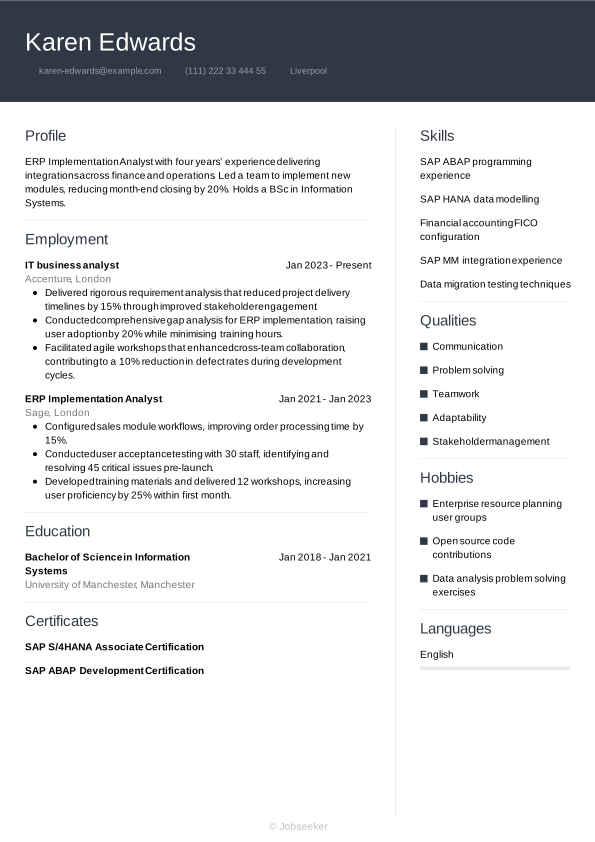
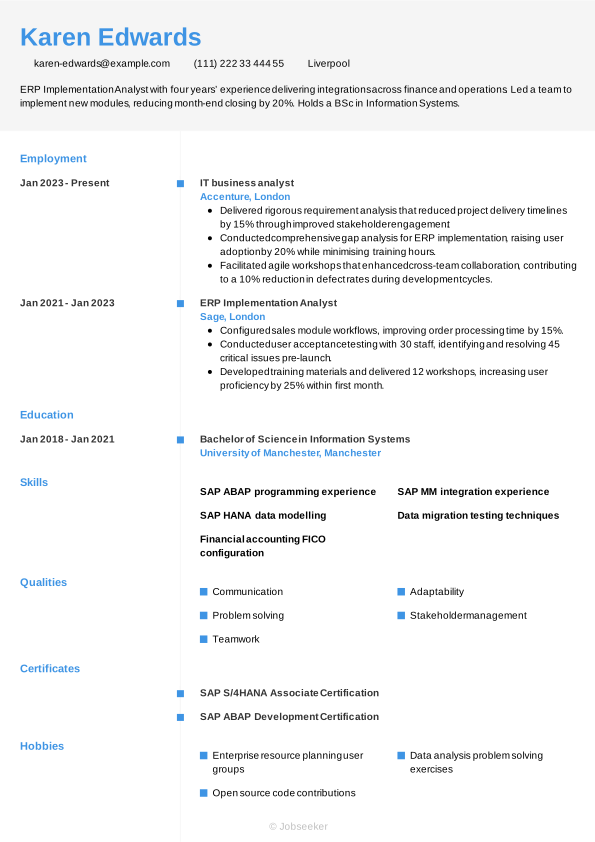
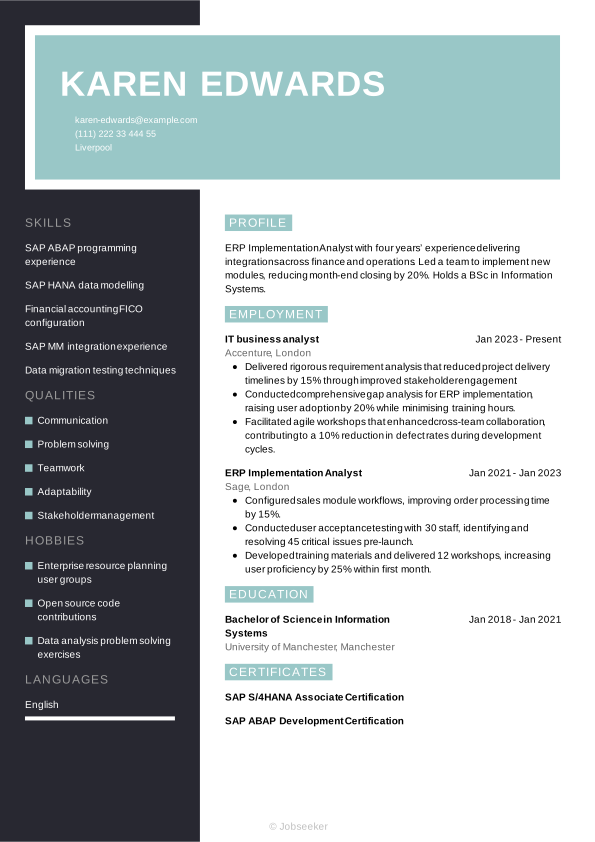
However, no matter where you are in your career, a SAP CV must present a clear, compelling narrative of your professional journey. To help you build that story, we’ll now break down the document piece-by-piece—from the initial contact header to your most significant career milestones.
CV Header
At the top of your SAP CV, add a header that establishes the design language of the document. Include the necessary contact information: your full name, email address, phone number and location. It's not typically necessary to include your full address. Additionally, add your LinkedIn profile, if this is in use and up-to-date. A well-utilised LinkedIn profile can give further information to the reader about your skills, experience, industry knowledge and career achievements.
For jobs in the UK, a personal photo is usually not required on your CV. That, along with any other personal details such as age, gender, ethnicity and nationality, are generally discouraged under the terms of the Equality Act 2010, which aims to reduce and eliminate discriminatory practices, such as recruitment bias.
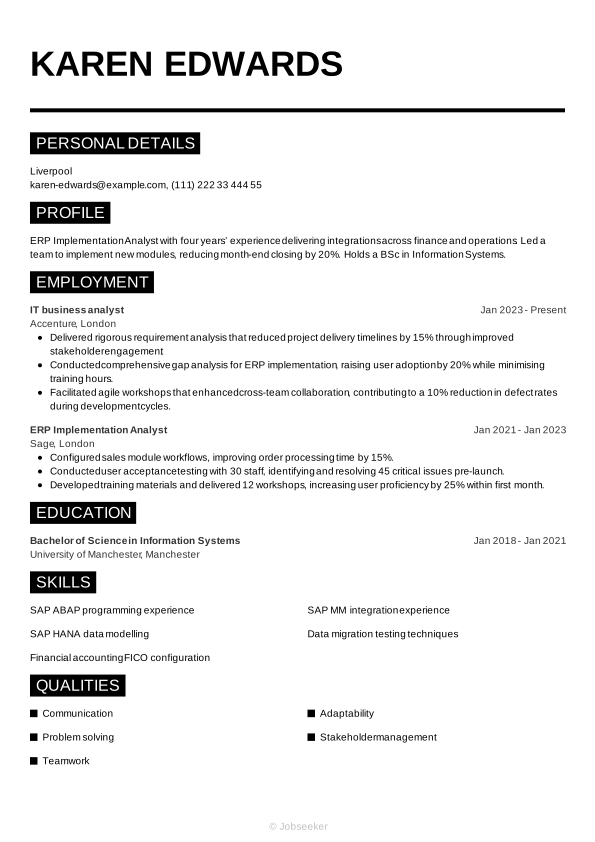
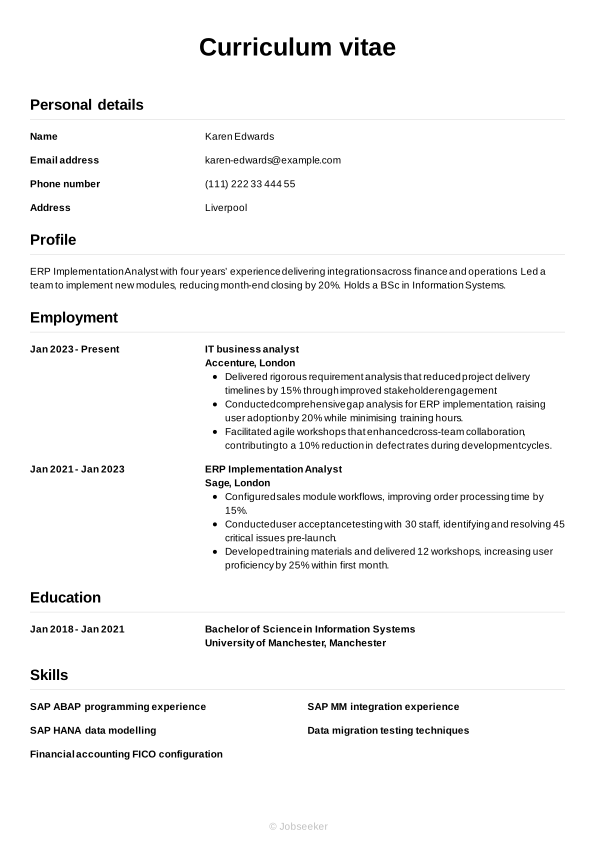
Karen Edwards
karen-edwards@example.com
(111) 222 33 444 55
Liverpool
linkedin․com/in/karen–edwards–123
CV Summary or Objective
Below your contact information, a short, concise CV summary or CV objective can set the tone for your application and provide brief, basic information on your key skills and qualities that gives a strong indication to the reader about your suitability for the SAP specialist role. A CV summary focuses on your key skills and achievements, while a CV objective provides an alternative approach, showcasing your career ambitions and how the role fits with these. This makes a CV objective ideal for entry-level candidates.
Both a CV summary and objective should be concise, with an ideal length of two or three sentences. List your key skills, personal strengths and career achievements or ambitions, taking care to ensure the content reflects the requirements listed in the job description.
The most effective way to approach a CV summary is to focus on one or two key skills that reflect the requirements of the job description and show how you've used them to create positive outcomes for previous employers. You'll also want to showcase your unique personal strengths, and touch on how they've contributed to your career progression up to now. Here's an example of an effective SAP CV summary, with evidence of your impact and neat, well-structured sentences:
Best example:
Business Systems Analyst with five years’ experience delivering process improvements and data migrations. Achieved a 20% reduction in processing time through system optimisation. Keen to leverage analytical expertise in SAP environments.
Poor example:
Business systems analyst with extensive experience in SAP environments, adept at improving processes and managing migrations, looking to apply skills in a supportive and innovative team setting.
Above is an example of a less effective CV summary, with some subtle, yet notable differences. For a summary to make less of an impact, it might include generic or vague information, lack evidence of your impact, or fail to highlight specific personal qualities that make you stand out from other candidates. It may also lack tailoring to the job description or include long, poorly structured sentences.
Work Experience
In your work experience section, you'll want to demonstrate your extensive experience in the enterprise software industry. Review the job description, and add skills and career achievements that match the requirements and will strike a chord with SAP recruiters. List your previous relevant enterprise software industry jobs in reverse-chronological order, starting with your present position or most recent relevant job. Include your job title, the name of the employer, its location and your dates of employment. For each entry, list a few bullet points describing your key skills and achievements in the role.
A successful CV should emphasise relevant previous roles in the industry, providing evidence to show how your key skills related to the enterprise software sector have led to positive achievements in your career to date.
Best example:
Business Systems Analyst, January 2023 - Present
Capgemini, London
- Implemented an automated reporting system that reduced monthly financial closing time by 45% across three regional offices.
- Optimised user requirements process, improving stakeholder satisfaction by 30% and accelerating project delivery by two weeks on average.
- Designed and deployed a custom data integration framework, consolidating five disparate databases and reducing data retrieval time by 60%.
Poor example:
Business Systems Analyst, January 2023 - Present
Capgemini, London
- Managed SAP system operations and provided general support to business users.
- Coordinated SAP configuration tasks and liaised with stakeholders on routine requirements.
- Monitored SAP performance and addressed technical issues as part of ongoing maintenance.
Your work experience section could miss the mark if it places too much emphasis on jobs that aren't relevant to the enterprise software industry, or if it fails to offer suitable evidence to confirm you have the key skills and qualities needed to work in the sector.
Education and Qualifications
In your education section, list any formal qualifications you've gained, particularly those that are most recent or required for the role.
SAP specialist jobs tend to require a relevant university degree just to be eligible for the role, so you'll want to showcase this in your CV. If you have a Bachelor of Science in Information Systems or another related degree that makes you an eligible candidate for the position, add it to your CV. You could also add other degrees or qualifications that highlight your key skills, like data migration testing techniques or SAP ABAP programming experience.
When creating your education section, think about which qualifications are most relevant to the role, and list them in reverse-chronological order, starting with the most recent and working back from there. When adding each qualification, include the name and level of the award, the institution, its location (if necessary), and the dates you attended or graduated. It can also be valuable to add bullet points outlining your key achievements and activities, such as projects you worked on, modules you completed, awards you won or societies you participated in while studying.
If the job description requires any specialist certifications or licences, you may wish to add these in your education section. If you add these, it's also a good idea to include the expiration date of the licence or qualification, if it has one.
Bachelor of Science in Business Information Systems, 2018 - 2021
University of Salford, Salford
Skills
The skills section of a SAP CV provides space for showcasing the key skills and qualities that set you apart as a candidate. You'll want to only include the most relevant skills, so review the job description and list hard and soft skills that match the requirements, while reserving some space to mention your own unique characteristics. In a SAP CV, focus on the most relevant and essential skills in your skills portfolio, such as communication and data migration testing techniques, to show you're qualified for the SAP specialist position and to put you in a strong position to progress.
Hard Skills
Hard and technical skills are the essential skills required for carrying out the everyday duties of the role. They might include specialist operation of certain software or equipment, or knowledge of certain industry standards and regulations. You could gain these skills via training, certifications or industry experience. For SAP specialist roles, key hard skills you've gained, such as SAP ABAP programming experience, and financial accounting FICO configuration, are typically among the most critical for the job. Review the job description, and include four or five key hard skills in your CV that show employers you're capable of completing the key duties of the role.
The ideal hard skills section will feature the most essential hard skills from the job description, while closely reflecting your own best technical abilities. The closer your strongest skills are to matching the job description, the higher your chances of success.
Review the examples below to understand which skills are often added to the hard skills section of a SAP CV.
- SAP ABAP programming experience
- SAP HANA data modelling
- Financial accounting FICO configuration
Soft Skills
Soft skills are distinct from hard skills and tend to reflect your inherent personal qualities and strengths. These are often more transferable to different roles, and help the reader understand your working style, and your likely fit to the team and the organisational culture. As a result of rapid technological changes to modern ways of working, soft skills are becoming more and more valuable to employers. Soft skills can also be particularly useful for junior or entry-level roles where candidates haven't had the time or career experience to develop hard skills and notable achievements.
Similar to your hard skills section, it's best to first review the job description to know which soft skills to focus on in your SAP CV. You'll want to include a combination of soft skills that you can provide evidence for throughout your CV. Craft a list of up to five key soft and transferable skills that reflect the job description, while also including some of your strongest, most unique skills to stand out from the crowd.
The section below provides an overview of soft skills often highlighted in a SAP CV.
- Communication
- Problem solving
- Teamwork
Expert Tip:
Transport for London emphasizes honesty and clarity. Use facts, relevant examples and keep your CV within two pages when tailoring it to the role. (1)
Foreign Languages
If you speak any additional languages, you might want to consider adding a languages section to your CV. Even if languages aren't a requirement of the job description, speaking a foreign language can reflect well on you as a candidate, and correlate with other soft skills that can increase your employability. In the languages section, list the languages you speak to at least a reasonable level, with an indicator of your competency level.
There are several methods of confirming your foreign language skills on your CV. The simplest way is by assigning a basic descriptive word, such as:
- English: Fluent
- Spanish: Intermediate
You might choose to adopt an international standard framework for languages, such as the Common European Framework of Reference (CEFR). This assigns a standardised level to your language skills, for example:
- A1: Beginner
- A2: Elementary
- B1: Intermediate
- B2: Upper intermediate
- C1: Advanced
- C2: Proficiency
Certifications
If you've invested your time and resources into gaining extra qualifications beyond the minimum requirements for the role, you could highlight these in a certifications section. It can enhance your chances of success to show specific training and certifications. Not only do these prove you're qualified for the role, but they also indicate proactivity and a dedication to professional development. Furthermore, a certifications section is particularly valuable if you're applying for a role that sets out required certifications or licences in the job description. These might include technical roles that require the use of specialist software or equipment.
Here are some key examples of certifications and licences that you could add to your CV for SAP specialist positions:
- SAP S/4HANA Associate Certification, 2023
- SAP ABAP Development Certification, 2023
- SAP Analytics Cloud Certification, 2023
Optional Sections
In addition to the core sections of your CV, optional sections can be a useful way of proving you've got the necessary SAP specialist skills. Consider adding optional sections if you're unable to show all the necessary skills for the job through work experience, but could show them through extracurricular activities and other areas of life. This could be especially relevant if you're a junior candidate, or if you're changing careers.
If you're curious about other ways to make your CV more effective, our career resources will help you strengthen your application.
Hobbies and Interests
Hobbies and interests are a legitimate way to showcase your skills, if you have any hobbies relevant to the role. In addition, hobbies and interests can showcase your personality, helping to differentiate you from other candidates. However, it's important to only mention hobbies and interests that are relevant, or related to, the role you're applying for. If your hobbies don't help you to show skills required for the role, that are missing elsewhere in your CV, it's best to leave this section out.
Achievements and Awards
Creating a section for your achievements and awards can help you draw attention to the things you're most proud of in your career to date. Add any awards you've won or career milestones you've reached, so employers can easily see the impact you've made in your career to date.
Voluntary Roles
Listing any previous voluntary work is another useful way of showing you have the necessary skills and experience for the job. If you don't have much relevant work experience, either because you're a junior candidate or you're changing jobs from an unrelated field, volunteering can provide valuable examples of your skills in action. Approach your volunteering section in much the same way as your work experience section.
For each entry, include a job title or description of your role, the organisation, its location and the dates you volunteered. Adding bullet points can also help you to show how you developed relevant skills, and used them to good effect.
References
For UK job applications, it's rare to include references on a CV and employers don't tend to request them until later in the recruitment process. However, it's worth checking the job advert just in case. If needed, include two or three references, adding their name, job title, organisation and contact details.
Always be sure to approach your referees and ask permission before including them in your CV. Alternatively, you may wish to simply indicate that you can provide references if and when necessary, with a line such as, 'references are available upon request'.
Data Insight:
When writing a cover letter, always tailor it for SAP. Almost all recruiters (95%) want to see a cover letter that's tailored to the position you're applying for. (2)
Top action words to use in a SAP CV
Using strong action verbs in your work experience bullet points is a great way to focus this section and show the impact you've made in your career to date. Starting each bullet point with an action verb that reflects the skills required for the role will help the reader to easily cross-reference your skills to the job description. Remember to always back up the action verbs you use with quantifiable evidence that shows the impact you made. You can use past tense for any action verbs describing previous jobs, with present tense for action verbs to describe your current role and responsibilities.
- Implement
- Configure
- Integrate
- Optimise
- Troubleshoot
- Maintain
- Develop
- Analyse
- Document
- Support
SAP CV sample
Now you know how to create a SAP CV for maximum impact, take a look below at this full, completed example:
Liverpool
•
karen-edwards@example.com
•
(111) 222 33 444 55
•
linkedin․com/in/karen–edwards–123
ERP Implementation Analyst with four years’ experience delivering integrations across finance and operations. Led a team to implement new modules, reducing month-end closing by 20%. Holds a BSc in Information Systems.
IT business analyst
2023
-2026
Accenture (London)
- Delivered rigorous requirement analysis that reduced project delivery timelines by 15% through improved stakeholder engagement.
- Conducted comprehensive gap analysis for ERP implementation, raising user adoption by 20% while minimising training hours.
- Facilitated agile workshops that enhanced cross-team collaboration, contributing to a 10% reduction in defect rates during development cycles.
Bachelor of Science in Information Systems
2018
-2021
University of Manchester (Manchester)
SAP ABAP programming experience
SAP HANA data modelling
Financial accounting FICO configuration
Communication
Problem solving
Teamwork
SAP S/4HANA Associate Certification
SAP ABAP Development Certification
English - Native
French - Advanced
If you're not sure what your one-page, finalised CV design might look like, check out our examples.
Dos and don'ts for a winning SAP CV
Tips to follow
- Keep your CV as concise as possible, aiming for a length of one side of A4 for junior roles, or two for more experienced candidates (longer than two sides is only necessary for senior or academic positions).
- Quantify your achievements as much as possible, offering evidence to support your claims, such as key performance metrics, other data or feedback you received.
- Proofread your CV thoroughly before sending, helping you avoid any errors in spelling and grammar that could harm your chances of success.
- Tailor your CV to match the key skills and experience necessary for the role, reflecting both the job description and your key qualities.
- Use action verbs to highlight how you've put your skills to good use, and the achievements you delivered for previous employers.
Common mistakes to avoid
- Don't include personal information, for example your age, gender, marital status or a personal photo (unless necessary for the role).
- Don't lie or exaggerate about events in your career, such as previous jobs, qualification or key achievements – it can backfire and disqualify you from the running.
- Don't design your CV with overly complex or elaborate formatting that can make it difficult to read or less likely to pass the ATS stage.
- Don't forget to review your contact details to ensure everything is up-to-date, including regularly checking your LinkedIn profile and updating any relevant information.
- Don't overburden the reader with too much information but stick to the most relevant, concise and focused content possible.
Guide to making your CV ATS compatible
Employers and recruiters now routinely use applicant tracking systems (ATS) to ease the burden of the selection process. One of the key functions of these systems is CV screening, which reviews CVs and ranks them based on their likely fit for the role. By taking on this task, the hiring manager can reduce the time and resources they spend on the initial selection process, making recruitment more efficient and cost-effective.
The growing prevalence of ATS apps requires a shift in approach by jobseekers, to prepare a CV with the best chance of passing the ATS screening stage. That's why we've put together a list of key ATS CV tips, to maximise your chances of success:
- Include keywords and phrases that mirror the job description, increasing your chances of ranking highly in the ATS screening stage.
- Use standard CV headings that clearly identify each section, such as 'work experience', 'education' and 'skills'.
- Choose a standard CV layout that avoids the use of any special design elements that might make your CV less compatible with ATS scanning software.
- Select a font that enhances the readability of your CV, including recognised serif and sans serif fonts between sizes 10 and 12 for body text, and 14 and 16 for headings.
- Use bullet points throughout your CV in place of full sentences. This serves a few purposes, reducing the overall length, helping keywords stand out and making it overall more scannable by ATS apps.
It's easy to get overwhelmed by the steps to creating an ATS-compatible SAP CV, but a few small changes can make a big difference. To smooth the process, use one of our expert-designed, ATS-optimised CV templates to increase your chances of success at this stage of the screening process.
If you want to stand out from other candidates with your CV, use Jobseeker's expert-designed CV templates, to instantly improve the look and feel of your application.
SAP CV FAQs
How do I produce an effective SAP specialist cover letter for my application?
A well-crafted cover letter can be just as vital to your chances of success as your CV. To write a cover letter that makes a positive impression on the reader, adopt a formal, professional layout and use a cover letter template that matches the design of your CV.
Most cover letters include three standard paragraphs of information. The letter opens with a brief personal introduction and confirmation of the role you're applying for, and your motivations for applying. In the next paragraph, list some key skills and career achievements related to the role, taking care not to repeat your CV. Finally, end your cover letter with an expression of gratitude for considering your application, and a call to action that puts the ball in the court of the employer to arrange an interview or establish dialogue with you.
Alternatively, if you're applying for the role via email, you may want to send a less formal cover note. This simply includes a brief introduction, confirming the role you're applying for and directing the reader to the relevant attached documents, rather than following the traditional professional letter conventions. Remember to include your contact details in your email, so the employer can follow up with you if necessary.
Jobseeker's cover letter examples for SAP specialist roles and other enterprise software industry positions can provide valuable insights from HR specialists on how to craft the most persuasive cover letter.
How do I write a SAP CV without experience?
Even if you're lacking relevant work experience, you can still write a SAP CV that impresses employers.
Choose a CV format that places greater emphasis on your skills over your work experience, such as the functional format. In this CV layout, your skills section and education typically come before your work experience.
For junior positions, it's important to emphasise your soft and transferable skills. Employers will be looking less for SAP specialist candidates with a depth of experience, and more for candidates who can show they have the soft skills, such as ability to adapt and learn, to thrive in a new role and environment.
How do I write a SAP CV headline for maximum impact?
A CV headline can be a way to grab the attention of the reader early in your CV, indicating that you're a good fit for the role and you offer something different to other candidates.
Aim to write a short, concise sentence that mentions the job title and focuses on one of your best skills or qualities.
For an impactful CV headline, focus on the most critical keywords and phrases from the job description, as this will mark you out as a strong fit for the role and give you a strong ranking in the ATS screening stage.
The examples below show best practice for writing a CV headline at different experience levels:
- Business Analyst
- ERP Expert Aspiring SAP Specialist
- Senior ERP Analyst
What SAP CV format gives me the best chance of success in 2026?
The best CV format for a SAP CV in 2026 depends on both your experience levels, and the role you're applying for, including its level, the company and industry norms.
For candidates with work experience, the traditional reverse-chronological CV is typically the best choice. This layout focuses mainly on your work experience, providing examples of key achievements, and how you've used your skills in your career to date.
On the other hand, for candidates with less experience, including graduates and career changers, a functional or skills-based CV format can be more effective, as it showcases your key skills and qualifications over your work experience.
A well-written cover letter is an essential element of any job application. Take a look at our HR-approved cover letter templates to find a design and layout that matches your CV.
Key takeaways for an impactful SAP CV
To make a strong first impression on hiring managers, tailor your CV for every application, adding keywords and phrases that match the job description. Select a suitable CV format for your experience level, and show the reader how you've used skills relevant to the role, to create a positive impact in your career to date.
Finally, building your CV using Jobseeker's HR-approved CV templates can help to catch the eye of recruiters and hiring managers, making your application stand out and giving you the best chance of gaining your dream job.
Sources:
- Transport for London (TfL), Writing a CV and cover letter
- Jobseeker, HR Trends

Impress employers with your CV
Step-by-step guidance to create a professional CV in minutes.