Desktop Support Engineer CV Example
Achieving success with your desktop support engineer applications requires a strong, compelling CV that gives your skills and career achievements a chance to shine. You will need to focus on the most relevant and essential specialist skills for the role that match your career experience, including troubleshooting software and hardware and configuring secure VPN connections. In this comprehensive guide, you'll learn the steps to producing a desktop support engineer CV that puts you in pole position to progress to the interview stage.
A desktop support engineer CV that includes all the necessary details and is tailored carefully to the job description puts you in a great position. It can help you pass the ATS screening stage, make a strong impression with the employer and reach the latter stages of the recruitment process. Let’s take a closer look at the key parts of a CV and how to develop them for maximum impact.
Main sections of a desktop support engineer CV
Your desktop support engineer CV strategy will depend on various factors, including your previous experience, your seniority and the details listed in the job description.
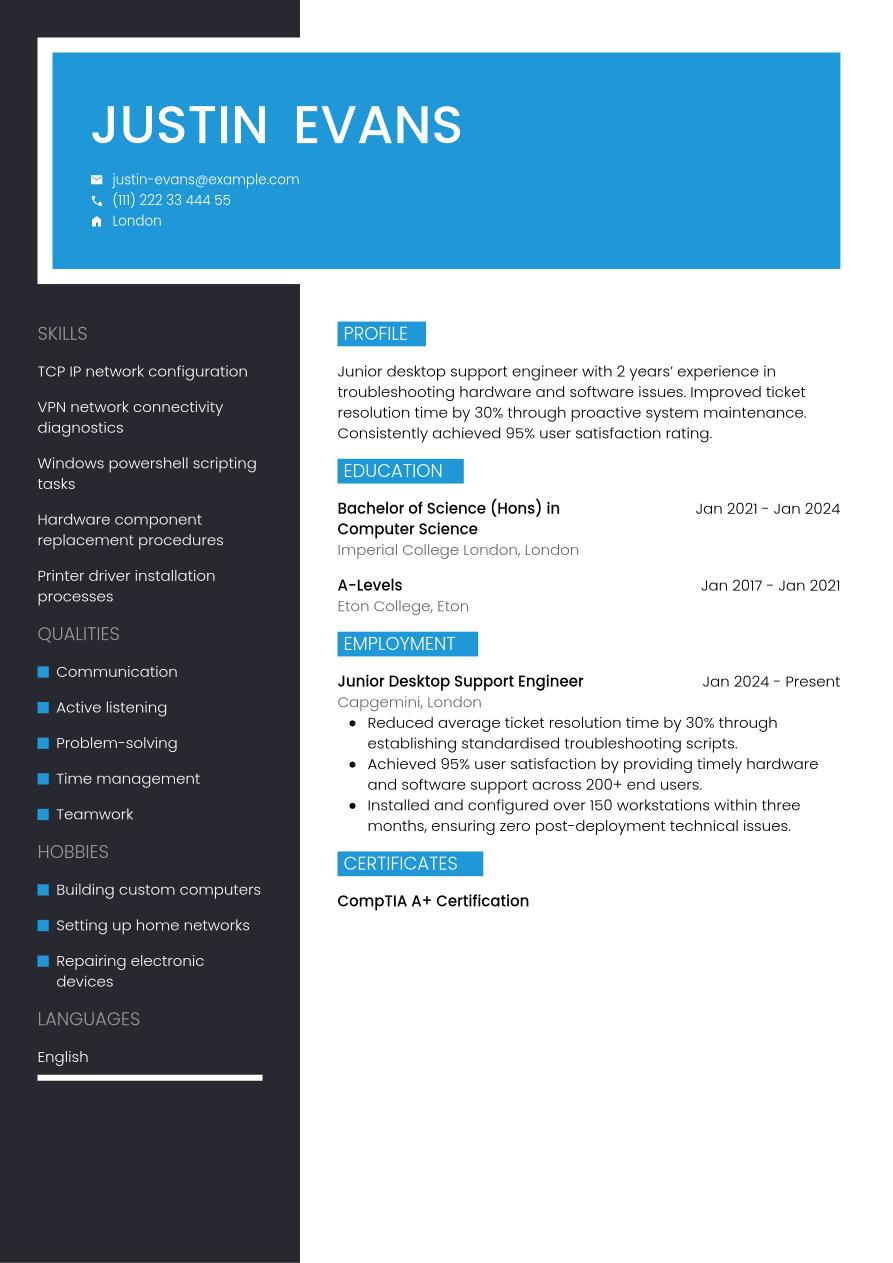
If you're a junior candidate, you may feel you lack the necessary depth of work experience to focus too much on this in your CV. As such, you can place greater emphasis on showing your skills via other sections. Therefore, for an entry-level CV, consider using a functional or skills-based structure. This format prioritises your skills and education, with less emphasis placed on your work experience. Optional sections such as certifications and training, internships and volunteering can also help you prove you have the necessary skills.
Once you've built up some relevant work experience, your CV becomes a showcase for how you've developed and used relevant skills to date. Employers will be focusing mainly on your CV's work experience section, looking for evidence that you've utilised your skills to create positive achievements and that you can do it again in the future. In this case, it's best to use a reverse-chronological CV format that places work experience as the main section under your header and CV summary. Mention your most recent and relevant employments and use bullet points under each job entry to show your skills and achievements, providing evidence in the form of data, figures and other metrics wherever possible.
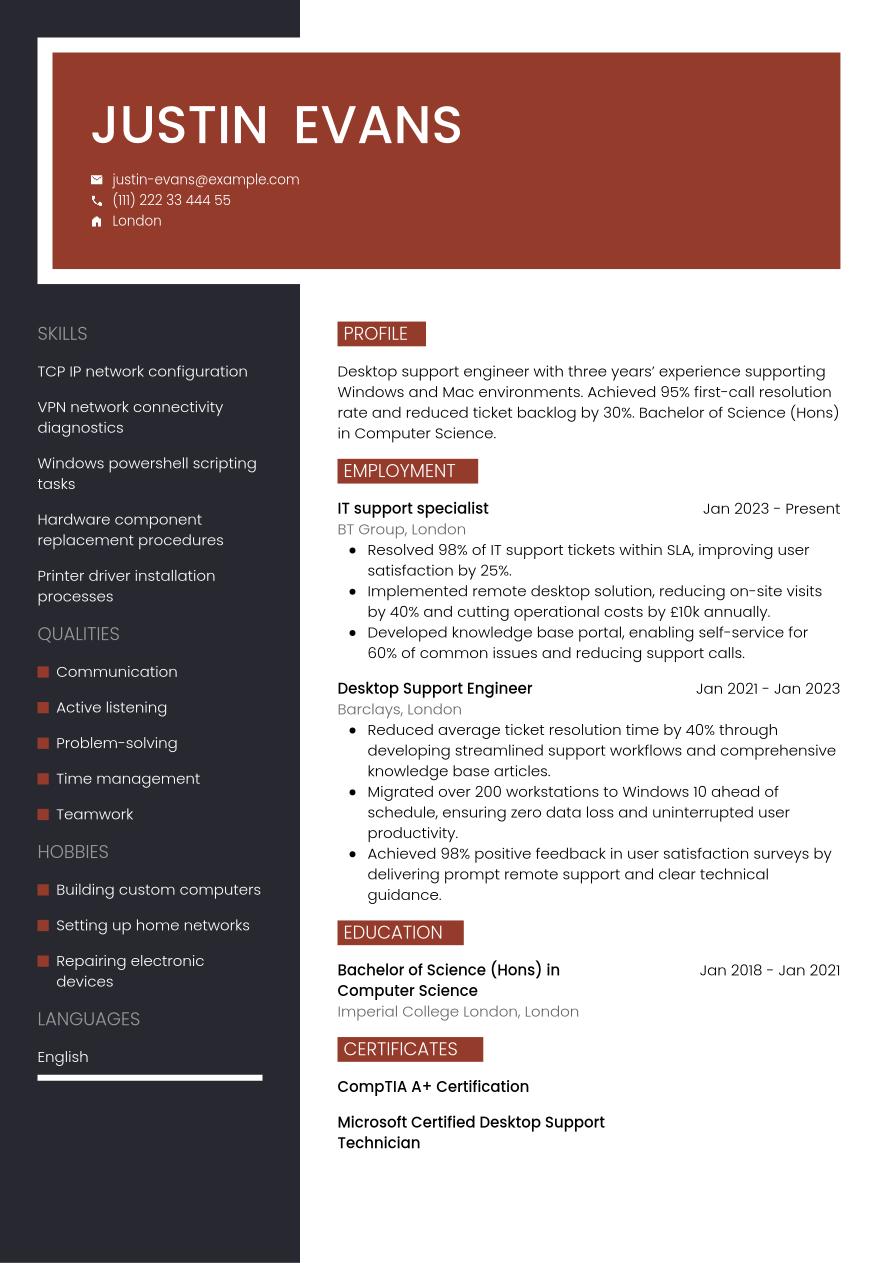
As an executive or senior-level candidate, it's critical to focus primarily on work experience in your CV. This is because employers will be expecting candidates to have a wealth of relevant experience, and to have reached a prominent position within the industry. Therefore, you'll want to create a detailed, reverse-chronological CV that shows the depth and extent of your work experience. You might also include optional sections, such as awards, publications or professional memberships.
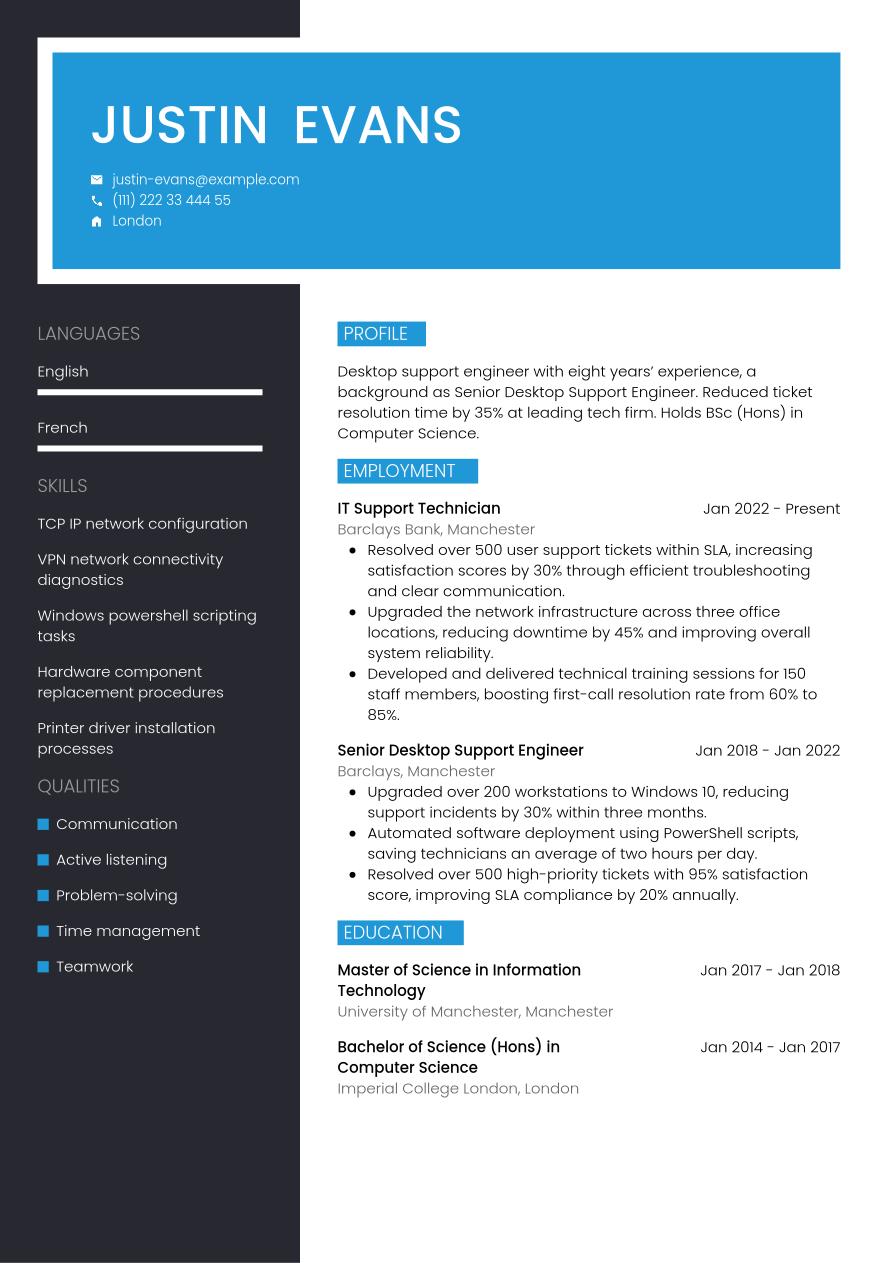
At the end of the day, though, a desktop support engineer CV is just a way to tell the story of how you’ve grown in your career. Regardless of your experience level, you want that progression to feel seamless and easy to follow for recruiters. To help you get there, we’re going to walk through each part of the CV step-by-step, starting with the basics in your header and working our way through to your professional achievements.
CV Header
Kick off your desktop support engineer CV with a header listing the essential contact information such as your name, email address, phone number and location. You don't typically need to include your full address. Incorporate design elements that set the tone and design language of your document. Additionally, add your LinkedIn profile, if this is in use and up-to-date. A well-utilised LinkedIn profile can give further information to the reader about your skills, experience, industry knowledge and career achievements.
For UK applications, it's not usually a good idea to add a personal photo or any other personal details, such as your age, gender, nationality or ethnicity. These can risk introducing bias to the selection process and, as such, are often discouraged in job adverts under the terms of the Equality Act 2010.
Justin Evans
justin-evans@example.com
(111) 222 33 444 55
London
linkedin․com/in/justin–evans–123
CV Summary or Objective
The first section below your CV header is typically your CV summary. This short paragraph outlines some of your key skills, achievements and experience, so employers can quickly get an impression of whether you have the right credentials for the desktop support engineer job. While the CV summary focuses on your key skills and achievements, a CV objective highlights your career ambitions, making it more suitable for junior candidates.
In your summary or objective, write two or three sentences introducing your key skills, unique qualities and career achievements, making sure they match the key requirements listed in the job description.
An effective summary will include brief reference to one or two of your strongest skills, ensuring they reflect the skills listed in the job description. It's important to make your skills and qualities feel unique to you, and show how you've used them to positive effect in your career to date. Below you'll find a good example of how to write an effective desktop support engineer CV summary. The example shows quantifiable achievements and well-structured sentences.
Good example:
Desktop support engineer with five years’ experience resolving over 1,000 technical issues across Windows and macOS systems. Improved ticket resolution times by 30%. Holds a BSc (Hons) in Computer Science.
Unengaging example:
Experienced desktop support engineer with a solid professional background in handling various technical issues on different systems and a degree in computer science offering reliable assistance and collaborative problem-solving skills.
The CV summary above contains various red flags and things to avoid. While the differences are subtle, they can make all the difference. Your summary could miss the mark if it's too generic and doesn't describe unique personal qualities and strengths. It might also be vague, use long, unstructured sentences, lack quantifiable evidence of your impact, or not be tailored to the job description.
Work Experience
The work experience section of a CV is usually the most important part. Employers look for evidence of how you've developed and used your skills to good effect in your career to date, as an indication of your likely future performance. Always take the time to tailor this section, including keywords and phrases that match the job description. This will help employers to judge how strong a fit you are for the role, and how you might apply your skills for the benefit of the organisation.
This section should contain a list of your most relevant previous jobs in the last 10 or 15 years. Add the job title, the name of the employer, its location and your dates of employment. Include detail in bullet points, outlining the skills you used in the role and the impact they made.
What differentiates one CV work experience section from all the others is the use of action verbs and quantifiable evidence in your bullet points. It should showcase how your actions led to positive outcomes for the employer, and show a progression in your skills throughout your career. See below for an example of a strong work experience section for a desktop support engineer CV.
Good example:
Desktop Support Engineer, January 2023 - Present
BrightWave Solutions Ltd., Manchester
- Resolved over 500 technical support tickets across Windows and macOS environments, achieving a 95% user satisfaction rating.
- Implemented company-wide OS updates and security patches, reducing malware infections by 75% within six months.
- Developed and delivered technical training workshops for 120 staff, improving first-contact resolution time by 40%.
Unengaging example:
Desktop Support Engineer, January 2023 - Present
BrightWave Solutions Ltd., Manchester
- Resolved various hardware and software issues to maintain daily operational efficiency.
- Provided proactive support to end users regarding system and network troubleshooting.
- Collaborated with teams to deliver general IT assistance and ensure technology functionality.
Above you'll find a less effective example of a desktop support engineer CV work experience section. A less-effective work experience section could focus too much on irrelevant or out-of-date roles, or include generic information about your responsibilities that fails to show the impact you made. It might lack tailoring to the job description or fail to provide evidence to support the claims made in the bullet points.
Education and Qualifications
With your education section, you'll draw attention to your most recent and highest qualifications, particularly emphasising any qualifications listed as a requirement in the job description.
Your career as a desktop support engineer typically won't require a specific degree or degree-level equivalent qualification. However, you should still include your highest certifications, training and formal qualifications in your CV's education section, even if not specified in the job description. These might include Microsoft Certified Desktop Support Technician, or any other relevant training that demonstrates your skills in windows powershell scripting tasks or printer driver installation processes.
Your education section should contain only the qualifications that you consider most relevant to the role. List them in reverse-chronological order, starting with the most recent and working back from there. When adding each qualification, include the name and level of the award, the institution, its location (if necessary), and the dates you attended or graduated. It can also be valuable to add bullet points outlining your key achievements and activities, such as projects you worked on, modules you completed, awards you won or societies you participated in while studying.
Specialist licences or certifications can also be a valuable addition to your CV's education section. If these are essential for the job and are referenced in the job description, it's a good idea to include them here rather than further down your CV. Include any expiration or renewal dates for certifications, if applicable.
Bachelor of Science in Information Technology, 2018 - 2021
University of Westminster, London
Key Skills
Your CV's skills section CV's skills section is a great place to showcase some of the key skills necessary for the role. Check the job description to understand which skills are most essential, and provide a combination of hard and soft skills, reserving space to include some unique qualities that can help you to stand out from the competition. For a desktop support engineer CV, it's valuable to highlight essential skills from your skill set, such as teamwork and TCP IP network configuration, to grab the attention of hiring managers and show you're qualified for the desktop support engineer position.
Hard Skills
Hard skills and technical skills are the specialist skills required for completing the everyday duties of the role, such as the use of certain software or equipment, or specialist industry knowledge. You can develop these skills through study, training, on-the-job or through completing industry certifications. For desktop support engineer jobs, essential hard skills from your career-to-date might include printer driver installation processes, and TCP IP network configuration. Check the skills specified in the job description, and add four or five key hard skills to your CV that show employers you're capable of completing the key duties of the role.
The best hard skills section would be based around skills listed as 'essential' or 'required' in the job description. To give yourself the best chance of success, you'll want your strongest skills to match closely with those most desired by the employer, and your hard skills list should reflect this.
Take a look below to see the type of skills that are commonly listed in a desktop support engineer CV hard skills section:
- TCP IP network configuration
- VPN network connectivity diagnostics
- Windows powershell scripting tasks
Soft Skills
Soft skills are the personal strengths and qualities that show employers how well you'll fit into the role and complement other members of the team. Soft skills tend to be more transferable and applicable to different roles than hard and technical skills. Owing to the rapidly evolving nature of the work landscape, soft skills are growing in importance for a number of roles and industry sectors where technology is replacing hard skills. Additionally, soft skills are particularly valuable for junior and entry-level candidates, who might not have much work experience but have the right building blocks for a successful career.
Similar to your hard skills section, it's best to first review the job description to know which soft skills to focus on in your desktop support engineer CV. You'll want to include a combination of soft skills that you can provide evidence for throughout your CV. Aim to add up to five soft and transferable skills, including a mix of the most essential skills from the job description, together with some skills that make you stand out as a unique and compelling candidate.
Below is a selection of soft skills regularly featured in a desktop support engineer CV.
- Communication
- Active listening
- Problem-solving
Languages
If you speak any languages in addition to your mother tongue, you might want to include them in your desktop support engineer CV as a languages section. These can be valuable for your application, whether languages are specified as a requirement in the job description or not. In this section, include any foreign languages you speak to a standard that could be useful in the world of work, with an indication of your proficiency level.
There are several ways to cite your proficiency in foreign languages. Firstly, you could use a simple descriptive word to indicate your abilities, such as:
- English: Fluent
- Spanish: Intermediate
You could otherwise use an internationally recognised language standard, such as the Common European Framework of Reference (CEFR). This assigns your language skills a standardised level of competence, as follows:
- A1: Beginner
- A2: Elementary
- B1: Intermediate
- B2: Upper intermediate
- C1: Advanced
- C2: Proficiency
Certifications and Licences
If you've invested your time and resources into gaining extra qualifications beyond the minimum requirements for the role, you could highlight these in a certifications section. If you've been proactive in pursuing professional development opportunities throughout your career, it's worth showcasing them. Not only do they make you more qualified, they also show a proactive and motivated mindset. In addition, the certifications section can be a valuable addition to your desktop support engineer CV if you're applying for a role that cites certain certifications or licences as a necessity in the job description. These might include roles where the use of specialist software or equipment forms part of your everyday duties.
Here are some key examples of certifications and licences that you could add to your CV for desktop support engineer positions:
- CompTIA A+ Certification, 2023
- Microsoft Certified Desktop Support Technician, 2023
- HDI Desktop Support Technician, 2023
Expert Tip:
With recruiters scanning CVs in less than nine seconds, Barnet Council highlights the importance of a short and compelling personal summary. (1)
Additional Sections
Adding optional sections to the end of your desktop support engineer CV is a good way of showing you have the necessary skills for the job. Consider adding optional sections if you're unable to show all the necessary skills for the job through work experience, but could show them through extracurricular activities and other areas of life. This could be especially relevant if you're a junior candidate, or if you're changing careers.
If you're curious about other ways to make your CV more effective, our career resources will help you strengthen your application.
Hobbies and Interests
Your hobbies and interests can be a useful way of showcasing additional skills that are relevant to the job description, but that you haven't been able to prove via your work experience. Additionally, hobbies and interests are an ideal way to show the employers some elements of your personality and interests beyond work, which can set you apart from other candidates. However, hobbies and interests can only add value to your CV if they provide evidence of skills and experience that you can use in the role you're applying for. As such, only add hobbies as a way of filling gaps in the skills you've developed or used through work experience.
Achievements and Awards
Including an achievements and awards section is an effective way of showing the reader the value you've added for employers in your career to date. In this section, add any awards or recognition you've received for achievements, and any career milestones you've reached that show you're a strong candidate for the job.
Volunteering
Another alternative to showcasing your skills and experience through work experience is by adding a volunteering section. This can give you a valuable showcase of your skills, particularly if you're a junior candidate or career changer without much relevant work experience. In your volunteering section, use a similar structure to your work experience section.
Add your job title or a description of the volunteer role, the organisation name, its location and the dates you volunteered (start and end date). Under this, add bullet points to show the skills you used, and evidence of how they contributed to positive achievements for the organisation.
Evidence-Based Insight:
More than 3 out of every 4 recruiters use ATS software to check basic candidate details, including experience levels, hard skills and previous job titles. (2)
Most impactful action verbs for a desktop support engineer CV
Using strong action verbs in your work experience bullet points is a great way to focus this section and show the impact you've made in your career to date. Starting each bullet point with an action verb that reflects the skills required for the role will help the reader to easily cross-reference your skills to the job description. When adding action verbs to your work experience bullet points, just remember to always provide quantifiable evidence that shows the value you added for each employer. Use past tense for any action verbs that describe previous roles (for example, 'developed') and present tense for current roles (for example 'collaborating').
- Repair
- Troubleshoot
- Configure
- Install
- Maintain
- Support
- Monitor
- Diagnose
- Upgrade
- Document
Desktop support engineer CV example
Now we've shown you everything that needs to go into your desktop support engineer CV, we can take a look at how it comes together in its final form in the following example:
London
•
justin-evans@example.com
•
(111) 222 33 444 55
•
linkedin․com/in/justin–evans–123
Desktop support engineer with three years’ experience supporting Windows and Mac environments. Achieved 95% first-call resolution rate and reduced ticket backlog by 30%. Bachelor of Science (Hons) in Computer Science.
IT support specialist
2023
-2026
BT Group (London)
- Resolved 98% of IT support tickets within SLA, improving user satisfaction by 25%.
- Implemented remote desktop solution, reducing on-site visits by 40% and cutting operational costs by £10k annually.
- Developed knowledge base portal, enabling self-service for 60% of common issues and reducing support calls.
Bachelor of Science (Hons) in Computer Science
2018
-2021
Imperial College London (London)
TCP IP network configuration
VPN network connectivity diagnostics
Windows powershell scripting tasks
Communication
Active listening
Problem-solving
CompTIA A+ Certification
Microsoft Certified Desktop Support Technician
English - Native
French - Advanced
If you want a sneak preview of what your one-page, fully designed and finalised CV might look like, see our completed examples.
The dos and don'ts of a successful desktop support engineer CV
Tips to follow
- Use a reverse-chronological approach to listing your work experience and education, starting with your most recent activities and working back from there.
- Use strong action verbs that reflect the impact you've made for employers in your career to date.
- Proofread your CV forensically before sending, so you can correct any errors of spelling or grammar that could dent your chances of success.
- List your qualifications in a dedicated education section, including grades and awards if these can help set you apart from other candidates (particularly for junior candidates).
- Open your CV with an engaging CV summary or objective that concisely summarises your key skills and career achievements to date.
Common mistakes to avoid
- Don't add unrelated information about previous work experience, as this takes up valuable space on your CV and ultimately won't increase your chances of success.
- Don't add a hobbies and interests section unless they include skills and experience directly related to the role, and help you showcase qualities you can't prove through work experience or other CV sections.
- Don't include false or misleading statements or lie about events in your career to date – it can be illegal and is likely to backfire.
- Don't use passive voice, such as 'the target was achieved', but instead use strong action verbs to show the value you added to previous roles.
- Don't crowd your CV by trying to fit too much in, but let your key experience and achievements speak for themselves.
A well-written cover letter is an essential element of any job application. Take a look at our HR-approved cover letter templates to find a design and layout that matches your CV.
How to optimise your CV for ATS screening
Applicant tracking systems (ATS) are becoming more and more integral to the recruitment process for many employers. These systems ease the burden of the recruitment process by performing various tasks, including scanning and ranking CVs based on their likely fit to the job description. This saves recruiters and hiring managers the time and effort of reading every CV in detail. With many vacancies often receiving hundreds of applications, ATS software can really relieve the burden on hiring teams and free them up to focus only on the most suitable candidates.
Because ATS software is becoming more common in the recruitment process, it's important to make some concessions in your CV to give yourself the best chance of progressing beyond the initial screening. With that in mind, here are some tips on preparing your CV for ATS screening:
- Include keywords and phrases that match the job description, giving you the best chance of appearing as a strong fit for the role.
- Use standard CV headings that make your CV easier to navigate, such as 'work experience', 'education' and 'skills'.
- Opt for a simple CV layout with consistent formatting, avoiding any special design elements that could make your CV harder for ATS apps to scan.
- Select a font that's widely used and maximises readability, including popular serif and sans serif fonts between size 10 and 12 for body text, and 14 and 16 for headings.
- Use bullet points instead of writing full sentences, to reduce the overall length of your CV, make it more keyword-dense and help ATS apps to scan it more easily.
You might feel there are a lot of things to remember when writing an ATS-compatible CV, but with just a few small tweaks, you can ensure yours passes this stage. Use one of our expert-designed, ATS-compatible CV templates to avoid the stress of adapting your CV for ATS screening.
If you're looking to make a strong first impression on hiring managers with your CV, use Jobseeker's eye-catching CV templates, which are approved by HR experts.
Desktop support engineer CV FAQs
How do I write a desktop support engineer cover letter to accompany my CV?
A cover letter that makes a positive impact with the reader can be just as important as your CV. For the best impact, choose a formal, professional letter layout and a cover letter template that reflects the look and feel of your CV, reinforcing your application's design language.
Most cover letters include three standard paragraphs of information. The letter opens with a brief personal introduction and confirmation of the role you're applying for, and your motivations for applying. In the next paragraph, list some key skills and career achievements related to the role, taking care not to repeat your CV. Finally, end your cover letter with an expression of gratitude for considering your application, and a call to action that puts the ball in the court of the employer to arrange an interview or establish dialogue with you.
Alternatively, if applying via email, you may wish to write a shorter, more simple cover note. You can use traditional email conventions for this, which are less formal than standard letter conventions. Simply introduce yourself and confirm the role you're applying for, direct the reader to the attached documents and add your contact details in your email footer/sign-off.
Jobseeker's cover letter examples for information technology industry job titles can help you gain valuable insights from HR specialists on how to craft the most engaging, professional cover letter.
How do I write a persuasive desktop support engineer CV without experience?
Even without a history of relevant work experience, you can still write a desktop support engineer CV that makes its mark with employers.
Opt for a CV structure that focuses more on your relevant skills than your work experience, such as a functional CV format. The order of this CV layout places the skills section first after your CV summary, before education, with work experience taking less priority.
If you're an entry-level candidate with no relevant work experience, focus on your soft and transferable skills in your desktop support engineer CV. Employers will be looking for candidates who can show they have the soft skills to learn a new role and adapt to new environments.
How do I write a desktop support engineer CV headline for maximum impact?
A well-written CV headline can be an effective way of introducing your CV, helping it be more compatible with ATS apps and engaging the reader early in the document.
Aim to write a short, engaging sentence that includes the job title and shows you to be a good match for the job description.
The most impactful CV headlines focus on the most critical keywords and phrases from the job description, helping the reader to make a snap judgement on whether to read your CV in more depth, while increasing the likelihood of passing the ATS stage.
Below you can find some examples of best practice for CV headlines at different levels of experience:
- Enthusiastic Junior Desktop Support Engineer
- Proactive Desktop Support Troubleshooting Expert
- Senior Desktop Support Engineer Specialist
What's the best CV format for a desktop support engineer CV in 2026?
The format that gives the best chance of success for your desktop support engineer CV in 2026 depends on various factors, such as your experience levels, the type and level of role you're applying for and the norms of the company and industry.
In most cases, the traditional reverse-chronological CV format is most effective, as it showcases your work experience, providing examples of relevant skills and how you've used them to contribute towards key achievements in your career to date.
Alternatively, for less-experienced candidates who might not want to emphasise previous employment (such as recent graduates or career changers), a functional format is more suitable. This layout prioritises your skills and qualifications.
Key takeaways for an impactful desktop support engineer CV
For the best chance of impressing employers, always tailor your CV for every application and include keywords and phrases that reflect the job description. Choose the most fitting CV format for your experience level, and focus on showcasing how you've developed the necessary skills for the role, and used them to positive effect in previous roles.
Finally, building your CV using Jobseeker's HR-approved CV templates can help to catch the eye of recruiters and hiring managers, making your application stand out and giving you the best chance of gaining your dream job.
Sources:
- Barnet Council (UK local government), Recruitment tips: How to write a supporting statement
- Jobseeker, Recruitment Statistics

Impress employers with your CV
Step-by-step guidance to create a professional CV in minutes.