Business Support Officer CV Example
If you're considering applying for business support officer positions, you'll want to draft a CV that gives your skills and career achievements a chance to shine. It's the mention of key responsibilities from your career, such as coordinating administrative tasks and liaising with IT teams that will show employers you're a good fit for the role. In this article, you'll discover all the advice you'll need for writing a business support officer CV that sets you apart from the crowd and boosts your chances of success.
If you write a business support officer CV that's more professional and engaging, it will help you progress through the ATS screening stage. Ultimately, it will also give you the best chance to impress the hiring manager, which will boost your prospects of reaching the interview stage. Let’s take a closer look at the key parts of a CV and how to develop them for maximum impact.
Key sections for a business support officer CV
Your strategy for writing a business support officer CV will depend heavily on your experience, your level of seniority and the requirements listed in the job description.
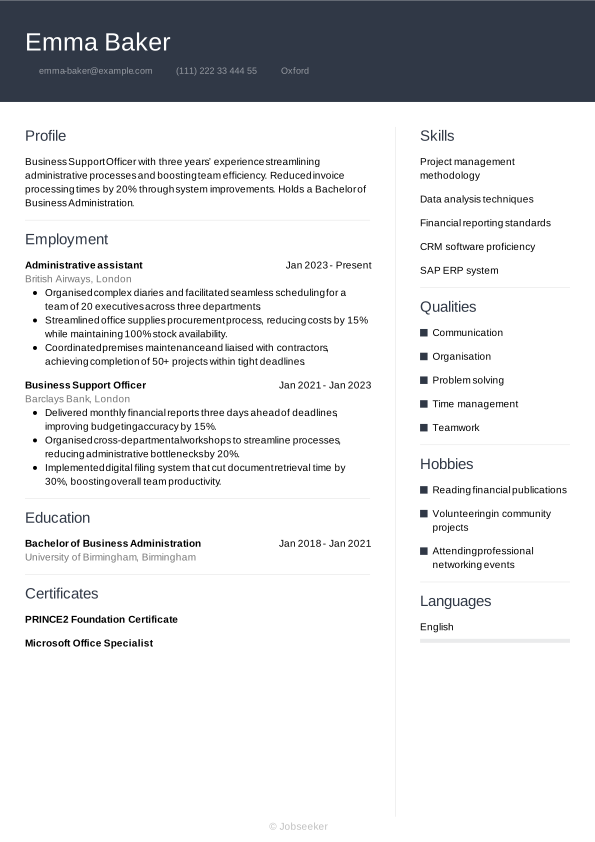
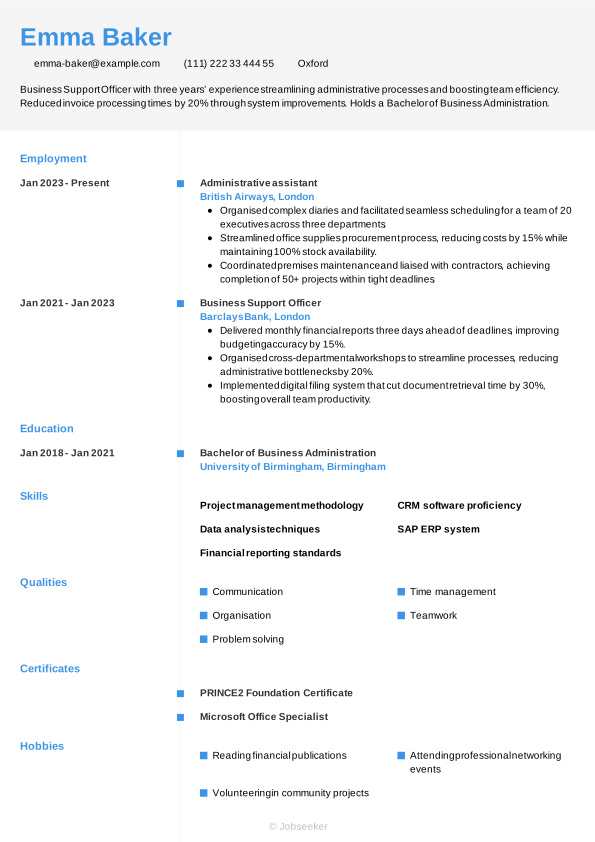
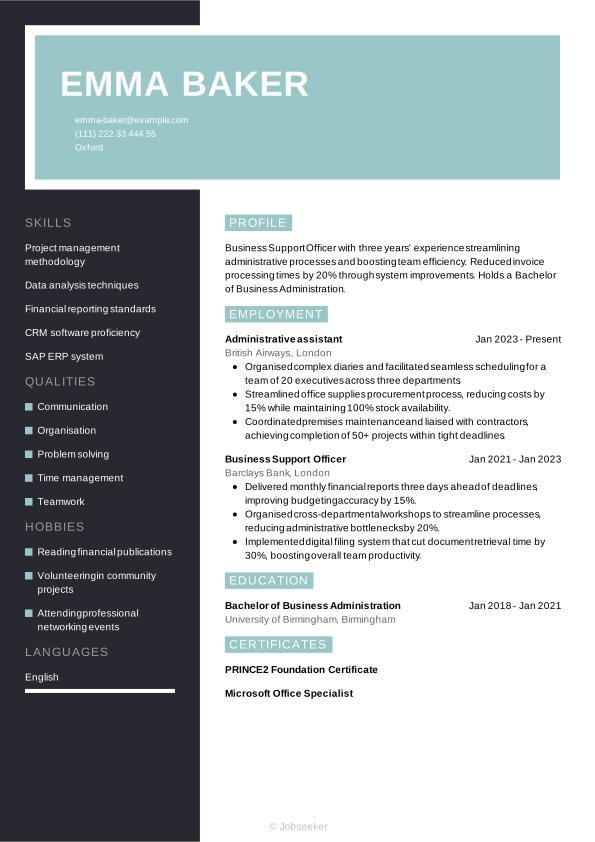
However, regardless of your seniority, a business support officer CV needs to tell a cohesive story of your professional growth. In the following sections, we’ll dive into each part of the CV step-by-step, starting with your header and moving through to your professional achievements.
CV Header
Start your business support officer CV with a header that features subtle, professional design elements and sets the tone for the document. Add your name, email address, phone number and location (your full address isn't normally needed). Additionally, consider adding a URL to your LinkedIn profile if you have one. This can help the reader to quickly access further information about your career and credentials that you haven't been able to add to your CV.
When you're applying for jobs in the UK, it's generally not advisable to include a photo or more personal details than are strictly necessary, such as your age, gender, ethnicity or nationality. Including these can jeopardise the recruitment process by introducing bias, and can fall foul of the Equality Act 2010.
Emma Baker
emma-baker@example.com
(111) 222 33 444 55
Oxford
linkedin․com/in/emma–baker–123
CV Summary or Objective
The first section below your CV header is typically your CV summary. This short paragraph outlines some of your key skills, achievements and experience, so employers can quickly get an impression of whether you have the right credentials for the business support officer job. While a CV summary showcases your key skills and achievements in the context of your career to date, a CV objective provides an alternative approach. It focuses instead on your ambitions for the future, making it ideal for junior candidates without much work experience.
Both a CV summary and objective should be concise, with an ideal length of two or three sentences. List your key skills, personal strengths and career achievements or ambitions, taking care to ensure the content reflects the requirements listed in the job description.
An effective CV summary will focus on a few of the key skills required for the role and show how you've put them to good use in your career to date. You'll want to give the reader a good impression of your unique qualities and briefly provide evidence of their impact in previous roles. Here's an example of an effective business support officer CV summary, with evidence of your impact and neat, well-structured sentences:
Best practice example:
Proactive business support officer with five years’ experience streamlining office operations. Implemented new filing system, reducing invoice processing time by 30% and improving team efficiency. Holds BA in Business Management.
Weak example:
Motivated business support officer with comprehensive administrative background, adept at managing office tasks, coordinating team activities and maintaining operational workflows, committed to delivering efficient support and fostering positive workplace dynamics.
The CV summary above contains various red flags and things to avoid. While the differences are subtle, they can make all the difference. For a summary to make less of an impact, it might include generic or vague information, lack evidence of your impact, or fail to highlight specific personal qualities that make you stand out from other candidates. It may also lack tailoring to the job description or include long, poorly structured sentences.
Work Experience
A CV's work experience section is usually its most important element. Employers will want to see how you've developed relevant skills in previous roles, and how you've put them to good use in successful projects and career achievements. Always tailor this section of your CV, focusing on keywords and phrases that match the job description, so employers can assess how you might put the same skills and qualities to good use in the future.
Add your most relevant previous jobs, including the job title, the name of the employer, its location and the dates you worked there. Below each entry, include several bullet points showcasing your skills and explaining how you used these to achieve positive results.
To differentiate your work experience section from other candidates, include action verbs and quantifiable evidence that showcases the impact you made. Show your career progression through the skills you developed and used in each role. Take a look at this business support officer CV example work experience section for inspiration:
Best practice example:
Business Support Officer, January 2023 - Present
Crestview Consulting Ltd, Manchester
- Streamlined office procedures by implementing a cloud-based filing system, reducing document retrieval time by forty per cent.
- Coordinated administrative support for five departments, enhancing cross-functional collaboration and achieving a twenty-five per cent improvement in task completion rates.
- Developed onboarding manual for new hires, standardising induction processes and reducing training time by two weeks.
Weak example:
Business Support Officer, January 2023 - Present
Crestview Consulting Ltd, Manchester
- Managed office correspondence and handled general inquiries from diverse teams.
- Coordinated administrative processes and provided general support across multiple functions.
- Executed routine tasks and maintained ongoing communication with various stakeholders.
Above is an example of what not to do with your business support officer CV. A less-effective work experience section could focus too much on irrelevant or out-of-date roles, or include generic information about your responsibilities that fails to show the impact you made. It might lack tailoring to the job description or fail to provide evidence to support the claims made in the bullet points.
Education
Your education section should showcase your most recent and highest qualifications, paying particular attention to anything that's specifically required for the role.
To work as a business support officer, it's not necessary to have a specific degree. However, while a degree isn't usually requested in the job description, it can be useful to include other relevant qualifications in your CV's education section. These might include PRINCE2 Foundation Certificate, or other courses that show your hard skills, such as project management methodology or data analysis techniques.
When listing your qualifications in your education section, select only the most suitable qualifications and list them in reverse-chronological order, starting with the most recent and working backwards. For each entry into your education section, add the qualification name and level, the institution or awarding body, its location and your dates of study or graduation. For extra emphasis on your education section, include bullet points showcasing projects you worked on, modules you studied, awards you won or societies you participated in, if they help you to prove you're a suitable candidate.
It may also be useful for you to add any specialist industry qualifications, certifications or licences that you might require for the role. If you choose to add these, remember also to add an expiration date, if the licence requires renewal in the future.
Bachelor of Arts in Business Management, 2018 - 2021
University of Manchester, Manchester
Key Skills
The skills section of a business support officer CV provides space for showcasing the key skills and qualities that set you apart as a candidate. You'll want to only include the most relevant skills, so review the job description and list hard and soft skills that match the requirements, while reserving some space to mention your own unique characteristics. In a business support officer CV, only list the most relevant and essential skills you possess, such as organisation and CRM software proficiency, to make a positive first impression and show you're qualified for the business support officer position.
Hard Skills
Hard skills are the specialist technical skills that are essential for carrying out the duties of the role. They might be developed through study, on-the-job training or experience in the industry, and some hard skills may require a licence or certification. For business support officer roles, hard skills from your career experience, such as CRM software proficiency, and SAP ERP system tend to be prioritised by employers and recruiters. Firstly, check the job description, then add four or five key hard skills in your CV that help the employer to decide if you're a good fit for the role.
You'll want to include a list of hard skills that closely matches the skills listed as 'essential' or 'desirable' in the job description, while also reflecting your own strongest technical skills.
See below for examples of skills that are frequently included in the hard skills section of a business support officer CV:
- Project management methodology
- Data analysis techniques
- Financial reporting standards
Soft Skills
In your soft skills list, add any personal qualities and transferable skills that show you'll be a good fit for the role, you'll settle in well with the organisation and you'll complement other team members. Soft skills are typically more transferable and applicable to different roles than hard and technical skills. As a result of rapid technological changes to modern ways of working, soft skills are becoming more and more valuable to employers. Soft skills can also be particularly useful for junior or entry-level roles where candidates haven't had the time or career experience to develop hard skills and notable achievements.
As with hard skills, review the job description to understand the best soft skills to mention in your business support officer CV. The best CV soft skills section includes specific skills that you can evidence with examples throughout your CV. Craft a list of up to five key soft and transferable skills that reflect the job description, while also including some of your strongest, most unique skills to stand out from the crowd.
Here are typical soft skills candidates include in a business support officer CV.
- Communication
- Organisation
- Problem solving
Foreign Languages
If you speak any languages in addition to your mother tongue, you might want to include them in your business support officer CV as a languages section. These can be valuable for your application, whether languages are specified as a requirement in the job description or not. Under this section, list any foreign languages you speak to a professional standard, with an indicator of your competency level for each.
There are a few acceptable ways of citing your foreign language proficiency levels. The simplest way is to assign a basic descriptive word to indicate your skills, such as:
- English: Fluent
- Spanish: Intermediate
Alternatively, use an internationally recognised framework for languages, such as the Common European Framework of Reference (CEFR). This gives your language skills a standardised competence indicator, as follows:
- A1: Beginner
- A2: Elementary
- B1: Intermediate
- B2: Upper intermediate
- C1: Advanced
- C2: Proficiency
Certifications, Training and Licences
If you've invested your time and resources into gaining extra qualifications beyond the minimum requirements for the role, you could highlight these in a certifications section. If you've been proactive in pursuing professional development opportunities throughout your career, it's worth showcasing them. Not only do they make you more qualified, they also show a proactive and motivated mindset. Furthermore, if there are any necessary certifications or licences for the job, this CV section takes on even more importance. If you're applying for a technical role or a position that involves the use of specialist software or equipment, these might make it more necessary to include a section showcasing your training.
Take a look at this list of example certifications and licences for business support officer candidates:
- PRINCE2 Foundation Certificate, 2023
- Microsoft Office Specialist, 2023
- ILM Level 3 Certificate, 2023
Expert Insight:
Barnet Council shows that recruiters spend only 8.8 seconds reviewing a CV, so a concise personal statement is essential to grab attention immediately. (1)
Optional Sections
Adding optional sections to the end of your business support officer CV is a good way of showing you have the necessary skills for the job. If you're unable to show you have all the necessary skills for the job through your work experience, optional sections can be a valid way of providing further evidence of your suitability, to give you the chance of gaining an interview. If you're an entry-level candidate or a career changer, optional sections can be particularly valuable.
Explore our career resources for practical strategies to make your CV stand out and move you closer to landing an interview.
Hobbies and Interests
One valid way to show you have relevant skills for the job is by listing your hobbies and interests. In addition, you can use hobbies and interests to show elements of your personality that might not shine through otherwise, giving you a chance to offer something different to most candidates. However, only mention hobbies and interests that are relevant to the role, and that help you prove skills that you haven't been able to show in your work experience or other CV sections.
Career Achievements
Listing your key career achievements in a distinct section can be an effective way of drawing attention to them. If you've been awarded any prizes or accolades, or reached any key career milestones, these can all help to show you have the required status and experience for the role.
Volunteering
Listing any previous voluntary work is another useful way of showing you have the necessary skills and experience for the job. If you don't have much relevant work experience, either because you're a junior candidate or you're changing jobs from an unrelated field, volunteering can provide valuable examples of your skills in action. Structure your volunteering section the same as your work experience section.
Add your job title or the name of the volunteer role, the organisation, its location and the dates you volunteered. Also add some bullet points outlining your skills and experience in the role, as well as any key achievements.
Analytical Insight:
The majority of HR specialists (almost 60%) view volunteering as relevant professional experience. (2)
Most impactful action verbs for a business support officer CV
Using strong action verbs in your work experience bullet points is a great way to focus this section and show the impact you've made in your career to date. Starting each bullet point with an action verb that reflects the skills required for the role will help the reader to easily cross-reference your skills to the job description. Remember, it's essential to evidence any action verbs you add to your work experience. This will help show your achievements and the impact you made in previous roles. Use past tense for action verbs that describe previous roles, and present tense for your current position.
- Coordinate
- Administer
- Liaise
- Organise
- Facilitate
- Support
- Manage
- Analyse
- Prepare
- Implement
Full example of business support officer CV
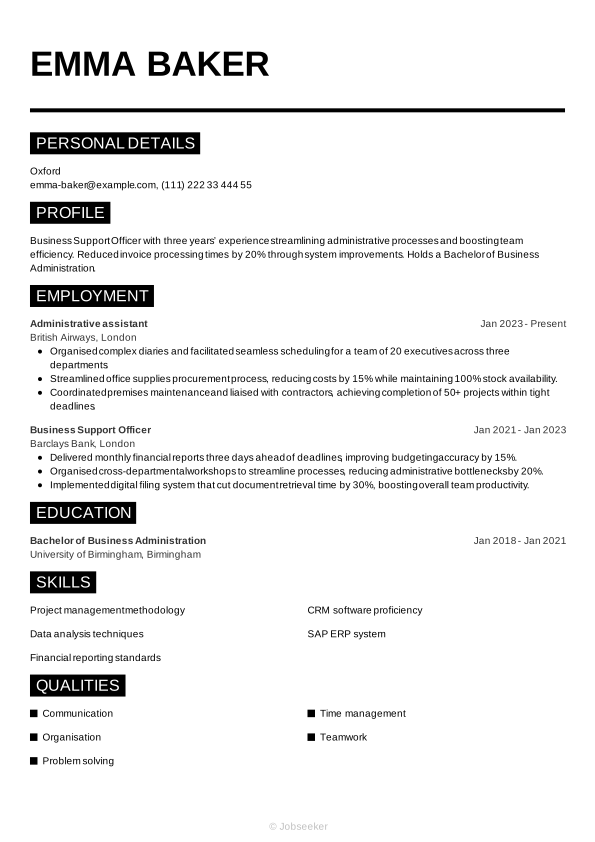
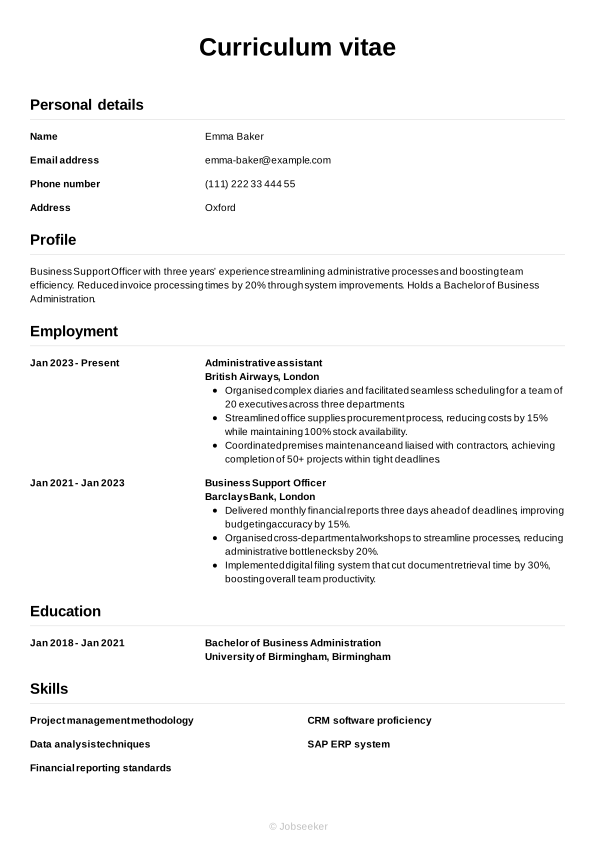
Now we've shown you everything that needs to go into your business support officer CV, we can take a look at how it comes together in its final form in the following example:
Oxford
•
emma-baker@example.com
•
(111) 222 33 444 55
•
linkedin․com/in/emma–baker–123
Business Support Officer with three years’ experience streamlining administrative processes and boosting team efficiency. Reduced invoice processing times by 20% through system improvements. Holds a Bachelor of Business Administration.
Administrative assistant
2023
-2026
British Airways (London)
- Organised complex diaries and facilitated seamless scheduling for a team of 20 executives across three departments.
- Streamlined office supplies procurement process, reducing costs by 15% while maintaining 100% stock availability.
- Coordinated premises maintenance and liaised with contractors, achieving completion of 50+ projects within tight deadlines.
Bachelor of Business Administration
2018
-2021
University of Birmingham (Birmingham)
Project management methodology
Data analysis techniques
Financial reporting standards
Communication
Organisation
Problem solving
PRINCE2 Foundation Certificate
Microsoft Office Specialist
English - Native
French - Advanced
If you're not sure what your one-page, finalised CV design might look like, check out our examples.
The dos and don'ts of a successful business support officer CV
Tips to follow
- Tailor your CV, matching it to the key skills and experience described in the job description, while telling a unique story about your best qualities and achievements.
- Use a reverse-chronological approach to listing your career timeline and education, starting with your most recent roles and courses, and working back from there.
- Use a clear, professional CV format that includes a standard font, regular, consistent line spacing and clear headings, to ensure it's easy to read.
- Keep your CV concise and to-the-point, with an optimum length of one side of A4 for junior positions, two sides once you become more experienced and more than two sides only for executive-level or academic applications.
- Proofread your CV in detail before sending it, to avoid unnecessary errors in spelling and grammar that could undermine your chances.
Common mistakes to avoid
- Don't forget to check your contact details to make sure they're current, and update your LinkedIn profile to ensure it doesn't contradict your CV.
- Don't use unnecessary industry jargon or acronyms that may alienate the reader, when simple, straightforward language will do the job.
- Don't include a hobbies and interests section unless you need to prove skills that you can't showcase through work experience, and unless your hobbies are particularly relevant.
- Don't fill your CV with irrelevant work experience that takes up precious CV space and won't persuade the reader of your suitability for the role.
- Don't overburden the reader with too much information but stick to the most relevant, concise and focused content possible.
A well-designed and concise cover letter can make a big difference to your job applications. Match your cover letter to your CV's design and styling with our HR-approved cover letter templates.
Guide to CV ATS optimisation
Applicant tracking systems (ATS) are a valuable tool for many recruiters and employers, helping them manage the recruitment process by scanning and assessing CVs based on their likely fit to the job description. This task can relieve some of the strain on hiring managers through the recruitment process, which can become very resource-intensive, with roles often eliciting hundreds of applications.
The growing prevalence of ATS apps requires a shift in approach by jobseekers, to prepare a CV with the best chance of passing the ATS screening stage. That's why we've put together a list of key ATS CV tips, to maximise your chances of success:
- Include keywords and phrases from the job description that are easy for ATS apps to identify, and help make you appear a strong fit for the role.
- Use standard CV headings that clearly identify each section, such as 'work experience', 'education' and 'skills'.
- Opt for a simple CV layout with consistent formatting, avoiding any special design elements that could make your CV harder for ATS apps to scan.
- Select a font that can enhance the readability of your CV, such as popular serif and sans serif fonts, with size 10 to 12 for body text and 14 to 16 for headings.
- Use bullet points in place of full sentences and paragraphs, as these are easier for ATS apps to scan and parse, and help your keywords stand out.
It's easy to get overwhelmed by the steps to creating an ATS-compatible business support officer CV, but a few small changes can make a big difference. To smooth the process, use one of our expert-designed, ATS-optimised CV templates to increase your chances of success at this stage of the screening process.
If you want to impress recruiters with your CV, use Jobseeker's ready-made CV templates, which are HR-approved for maximum chances of success.
Business support officer CV FAQs
How do I produce an effective business support officer cover letter for my application?
Your cover letter can have just as strong an impact on your chances of success as your CV. When writing a cover letter, use a professional, formal letter structure and select a cover letter template to match the look and feel of your CV.
A typical cover letter layout includes three key paragraphs of written content. Firstly, the opening paragraph includes an introduction to yourself and confirms the role you're applying for, as well as outlining your motivation for applying. Secondly, you'll want to detail some of your key skills and achievements, without repeating your CV. Close your cover letter by expressing your gratitude and enthusiasm, and leaving a call to action that encourages the reader to make contact with you.
Alternatively, if you're sending your application via email and prefer a more informal tone, you might wish to include a short cover note. This can adopt more casual email conventions rather than following a professional letter format, and simply needs to introduce you, confirm the role you're applying for and direct the reader to the attached CV or application form. Include your contact details at the end of your CV.
Jobseeker's cover letter examples for business support officer roles and other administration industry positions can provide valuable insights from HR specialists on how to craft the most persuasive cover letter.
How do I write a business support officer CV without experience?
Even without relevant work experience, it's possible to write a business support officer CV that impresses employers.
Choose a functional CV format, that gives greater emphasis to your skills than to your work experience. In this layout, the skills section comes immediately below your CV summary, followed by education, with work experience taking less priority.
If you're applying for your first job, focusing on your soft and transferable skills can help you to create a strong business support officer CV. Employers will likely be looking for candidates who can show they have well-developed soft skills for learning and adapting to a new role and environment.
How do you write an attention-grabbing business support officer CV headline?
A well-crafted CV headline can draw the reader in, providing a hint of your suitability for the role, while increasing the likelihood of passing the ATS screening stage.
Aim to write a short, engaging sentence that includes the job title and shows you to be a good match for the job description.
For an impactful CV headline, focus on the most critical keywords and phrases from the job description, as this will mark you out as a strong fit for the role and give you a strong ranking in the ATS screening stage.
Below you'll find some examples of CV headlines for different experience levels:
- Proactive Junior Business Support Officer
- Proactive Business Support Officer Expert
- Accomplished Senior Business Support Officer
What's the best business support officer CV format for 2026?
The best CV format for a business support officer CV in 2026 depends on both your experience levels, and the role you're applying for, including its level, the company and industry norms.
For candidates with work experience, the traditional reverse-chronological CV is typically the best choice. This layout focuses mainly on your work experience, providing examples of key achievements, and how you've used your skills in your career to date.
Alternatively, for less-experienced candidates who might not want to emphasise previous employment (such as recent graduates or career changers), a functional format is more suitable. This layout prioritises your skills and qualifications.
Key takeaways for success with your business support officer CV
For the best chance of impressing employers, always tailor your CV for every application and include keywords and phrases that reflect the job description. Select a suitable CV format that reflects your experience level, and focus on highlighting your key skills, and demonstrating how you've put them to good use to achieve positive outcomes in your career to date.
Finally, using an eye-catching, expert-designed CV template from Jobseeker can really give your CV an edge over those from rival candidates, helping you to achieve success in your job applications.
Citations:
- Barnet Council (UK local government), Recruitment tips: How to write a supporting statement
- Jobseeker, HR Statistics

Impress employers with your CV
Step-by-step guidance to create a professional CV in minutes.