A Guide to CV Order: How to Organise Your CV
There is no 'one-size-fits-all' CV order. Whether you should lead with your experience or your skills depends entirely on your career stage and the role you’re targeting. To impress employers, you need a layout that is built for speed and clarity. We break down the essentials of formatting your CV—from chronological to hybrid—and show you exactly how to order your sections to grab a hiring manager’s attention.

Organising your CV for impact
Before you start writing, you need to make a strategic choice: which order will best showcase your strengths? Deciding how to sequence your information is the first step in creating a professional CV.
Once you have picked the right approach for your career stage, we will move on to the essential sections you need to include, the best file formats to use, and the formatting tips that ensure your CV looks polished on every screen.
Most candidates choose one of these three ways to arrange their information:
- Chronological: The most common CV layout (sometimes called 'reverse-chronological' or 'traditional CV'), this is ideal for when you've built up some relevant work experience, or if you're a senior candidate. Your work experience section is the main focus of the CV, placed above skills and education, and is presented from most recent to earliest.
- Functional: Also known as 'skills-based', this CV layout is more suitable if you're just starting out in your career or if you don't have any relevant work experience (for example, if you're changing careers). Functional CVs have a prominent skills section, with skills grouped into categories, and work history mostly presented around the skills gained.
- Hybrid: Sometimes called a 'combination CV', this CV structure combines the best elements of chronological and hybrid layouts, to showcase key skills while also still communicating your work history. This CV order tends to place the skills section above work experience, but gives similar or equal billing to both sections.
The three best CV layouts (with examples)
If you're struggling to decide which of the three main CV layouts to use for your next job application, take a look at the "decision making" table below to quickly identify your situation and choose the best approach:
Chronological CV | Functional CV | Hybrid CV | |
Primary Focus | Employment history and career progression | Specific skills and qualifications | Balanced billing for both skills and work history |
Recruiter View | Focuses on past performance and "extra value" added in roles. | Focuses on raw capability and potential. | Focuses on specific expertise backed by professional proof. |
ATS Compatibility | High. The most standard and easy-to-scan layout. | Lower. Can be harder for some systems to parse accurately. | High. Provides clear sections that most modern systems recognise. |
When to Use | If you have a steady work history or are a medior/senior candidate. | If you are a fresh graduate or changing careers with no industry experience. | If you want to highlight specific technical skills or if you have a non-linear career path. |
To help you decide which approach is right for you, it is often easiest to see them side-by-side. The visual comparison of CV examples below highlights the primary difference between the three: it’s all about which section gets the "top billing" on your first page. Whether you lead with a detailed career history to show progression, or lead with a skills section to mask a lack of industry experience, your choice should make your strongest selling points impossible for a recruiter to miss.
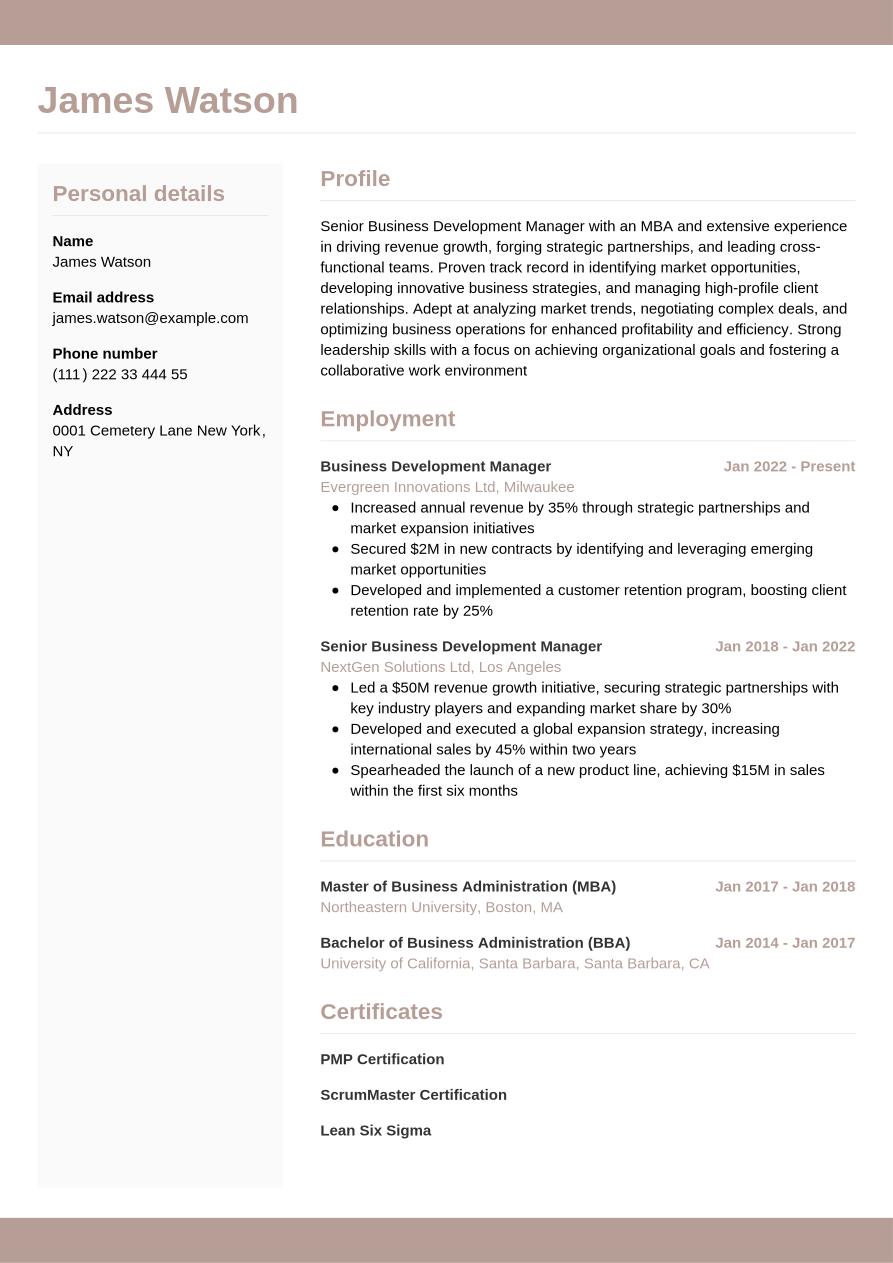
This type of CV provides a detailed work experience section, which is the main section for outlining not only your employment history, but the skills you used in each role, and key achievements from your career.
Order of sections: CV header > CV summary > Work experience > Education > Skills
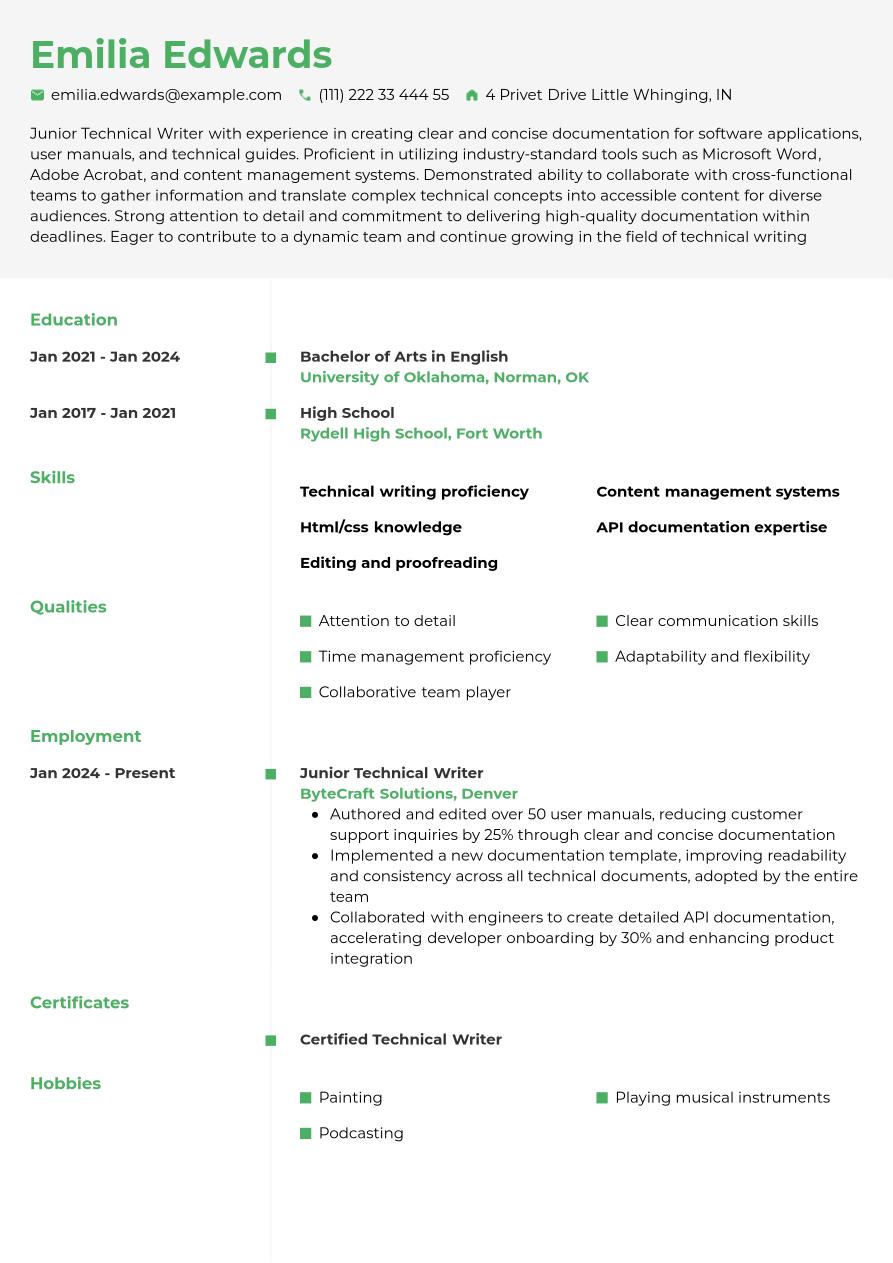
Within a functional CV layout, the main emphasis is on your skills and qualifications. This means listing your skills and education sections come before your work experience. You can provide categories of skills with each individual skill listed under a sub-heading, or include work-related achievements in the context of said skills.
Order of sections: CV header > CV summary > Skills > Education > Work experience
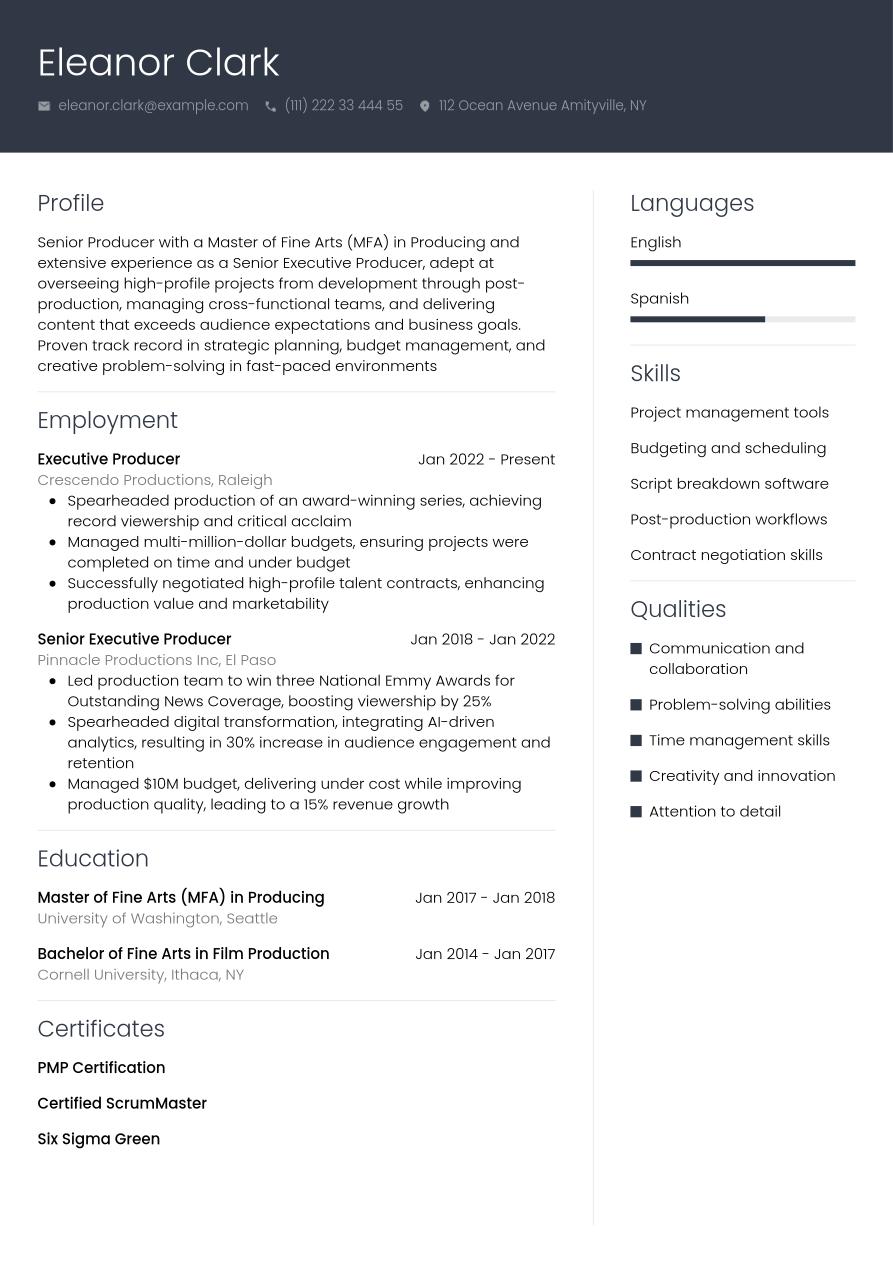
In this approach, place the skills section above work experience to grab attention immediately, but keep the descriptions of your past roles detailed enough to show impact. Ensure your work experience section directly supports the claims made in your skills section.
Order of sections: CV header > CV summary > Skills > Work experience > Education
CV sections and order
Now that we've established what we mean by 'CV order', let's take a look at the key elements of a CV, and the best order to present them in.
What are the 5 main sections of a CV?
There are five common sections employers will expect to see on your CV. These sections ensure you provide the reader with a comprehensive overview of your background, experience and skills. The five main sections are as follows:
- Personal Information: Includes your name, phone number, email address, and location.
- Professional Summary: A brief introduction at the top of your CV that highlights your key skills, experience, qualifications and career goals.
- Work Experience: A chronological or functional list of your previous jobs, including your job title, the company name, the dates you worked there and your skills and achievements in the role.
- Skills: A list of your relevant hard and soft skills, tailored to the job you're applying for.
- Education: Details of your degrees, qualifications, places of study and dates of attendance.
How to order sections of a CV?
The best order to arrange your CV sections will depend on your experience levels and the type of role you're applying for. In most cases, employers and recruiters will want to learn about how you've used your skills in previous jobs. This makes your work experience section the most important element of the CV, so you'll want to make it the most prominent. However, less experienced candidates might wish to emphasise skills and qualifications more. As such, you might shuffle the order of the CV to place the skills and education sections higher up.
You can split a CV into three broad segments:
Introduction | Your CV header with contact details, plus your CV summary or objective. This segment stays at the top of your CV regardless of your chosen CV layout. |
|---|---|
Core | This middle segment contains the three key sections of a CV — work experience, skills and education. You can switch the order of these three sections, depending on which element you wish to emphasise. |
Supporting | The final segment of your CV contains extra optional sections. These can be valuable, depending on your experience levels. The order you place each of these sections is up to you. However, all of them will always come below the three key, essential CV sections (work experience, skills and education). |
Optional sections of a CV
Just like the main sections of the CV, the optional sections you select will depend on your experience level and seniority. They should only be included when directly aligned with the job description and support your job application. Some sections that apply to any level of seniorty or industry are:
Junior candidates might pick optional sections that help them showcase skills they're unable to demonstrate through paid work experience, such as:
- Volunteering
- Hobbies and interests
- Internships
For more senior candidates and academic applications, optional sections are more valuable as a way of showing your expertise and differentiating you from other well-qualified candidates.
- Key projects
- Awards and achievements
- Publications and conferences
- Professional memberships
Expert Tip
Your chosen CV order may differ from application to application, depending on the job description and your suitability for the role. It can be useful to draft a basic CV containing all your career details as well as your key skills and educational achievements. You can then tailor this basic CV to match the job description for every role.
How to achieve the perfect CV formatting
To make a strong first impression with your CV, it's crucial to get the document's formatting right. Here are some key tips to ensure your CV has a layout that's both easy to read, and stands out from the competition:
Length | Keep it brief and to-the-point, making it easy to read and impactful. Research from Jobseeker discovered that 82.1% of HR professionals favoured a CV length of between one and two pages. |
Headings | Use clear section headings that match traditional CV naming conventions to make it easier to read for humans and ATS. |
Spacing | Aim for margins around the top, bottom and sides of between 0.75" and 1". To keep your CV looking professional, have 0 to 1.15 spacing between lines, and 6-12 points between paragraphs. between text. |
Font | Popular serif fonts (for traditional, formal roles) include Georgia, Times New Roman and Garamond, while sans serif fonts (for more modern, informal industries) include Arial, Helvetica, Verdana and Calibri. Aim for a font size of 10 to 12 points, depending on your chosen font. |
Order | Whether you lead with work experience or choose a CV layout that places skills and education more prominently, make sure your CV section order makes sense considering your experience levels, skills and career achievements. |
Design | Subtle, understated design elements can enhance your CV, but you'll want to make sure your CV design doesn't become distracting. Opt for a clean, simple layout with a design that compliments the written content, and avoid heavy design focus that might prevent ATS from reading your CV correctly. |
Sections | Shorter sections force you to draw out the most critical, impactful details, which will help you impress recruiters and employers. Although work experience is typically the most important section of a CV, it's crucial that this section, and any other important sections, don't become too long. |
After you've finished writing your CV, ask someone else to read it and give you feedback on areas for improvement. Someone who knows you well, either personally or professionally, may pick up on some important skills or qualities that you've neglected to mention. Jobseeker's CV builder has a feedback option enabling you to create a link to your CV or cover letter, to send to friends, family or colleagues for feedback and collaboration.
Create your professional CV in minutes
Build a CV and share it instantly for feedback and collaboration:
Other CV options to consider
Aside from the main three CV layouts, there are several other approaches to select from. However, it's important to take care when opting for an alternative CV layout and only use it when it's appropriate. Think about the role itself, the organisation, its culture and your own personal style, and only select an alternative layout when you're confident it will have a positive impact. Some alternatives to choose from include:
- Creative CV: This CV style includes visual CV layouts, such as PowerPoint, infographics and other styles using imagery, graphics, icons or other design elements to build the narrative. This CV style can be useful for creative roles or anything design-related.
- Video CV: Video CVs can be a valuable way of showcasing your presentation skills. They often accompany a written CV. You might use a video CV to introduce yourself for a sales position, or for any role that requires presenting to clients or the public.
- Academic CV: CVs for academic applications tend to be longer and more comprehensive than a standard, traditional CV. They typically include details of publications, awards, key projects, teaching experience and professional memberships, and can extend beyond two pages in length.
- Simple CV: A simple CV tends to stick to the main, traditional CV sections without too many additional sections or extensive commentary on your achievements. This layout uses clean, understated styling and CV formatting and is ideal for quick scanning.
CAUTION: While PowerPoint, video, or infographic CVs may look great, they are often unreadable by ATS that companies use. It's best to use them to support your easy-to-read PDF CVs.
Which file format should you pick for your CV?
The file format of your CV might seem like a minor point, but if you choose an incompatible or inappropriate CV file format, it could harm your chances of success. Here's a quick overview of the different file formats you could use, and how to choose which is best for your CV:
For the most secure and accessible CV file format, choose PDF. Saving and exporting your CV as a PDF gives you peace of mind that your CV won't be amended or tampered with, and it should retain all its original formatting. PDF files are also likely to be compatible with ATS software, ensuring your CV is accurately scanned, parsed and ranked.
Word
As one of the most popular and widespread word processors, saving your CV as a Word format (.doc or .docx) should enable readers to easily access it. However, one of the risks of keeping your CV as a Word document is that it's open to editing, and depending on the version of Word, formatting could be disrupted or broken. You could set your Word CV as read-only if you want to avoid the risk of it being tampered with or changed inadvertently.
Video
Video CVs are becoming increasingly popular as a means of introducing yourself in a personal and memorable way. Just check the job listing to see if video CVs are permitted or encouraged, and think carefully about the role, the employer and industry sector before deciding to use this as your CV format.
PowerPoint
PowerPoint lends itself to a more visual, creative CV than other text-based documents. With .pptx format, you can easily add graphical elements and transitions, making your CV engaging for slideshow-style reading. However, this format can work less well when printed, and you'll also need to be mindful of the employer's openness to more creative CV formats.
Website/portfolio
If you have a personal website, portfolio or social media account that showcases your work, such as LinkedIn, you could use this as a CV. This can help you show examples of your work as evidence of your skills and achievements, and other impactful information such as endorsements and feedback from colleagues or clients. Just check before you submit a portfolio or LinkedIn profile, that the employer or recruiter will accept this. Alternatively, you can use a CV builder like Jobseeker to import your LinkedIn profile and automatically generate a professionally designed CV and add a link to your website or portfolio inside the CV.
5 tips to pass the ATS stage with your CV order
Many employers now use applicant tracking systems (ATS) to assist with the recruitment process. These systems can automate certain recruitment stages, including organising, screening and ranking CVs according to likely suitability for the role. Thankfully, there are numerous things you can do to help your CV pass the ATS screening stage. Take a look at these 10 tips for an ATS-optimised CV:
- Clear column structure: CV designs with multiple columns can be more difficult for ATS software to scan accurately. Stick to a simple, single-column design for optimal ATS compatibility.
- Avoid graphics and visuals: Over-reliance on visual elements such as icons and infographics can make your CV easier on the eye, but it can be less compatible with ATS scanning. Use visual elements to enhance the written content of your CV, not replace it.
- Keyword optimise to match the listing: Add keywords throughout your CV that match the words and phrases present in the job description. ATS systems will search for keywords as part of their screening, and greater keyword density is likely to see your CV rank higher.
- Avoid footers: Adding document footers introduces a different structure that can confuse ATS software. Keep your content in the main body text of your CV for optimal ATS compatibility.
- Use compatible file types: A PDF file format is your safest bet for compatibility with ATS systems, but check the job listing or job portal if you're unsure. PDF files retain formatting and accessibility features, making them easier for ATS systems to scan.
Key takeaways for structuring your CV
The CV structure you pick will depend on the stage of your career and the level of your work experience. As each job is different, you’ll need to consider whether you place more focus on your work experience, education or skills. Whatever CV layout you select, it's essential to tailor your approach both to the CV order and the content itself. A CV tailored to reflect the job description will always fare better than a generic CV.
FINAL TIP: Open your CV and look at it for 10 seconds. If your most relevant skill isn't in the top third of the page, reconsider your order.
Jobseeker’s online CV builder allows you to easily create, duplicate, edit and re-order your CV, tailoring it according to the role, without affecting formatting. Choose from a selection of professional CV templates and review our library of expert articles for many more useful tips to help you with your applications. Jobseeker can even help you make the most of your cover letter, with a range of cover letter templates. You can also find cover letter examples for inspiration. Sign up today to get started.
CV order and layout FAQs
What is the best CV order in the UK?
The best CV order for the UK is usually a chronological CV. According to Jobseeker's research, 44% of HR professionals favour a chronological layout, 21.4% prefer a functional layout and 20.1% a combination layout. However, your best CV layout will be individual to you, and will depend on your experience levels, and the role you're applying for.
How long should a CV bullet point be?
Keep your CV bullet points concise and to-the-point. One sentence per bullet point is ideal, though you could also use two short sentences. Write in implied first person (omitting "I" statements) to make your content more compact.
How to make a CV stand out visually?
To make a CV stand out from the crowd, add subtle, unintrusive design elements and colour accents that enhance the overall look and feel of the document. Don't lean too heavily on graphics and visuals, but use clean, professional CV templates that elevate your CV above the competition.
Should I include a photo on my CV?
In most cases it's best to avoid adding a personal photo to your CV. Although they can enhance the visual appearance of a CV, a photo can also risk introducing hiring bias. As a general rule, it's best to limit the personal information on your CV, including personal photos, unless they're strictly required for the role and requested in the job listing.
Is it good to add colours to my CV?
Adding colours to your CV can help it stand out from the crowd and draw attention to key elements in the document. However, it's best to use simple colour schemes with professional colours that don't distract the reader from the written content. Also be aware of colour contrast within your CV, and ensure you use dark or black text on light backgrounds, or white text on dark backgrounds.
Which CV format is most ATS-friendly?
The traditional chronological CV is typically the most ATS-friendly CV layout. This CV order contains all the most essential sections and information in a clear, logical layout that will be easy for ATS software to scan accurately. If you use a different CV layout, make sure it has clear, well-defined headings and traditional sections so the ATS software can navigate your CV as easily as possible.

Impress employers with your CV
Step-by-step guidance to create a professional CV in minutes.



![Extracurricular Activities in the CV [10+ Examples]](/api/media/images/14f4e525-1af6-4198-8ae7-bc8d8eb846d9/380-190-0.03%2C0.00%2C99.94%2C100.00/extracurricular-activities-in-the-cv-10-examples.jpg)